Operation Swlt( I1
oo o°
• Im
• PHOTO
• (SNAPSHOT)
• Builon
V
Lock Button •
V
Power SwitchMENU/SET Dial
Display
Menu
Menu
Flash
NOTES:
• Do not fire tire flash at a person at sh(_rt range.
SnapshotFlash(AutoFlash)
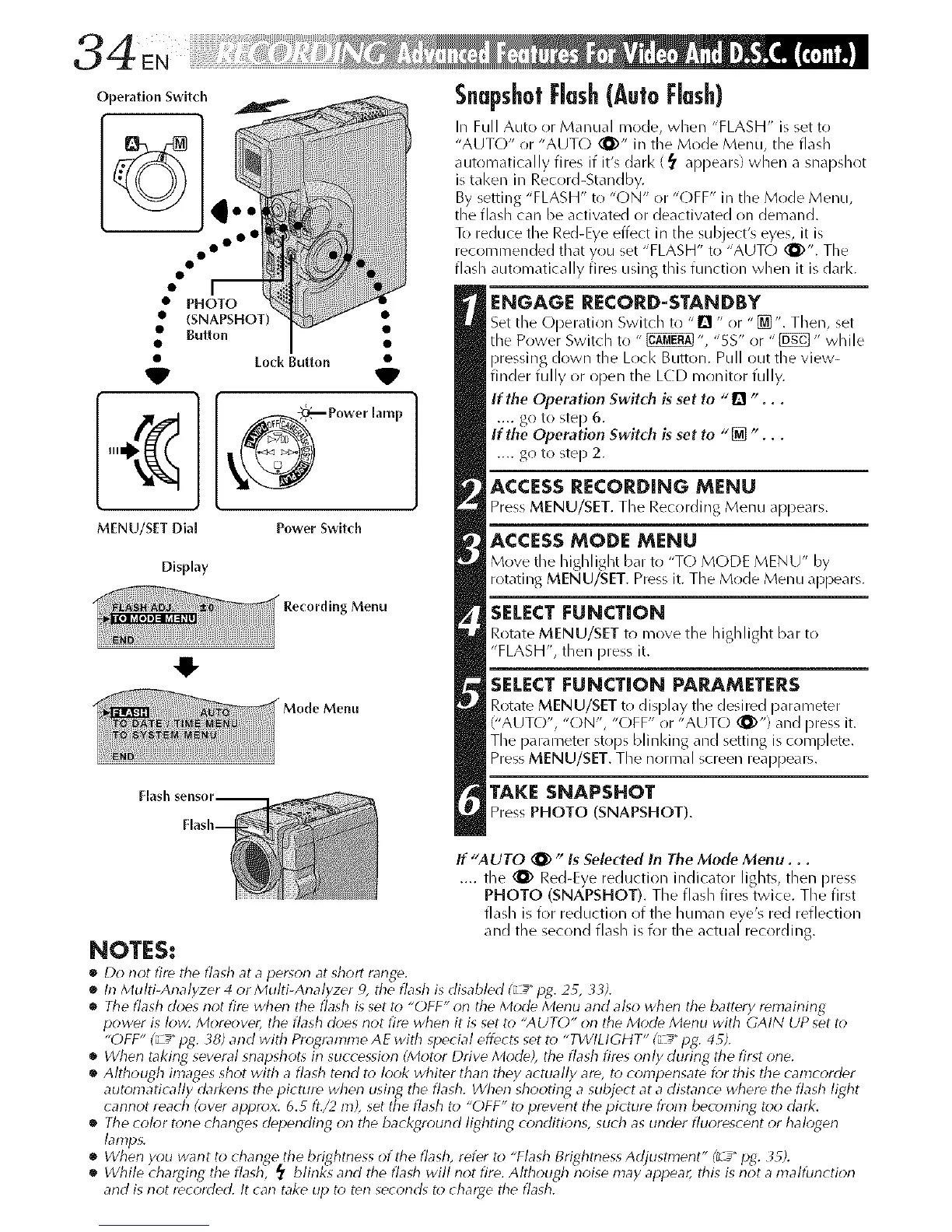
In Full Auto or Manual mode, when "FLASH" is set to
"AUTO" or "AUT() (_Y' in the Mode Menu, the flash
automatically fires if it's darl< (_ appears) when a snapshot
is tal<en in Record-Standby.
By setting "FLASH" to "ON" or "OFF" in the Mode Menu,
the flash can be activated or deactivated on demand.
To reduce the Red-Eye effect in the subject's eyes, it is
recommended that you set "FLASH" to "AUTO (_)". The
flash automatically fires using this function when it is dark.
ENGAGE RECORD=STANDBY
Set the Operation Switch to "1_ " or "[]". Then, set
the Power Switch to "_ ", "5S" or "[]_] " while
pressing down the Loci< Buttoll. Pull out the view-
finder fully or open the LCD monitor fully.
If the Operation Switch is set to "[] "...
.... go to step 6.
If the Operation Switch is set to "[] "...
.... go to step 2.
ACCESS RECORDING MENU
Press MENU/SET. The Recording Menu appears.
ACCESS MODE MENU
Move the highlight bar to "T() MODE MENU" by
rotating MENU/SET. Press it. The Mode Menu appears.
SELECT [=UNCTION
Rotate MENU/SET to move tile Iliglllight bar to
"FLASH", then press it.
SELECT [=UNCTION PARAMETERS
Rotate MENU/SET to display the desired parameter
("AUTO", "ON", "OFF" or "AUTO _)") and press it.
The parameter stops blinl<ing and setting is complete.
Press MENU/SET. The normal screen reappears.
TAKE SNAPSHOT
Press PHOTO (SNAPSHOT).
If "AUTO _ " Is Selected In The Mode Menu...
.... the (1_ Red-Eye reduction indicator lights, then press
PHOTO (SNAPSHOT). The flash fires twice. The first
flash is for reduction of the human eye's red reflection
and the second flash is for the actual recording.
• In Multi-Analy7er 4 or Multi-Analy7er 9, the flash is disabled (_L_ pg. 2_, 33).
• The flash does not fire whw_ the flash is set to "OFF" on the Mode Menu and also whwl the battery remaining
power is low. More(*ver, the flash d(*es not fire when it is set to "AUTL)" orl tile Mode Menu with GAIN UP set t_*
"OFF" (_ _" pg. 38) and with Programme AE with special effects set to "TWtLtGI tT" (L_" pg. 4 _).
• When taking several snapshots irl succession (Mot_*r Drive Mode), the flash fires only during the first orle.
• Although images shot with a flash tend to look whiter tharl they actually are, to compensate for this tire camcorder
autonlatically darkens the picture when using the flash. Wtren shooting a subject at a distance where the flash light
cannot reach (over approx. 6.5 fl./2 hi), set the flash to "OFF" to prevent the picture from boo, ruling too dark.
• The color tone changes delJending on the background lighting conditions, such as under fluorescent or halogen
lamps.
• Whorl you want to change tile brightness of tire flash, refer to "Flash Brightness Adjustment" (LI_"pg. i_5).
• While charging the flash, _ blinks and tire fladr will riot fire. Although noise may appear, flris is riot a malfunctiorl
and is not recorded. It can take up t_*ten seconds to charge fl_e flash.


 To Next Page
 Loading...









