'"iii'l'i'i'ii, EN37
[Power Switch: [Power Switch: _]
or 5S] Power [amp Power lain
Display Display
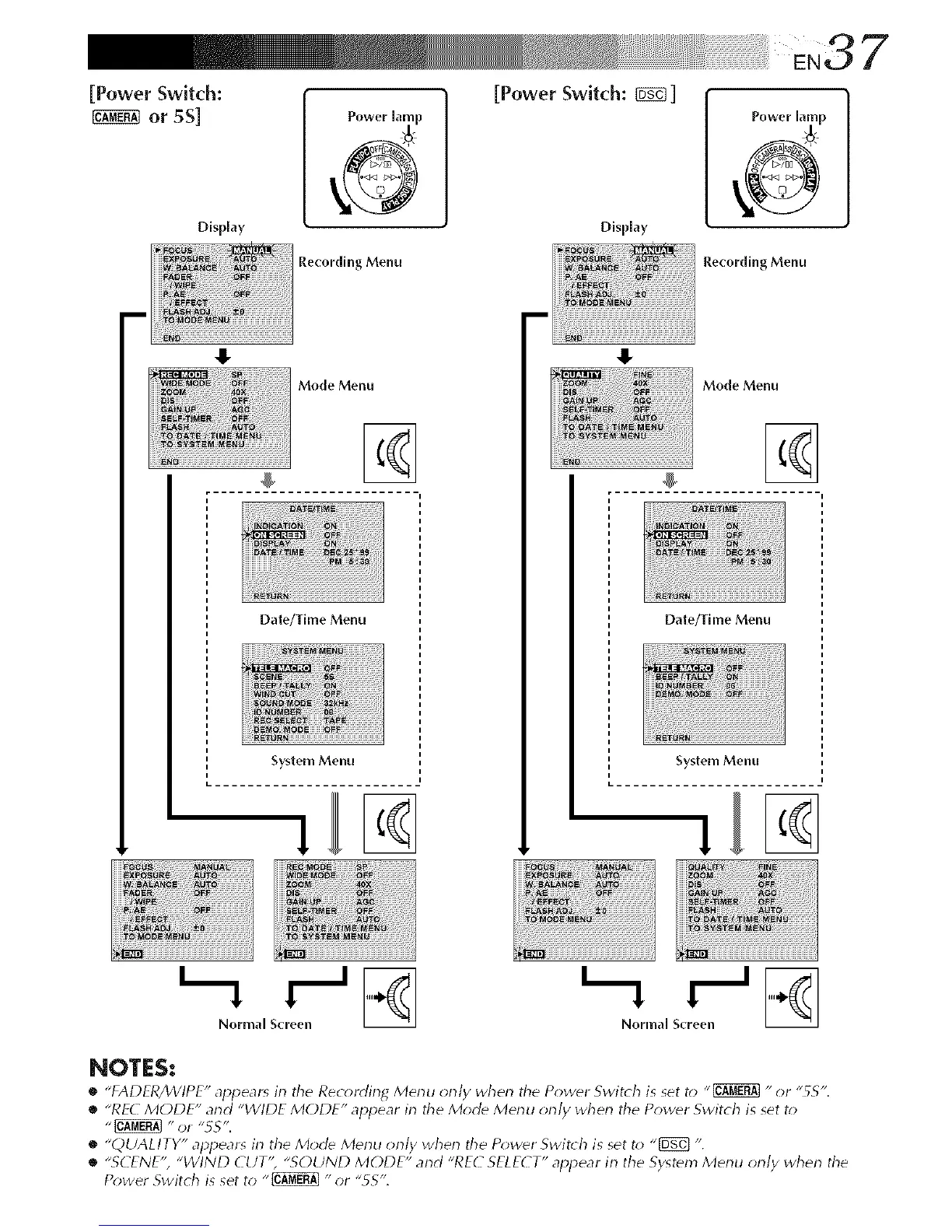
Recording Menu
.i
Recording Menu
Mode Menu
%
Date/Time Menu
System Menu
Mode Menu
Date/Thlle Menu
System Menu
Normal Screen Normal Screen
NOTES:
• "FADFR/WIPE" appear_ irl the Rec_rding Merlu orlly wherl the Power Switch i_ _et t_J"_ "or "55".
• "RF(_ MODE" arid "WIDE MODE" appear irl the Mod_ Merlu orl/y wherl the Power Switch is set t_
• "QUALITY" appears irl the Mode Merlu orl/y wherl the P_;wer Switch is set t_; "[_} ".
• "SCENE", "WIND CUT'; "SOUND MODE" and "REC SELECT" appear irl the System Menu orl/y when the
Power Switch is set to "_ "or "5S".



 To Next Page