Recording Menu
FOCUS
EXPOSURE
W.BALANCE
FADER/WIPE
P.AE/EFFECT
FLASH ADJ.
TO MODE MENU
Mode Menu Ex
REC MODE
WIDE MODE
QUALITY
ZOOM
DIS
GAIN UP
SELF-TIMER
FLASH
TO OATE_IME MENU
TO SYSTEM MENU
: Factory-preset
E×planations
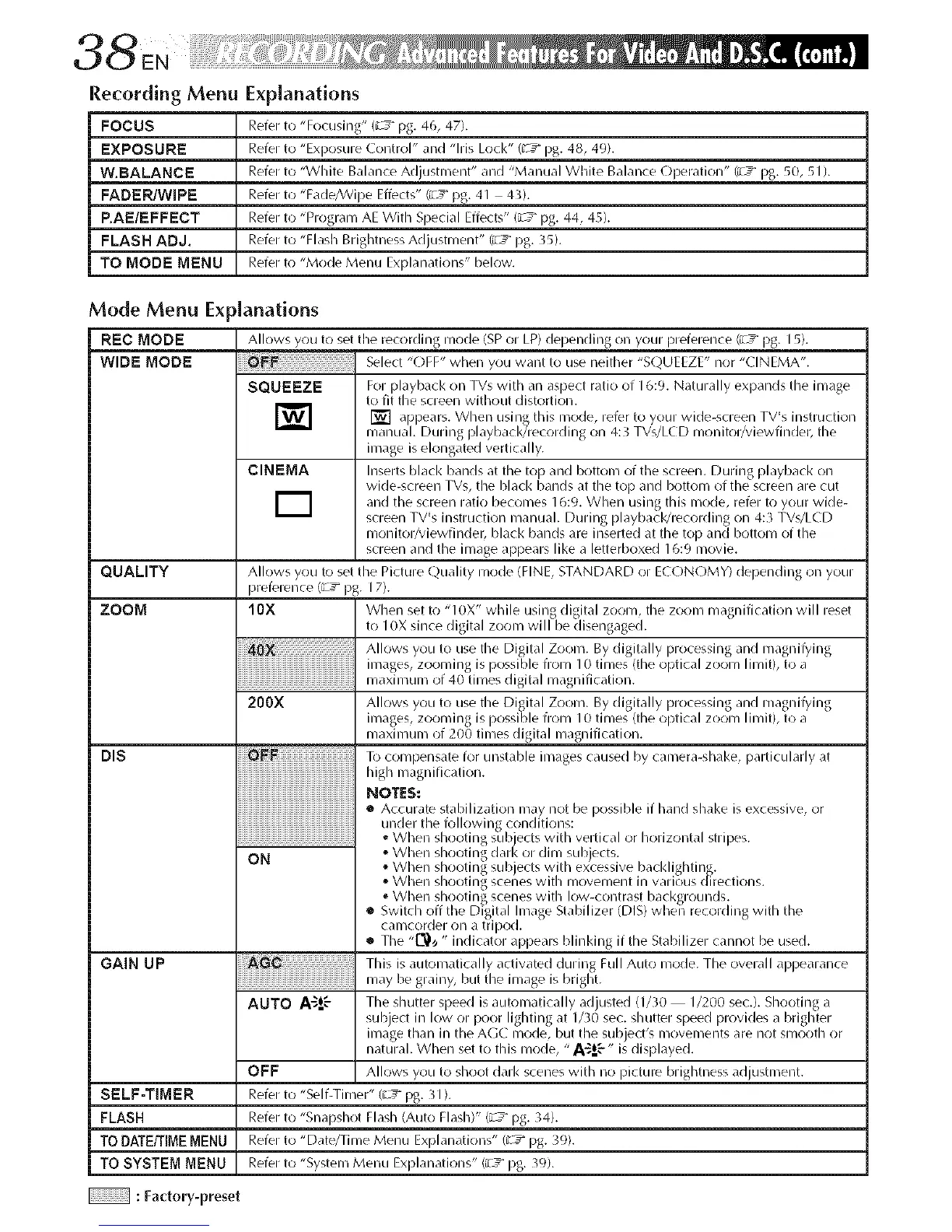
Refer to "Focusing" (_ 5= pg. 46, 47).
Refer to "Exposure Control" and "Ms Lock" (u"T pg. 48, 49).
Refer to "White Balance Adjustment" and "Manual White Balance Operation" (z _ pg. 50, 51 ).
Refer to'Fade_Vipe Effects" (zg pg. 41 43).
Refer to "Program AE With Special Effects" {zg pg. 44, 45).
Refer to "Flash Brightness Adjustment" (z _ pg. 35).
Refer to "Mode Menu Explanations" below.
_Janations
Allows you to set the recording mode {SP or LP) depending on your preference (_ _ pg. 15).
.........................................Select "OFF" when you want to use neither "SOUEEZE" nor "CINEMA".
SQUEEZE For playback on TVs with an aspect ratio of 16:9. Naturally expands the image
to fit the screen without distortion.
] [] appears, using nlode, to your TV's instruction
Whell this refer wide-screen
manual. During playback/recording on 4:3 TVs/LCD monitor/viewfinder, tile
image is elongated vertically.
CINEMA hlserts black bands at tile torl and bottonl of tile screen. During playback on
wide-screen TVs, the Mack bands at the top and I-_ottom of the screen are cut
alld tile screen ratio beconles 16:9. When using this nlode, refer to your wide-
screen TV's instruction manual. During playback/recording on 4:3 TVs/LCD
monitor/viewfinder, Mack bands are inserted at tile top and bottom of the
screen and the image appears like a letterboxed 16:9 nlovie.
Allows you to set the Picture Quality mode (FINE, STANDARD or ECONOMY) depending on your
preference {;7 _ pg. 17).
10X When set to "10X" while using digital ZOOlyl, tile ZOOl/I inagnification will reset
to I0X since digital zoonl will be disengaged.
Allows you to use the Digital Zoonl. By digitally i_rocessing and inagni@ing
200X Allows you to use the Digital Zoonl. By digitally i_rocessing and inagni@ing
inlages, zoon/ing is possible from 10 tilnes (the optical ZOOln lilnit), to a
inaxinlunl of 200 tinles digital I/lagnification.
To colnpensate for unstaMe images caused by canlera-shake, particularly ,it
high nlagnification.
MOTES:
• Accurate stabilization nlay not be )ossiMe if hand shake is excessive, or
under the folk)wing conditions:
o When shooting subjects with vertical or horizontal stripes.
®Whell shooting dark OF diln sub ects.
OM • When shooting sub ects with excessive I-_acklif2hting.
• When shoo ing scel:les Wl h inovelnen in varlc_'_us({irec ions.
When shooting scenes with low-contrast backgrounds.
• Switch off the Digital Inlage Stabilizer (DIS) when recording with the
canlcorder 011 a tripod.
• The "[_)_ " indicator apl)ears Minking if the Stabilizer cannot be used.
This is autol/latically activated during Full Auto i/lode. The overall al)l)earance
inay be grainy, but the ilnage is bright.
AUTO A'_!-'- Tile shutter speed is autonlatically adjusted (1/30 1/200 sec.). Shooting a
subject in low or poor lighting at 1/30 sec. shutter speed provides a brighter
inlage than in the AGC nlode, but tile subject's movements are not smooth or
natural. When set to this mode, "A-_=oE" is displayed.
OFF Allows you to shoot dark scenes with no picture brightness adjustment.
Refer to "Self-Tinier" (; T pg. 31 ).
Refer to "Snapshot Flash (Auto Flash)" (_ pg. }4).
Refer to "Date/Time Menu Explanations" (; T pg. }9).
Refer to "Systenl Menu Explanations" (_ _ pg. 39).


 To Next Page
 Loading...









