41
Operation Swltcll
START/STOP
Button • • • •
MENU/sET Dial
Dkp{ay
Lod( Button _t
_ Power lamp
Power Switch
Recording Menu
FADER/WIPE Menu
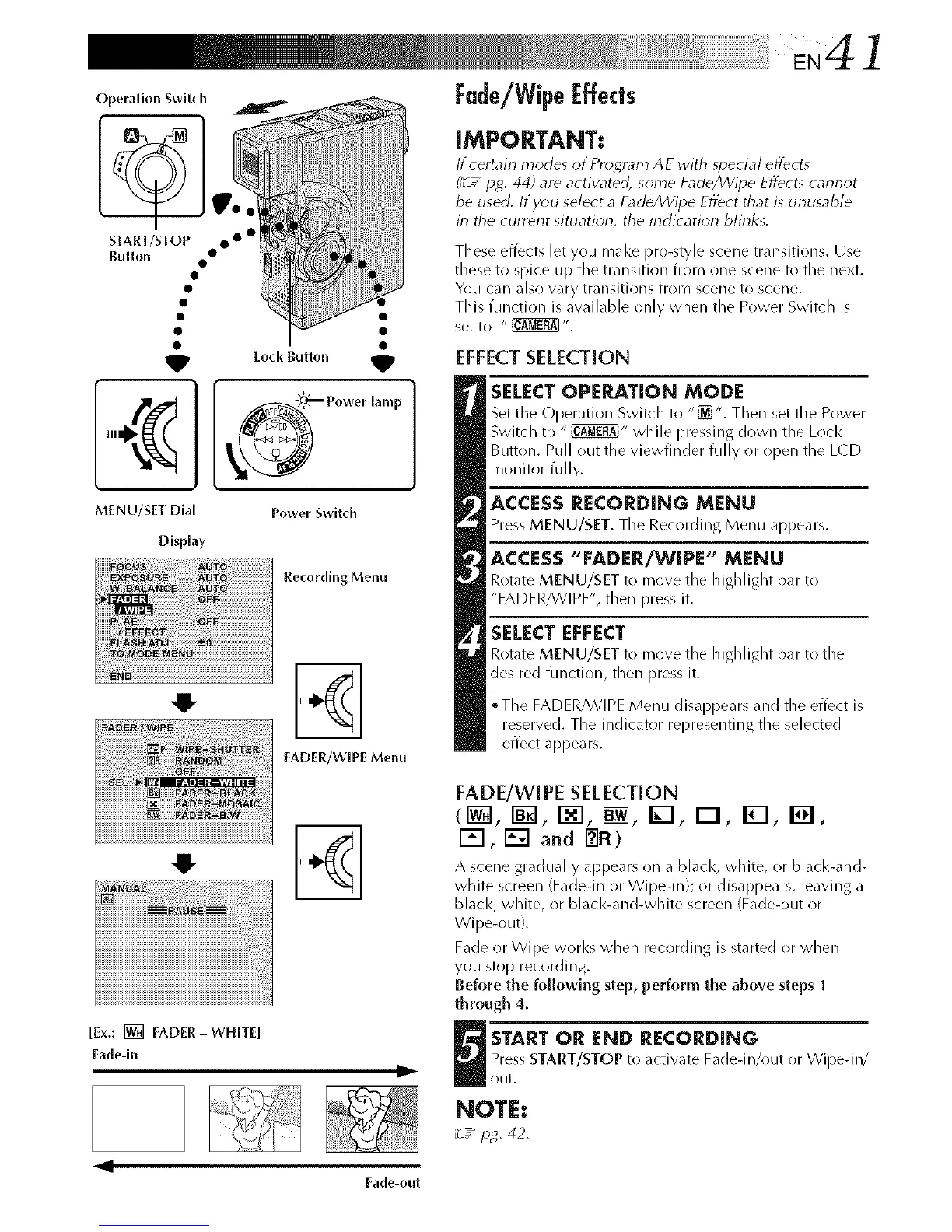
[Ex.: [] FADER-WHITE]
Fade-ln
Iii
Fade/Wipel:ffects
iMPORTANT:
lt certain modes orPros, ram AE with _pecial eflbcts
(_-z_ pg. 44) are activated, some Fad_/Wipe Eflbcts cannot
be used. Hyou select a FadegJVipe Eflbct that is unusable
in the current situation, the indication blinks.
These effects let you mal<e pro-style scene transitions. Use
these to spice up the transition from one scene to the next.
You can also wry transitions from scene to scene,
This function is available only when the Power Switch is
set to " _".
EFFECTSELECTION
SELECTOPERATION MODE
Set the Operation Switch to "[_". Then set the Power
Switch to " _" while pressing down the Lock
Button. Pull out the viewfinder fully or open the LCD
monitor fully.
ACCESSRECORDING MENU
Press MENU/SET. The Recording Menu appears.
ACCESS"FADER/WIPE" MENU
Rotate MENU/SET to move the highlight bar to
"FADER/WIPE", then press it.
SELECT EFFECT
Rotate MENU/SET to move the highlight bar to the
desired function, then press it.
°The FADER/WIPE Menu disappears and the effect is
reserved. The indicator representing the selected
effect appears.
FADE/wIPE SELECTION
(1_, I_1, I-_1, B__,I_-I, I-I, IWl, I_1,
I'_'l, [] and _FI)
A scene gradually appears on a black, white, or black-and-
white screen (Fadedn or Wipedn}; or disappears, leaving a
black, white, or black-and-white screen (Fade-out or
Wipe-out}.
Fade or Wipe works when recording is started or when
you stop recording.
Before the following step, perform the above steps 1
through 4.
U TART OR END RECORDING
Press START/STOP to activate Fadedn/out or Wipedn/
otlt.
NOTE:
_T_ pg. 42.
Fade-out



 To Next Page