m
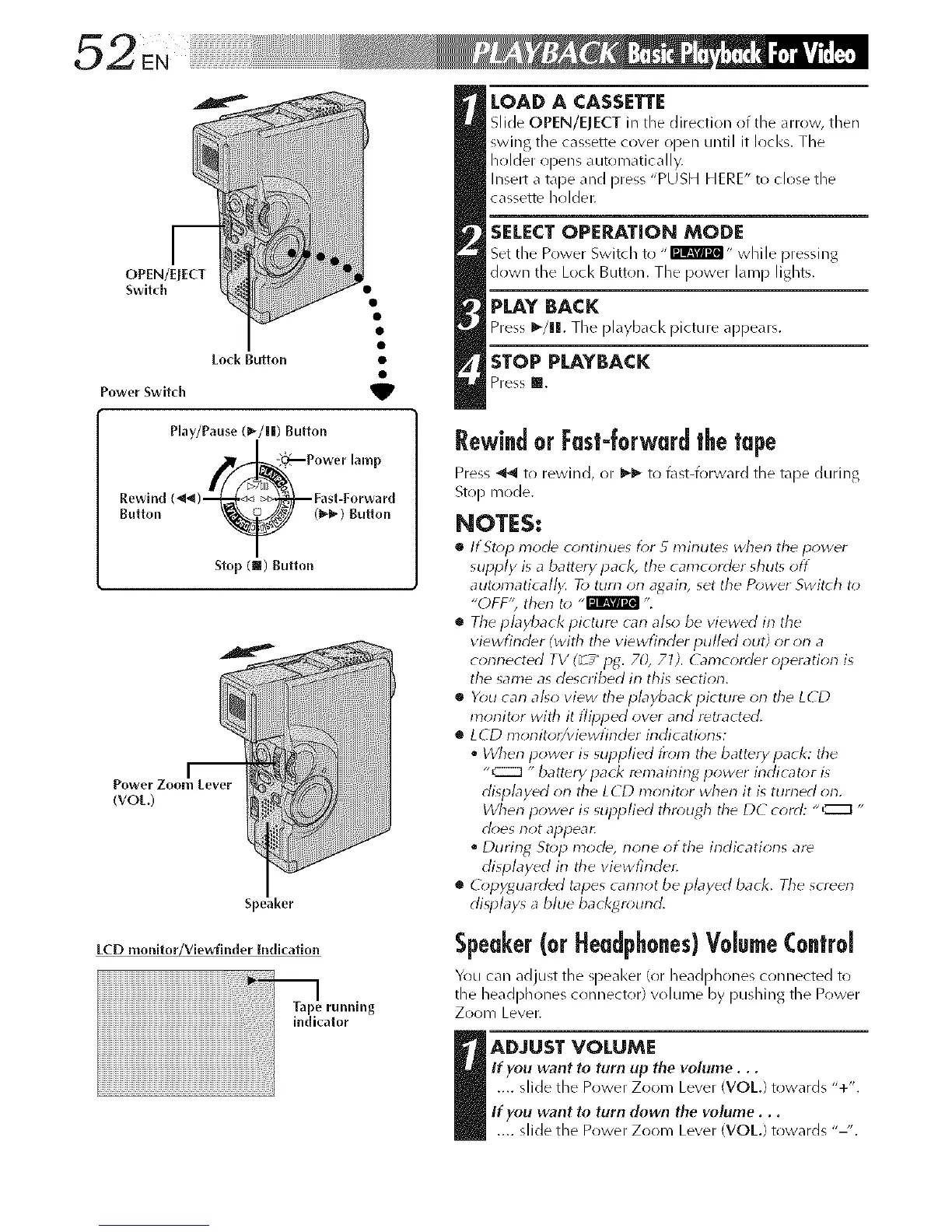
OPEN/ErECT
Switch
Lo_k Button •
Power Switch _lP
Rewind
Button
Play/Pause (_-/||) Button
_ (_,_) gulton
Stop (m) Button
jm
Power Zoom Lever
(VOt.)
Speaker
ECD monilor/Viewfinder Indicallon
LOAD A CASSETTE
Slide OPEN/ElECT ill tile direction of tlqe <iHOW, then
swing the cassette cover open until it locks. The
holder opens automatically.
Insert a tape and press "PUSH HERE" to close the
cassette hrflder.
SELECT OPERATION MODE
Set the Power Swkch to - rmm_l- while pressing
down the Loci< BurLon. The power lamp lights,
PLAY BACK
Press I_/ll. The pl<@)acl< picture appedrs.
STOP PLAYBACK
Press I!.
Rewindor Fast-forwardthetape
Press _ to rewind, or _ to l\lst-forward the tdpe during
Stop mode.
NOTES:
• If Stop mode continues D;r 5 minutes when the power
supply is a battery pack, the camcorder shut_ off
automatically. To ttlrrl on agairl, set the Power Swit( h to
"OFF'; then to ,,l_llg_t_ "L
• The pbyback picture carl also be viewed irl the
viewfinder (with tile viewfirlder pulled out) or on a
conrlected TV (_ / pg. 70, 71 ). G_mcor_ler opera tion is
the same as desoibed irl this section.
• You can a/_o view the pbyback picture on the LCD
monit_;r with it flipped over and retracted.
• LCD monitor/viewfinder indications:
* When power is supplied t?om the batterypack: the
"C:Z] "battery pack remaining power indicator is
displayed on the LCD monit_;r when it is turned orl.
When power is supplied thn*ugh the DC cord: "C::_ "
cl<;es not appear.
During Stop mode, rlone of the indications are
displayed irl the vievvfindec
• (2_pyguarded tapes carlrlot be played back. Tile screen
displays a blue backt4n*und.
Speaker(orHeadphones)Volume(o.trol
You can adjust the q_eaker (or headphones connected to
the heal@hones crmneelor) volume by pushing the Power
ZooI3/ Lever.
I ADJUST VOLUME
If you want to torn up the volume...
.... slide the Power Zoom Level (VOL) towards "+".
If you want to torn down the volume...
.... slide the Power Zoom Lever WOE) towards "-'.



 To Next Page