oo oe
V
Lock Button
° o
MENU/SN Dial Power Switch
Display
V
lamp
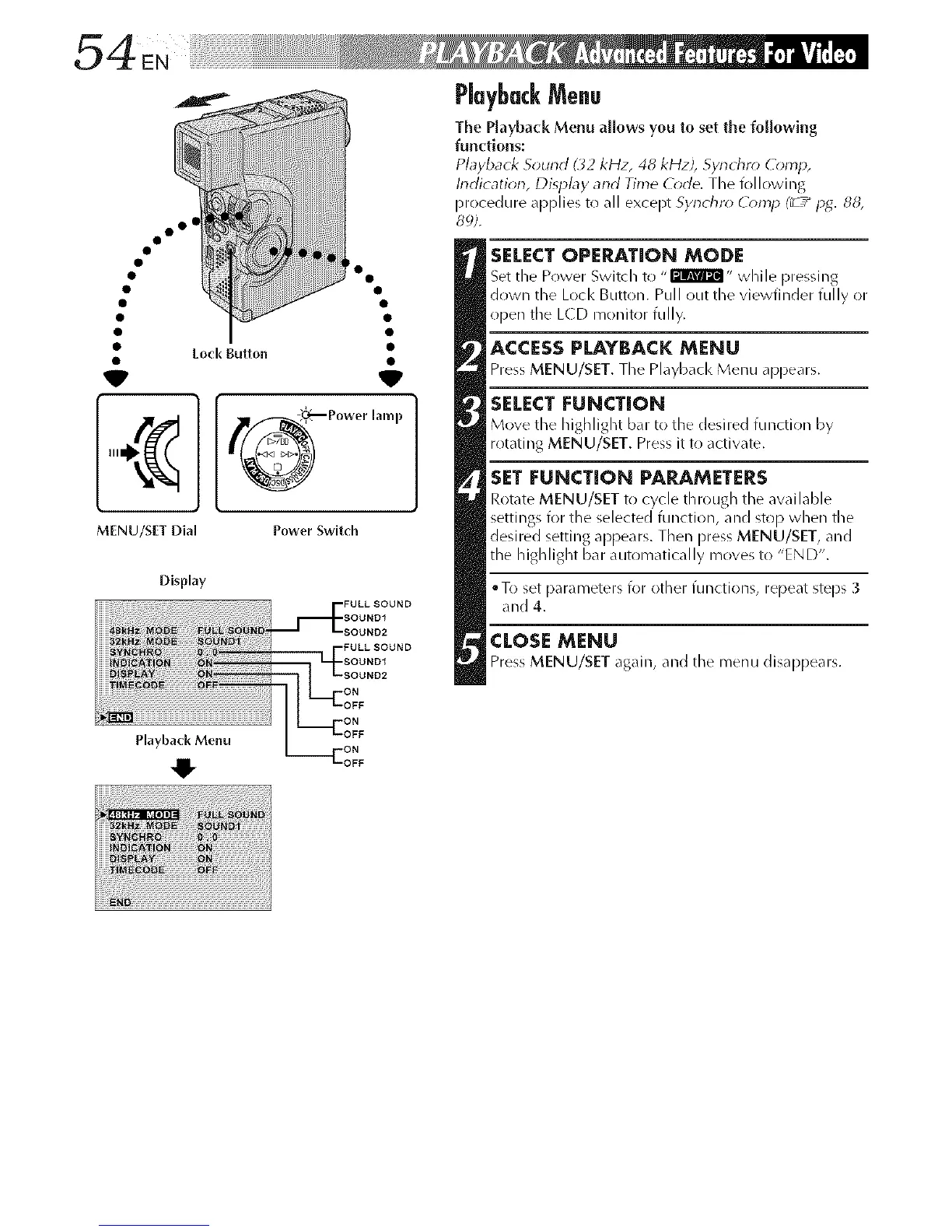
PlaybackMenu
The Playback Menu allows you to set the following
functions:
Playback S_und ( _2kHz, 48 kHzJ, Synchrr_ ComH,
Indicatk_n, Display and Time C_de. The following
procedure applies to all except Synchn* (_*lnlJ (_ ,_H_4.88,
8_;).
SELECT OPEP_TION MODE
Set tile Power Switch to ,,@lrRF_I" while pressing
down tile Lock Button. Pull out the vJewfJllder fully or
iiDe[l tile L(D n/onitor fully.
ACCESSPLAYBACK MENU
PressMENU/SET. The Playbacl< Menu appears.
SELECT FUNCTION
Move the highlight b_. to the desired function by
rotating MENU/SET. Pressit to activate.
SET FUNCTION PARAMETERS
Rot_te MENU/SET to cycle through the awfilable
settings for the selected function, and stop when tile
desired setting appears. Then press MENU/SET, and
the highlight bar automatically moves to "END".
• To set Darameters for other functi(>ns, repeat steps 3
and 4.
CLOSI:MENU
PressMENU/SET again, and the menu disappears.



 To Next Page