,_56
NormalPlayback
Images shot with file camcorder are automatically
numbered, then stored in numerical order in the
MultiMediaCard. You can view tile stored images, one at a
time, much like flipping through a photo album.
I--
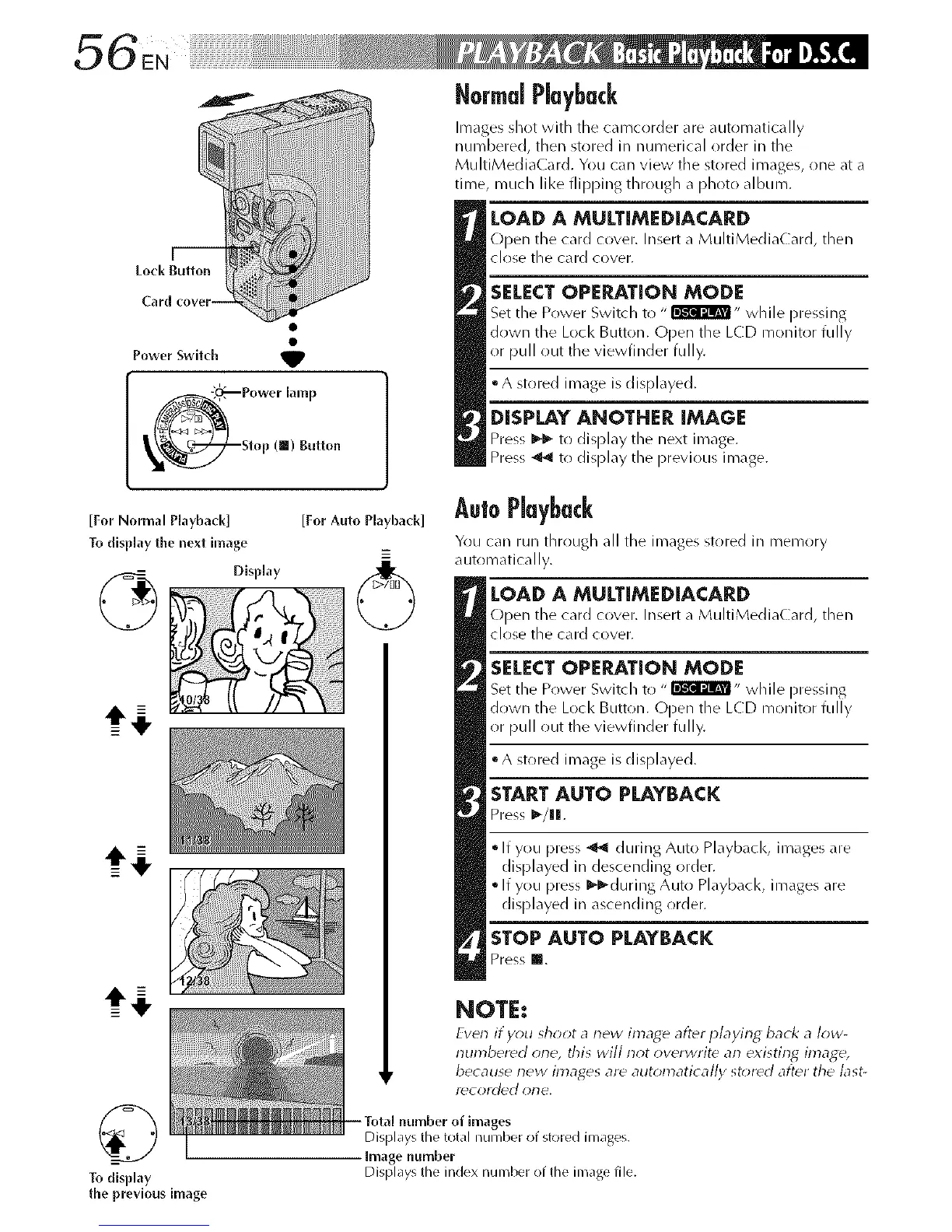
Lock Button
Power Switch _,
Power lamp
Stop (ll) Button
LOAD A MULT[MEDIACARD
Open the card cover. Insert a MultiMediaCard, then
close the card cover.
SELECTOPERATION MODE
Set the Power Switch to " I'i!Wl'J_,, while pressing
down the Lock Button. Open the LCD monitor fully
or pull out the viewfinder fully.
° A stored image is displayed.
DISPLAY ANOTHER IMAGE
Press _I_-to display the next image.
Press _ tr) display tlle previous image.
[For Normal Playback] [For Auto Playback]
To disp[ay the next image
_=
Display
©
Todisplay
the previous image
AutoPlayback
You can run through all the images stored ill memory
automatically.
LOAD A MULTIMEDiACARD
Open the card cover. Insert a MultiMediaCard, then
close the card cover.
SELECT OPERATION MODE
Set the Power Switch to "lik'_r_R_- while pressing
down the Lock Button. Open the LCD monitor fully
or pull out the viewfinder fully.
° A stored image is displayed.
STARTAUTO PLAYBACK
Press _-/lIl[.
* If you press _ during Auto Playback, images are
displayed in descending order.
* If you press I_-during Auto Playback, images are
displayed in ascending order.
STOP AUTO PLAYBACK
Press m.
NOTE:
Even if you sh_*ot a new image after playing back a low-
numbered one, this will not overwrite an existing image,
because new images are automatically st,;red after the last-
Y_COI'(]d€] ol-le,
Total number of images
Displays tile total number of stored images.
Image number
Displays the index number of the inlage file.



 To Next Page