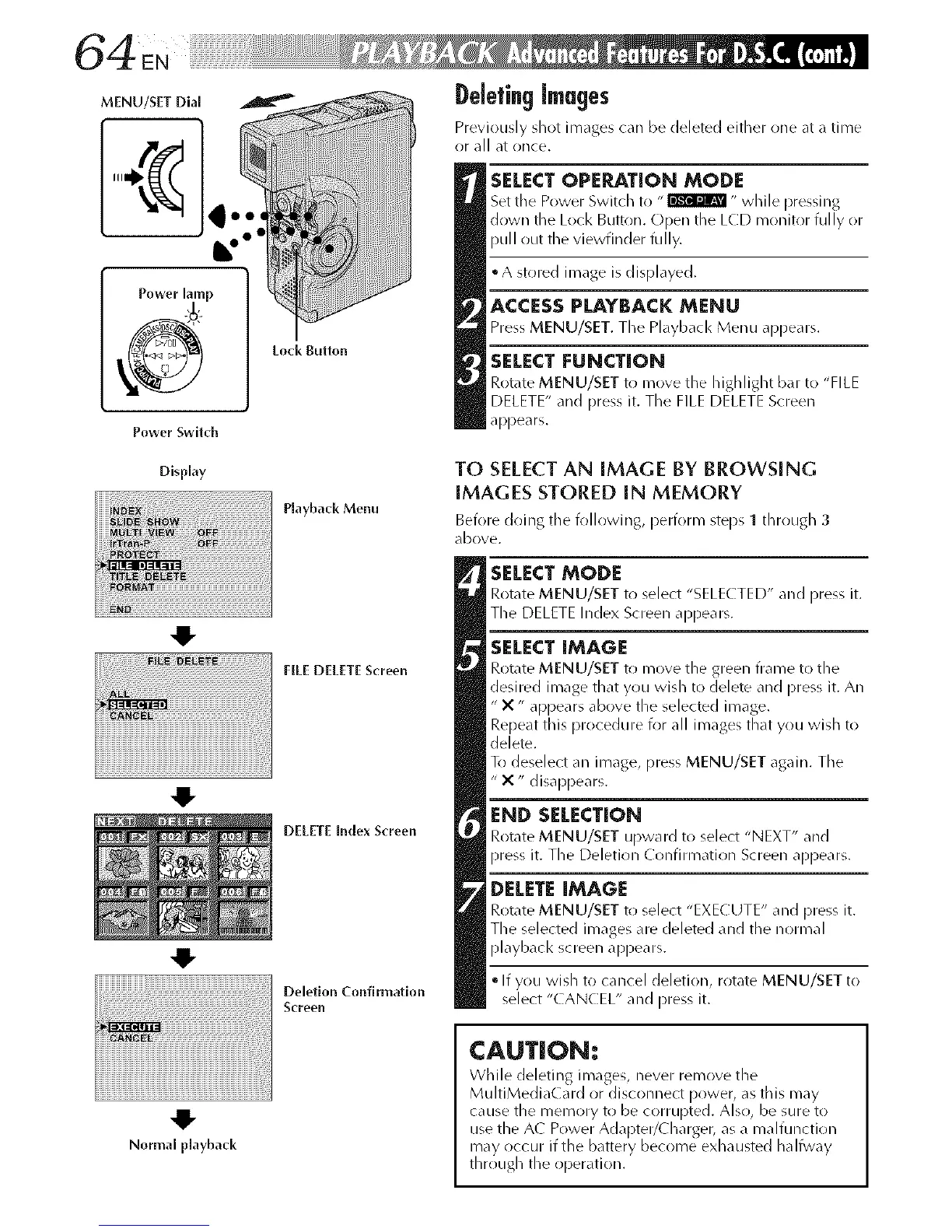
MENU/SET Dial
Power Switch
DeletingImages
Previously shot images can be deleted either one at a time
or all at once.
SELECT OPERATION MODE
Set tile Power Switch to "_ " while pressing
down the Lock Button. Open the LCD monitor fully or
pull out the viewfinder fully.
• A stored image is displayed.
ACCESSPLAYBACK MENU
Press MENU/SET. The Playback Menu appears.
SELECT [:UNCTION
Rotate MENU/SET to move the highlight bar to "FILE
DELETE" and press it. The FILE DELETE Screen
appears.
Display
Playback Menu
4!-
FILE DELETEScreen
_iili iiiiiiiiiiiiiiiiiiiiiiiiiiiiiiiiiiiiiiiiiiiiiiiii!liiiiii_i_ii
4!-
DELETE Index Screen
Deletion Confirmation
Screen
TO SELECTAN IMAGE BY BROWSING
IMAGES STORED IN MEMORY
Before doing the following, perform steps 1 through 3
dbove.
SELECT MODE
Rotate MENU/SET to select "SELE(TED" and press it.
The DELETE Index Screen appears.
SELECT IMAGE
Rotate MENU/SET to move the green frame to the
desired image that you wish to delete and press it. An
" X" appears above the selected image.
Repeat this procedure for all images that you widl to
delete.
To deselect an image, press MENU/SET again. The
" X " disappears.
END SELECTION
Rotate MENU/SET upward to select "NEXT" and
press it. The Deletion Confirmation Screen appears.
DELETE IMAGE
Rotate MENU/SET to select "EXECUTE" and press it.
The selected images are deleted and the normal
playbacl< screen appears.
• If you widl to cancel deletion, rotate MENU/SET to
select "CANCEL" and press it.
41"
Normal playback
CAUTION:
While deleting im_ges, never remove the
MultiMedia(ard or disconnect power, as this may
cause the memory to be corrupted. Also, be sure to
use the A( Power Adapter/Charger, as a malfunction
may occur if the battery become exhausted halfway
through the operation.



 To Next Page