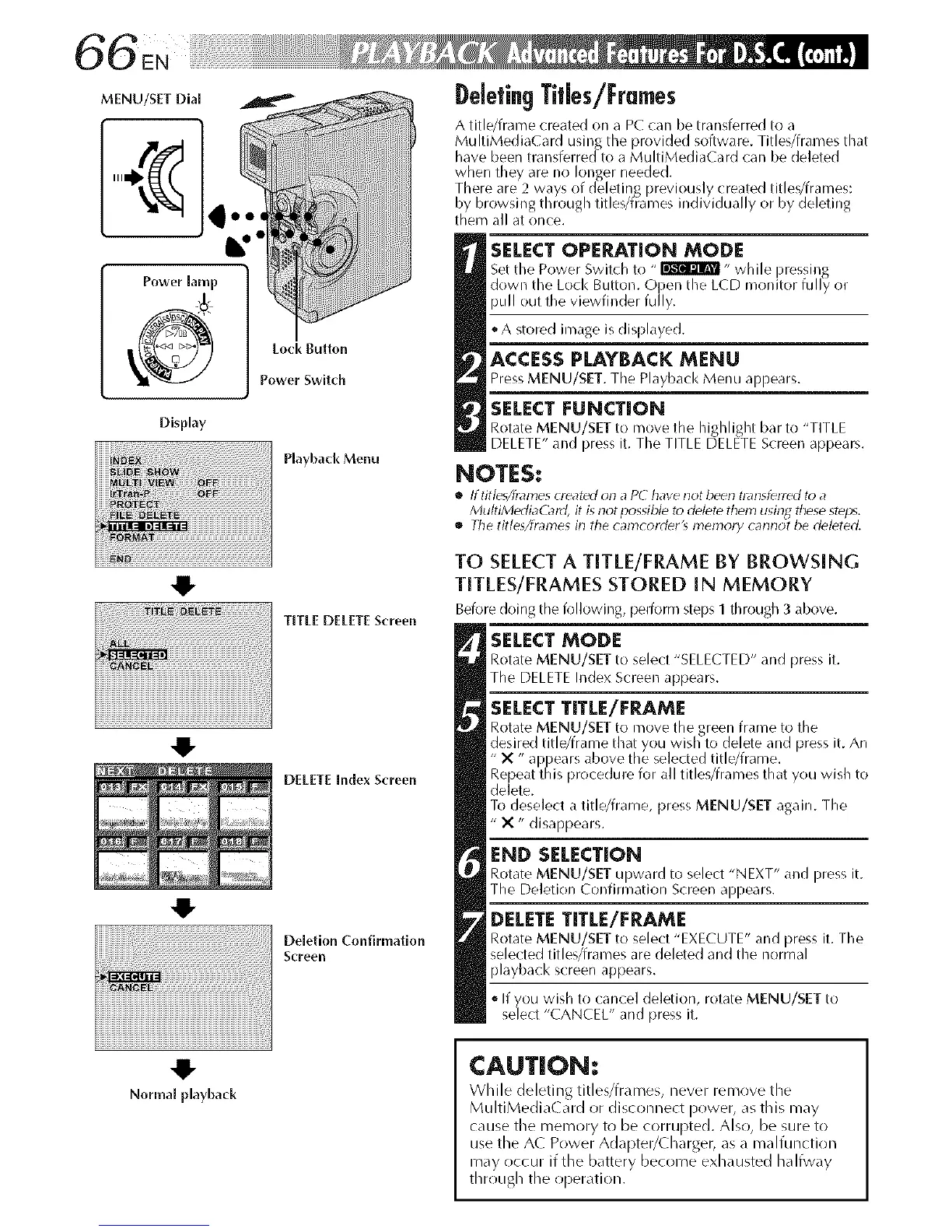
Display
PlaybackMenu
TITLE DELETE Screen
DELETE Index Screen
Deletion Confinnatlon
Screen
Normal playback
DeletingTitles/Frames
A title/frame created on a PC can be transferred to a
MultiMediaCard using the provided software. Titles/frames that
have been transferred to a MultiMedi,iC,ird can be deleted
when they are no longer needed.
There are 2 ways of deletinR previously created titles/frames:
by browsing through titles/frames individually or by deleting
them all at once.
SELECT OPERATION MODE
Set the Power Switch to "_" wMe ]ressing
down tie Loc< Button. Open t_e LCD monitor fu y or
pull out the viewfinder fully.
oA stored image is displayed.
ACCESSPLAYBACK MENU
Press MENU/SET. The Playb;_cl< Menu al-)pears.
SELECT FUNCTION
Rotate MENU/SET to move the highlight bar to "TITLE
DELETE" and press it. The TITLE DELETE Screen appears.
NOTES:
• Iftitle_/h_21nescreated on a PC have not been tl_llsferled to a
MultiMertiaC_ld, it is not possible to delete them usin_ these steps.
• The titleXfn_l'nes in the camcorder_ menlory cannot be deleted.
TO SELECTA TITLE/FRAME BY BROWSING
TITLES/FRAMES STORED IN MEMORY
Before doirlg the following, pelforr'n steps I through 3 above.
SELECT MODE
Rotate MENU/SET to select "SELECTED" and press it.
The DELETE Index Screen appears.
SELECT TITLE/FRAME
Rotate MENU/SET to move the green frame to the
desired title/frame that you wish to delete and )ress it. An
" X " a __ears above the selected title/frame.
Repeat t/is proce( ure for a tit es/frames t/at you wis _to
delete.
To deselect a title/frame, press MENU/SET again. The
" X " disappears.
END SELECTION
Rotate MENU/SET upward to select "NEXT" and press it.
The Deletion Confirmation Screen appears.
DELETE TITLE/FRAME
Rotate MENU/SET to select "EXECUTE" and press it. The
selected titles/frames are deleted and the normal
playback screen appears.
If you wish to cancel deletion, rotate MENU/SET to
select "CANCEL" and press it.
CAUTION:
While deleting title_/fr_u_es, never remove the
MultiMedia(ard or disconnect power, _s this may
cause the memory to be corrupted. Also, be sure to
use the A( Power Adapter/(_harger, as a malfunction
may occur if the battery become exhausted halfway
through the operation.



 To Next Page