_Hay/Pause (_/11)
Button
I !
Re([ to _ I I Yellow to
AUDIO _ _ VIDEO
R OUT t OUT*
/
White to
AUDIO
L OUT
Audio/
Video cable
[RCA plug to
RCA plug]
(optional)
White to
AUDIO L IN
Red to i t Yellow to
AUDIO R IN VIDEO IN*
I
Power Switch
To
S-VIDEO
OUT
S-Video cable
(optional)
To
S-VIDEO iN
*Connect when the S-Video cable is not used.
Dubbingimges/Sounds RecordedO, A
TapeToAnotherTape
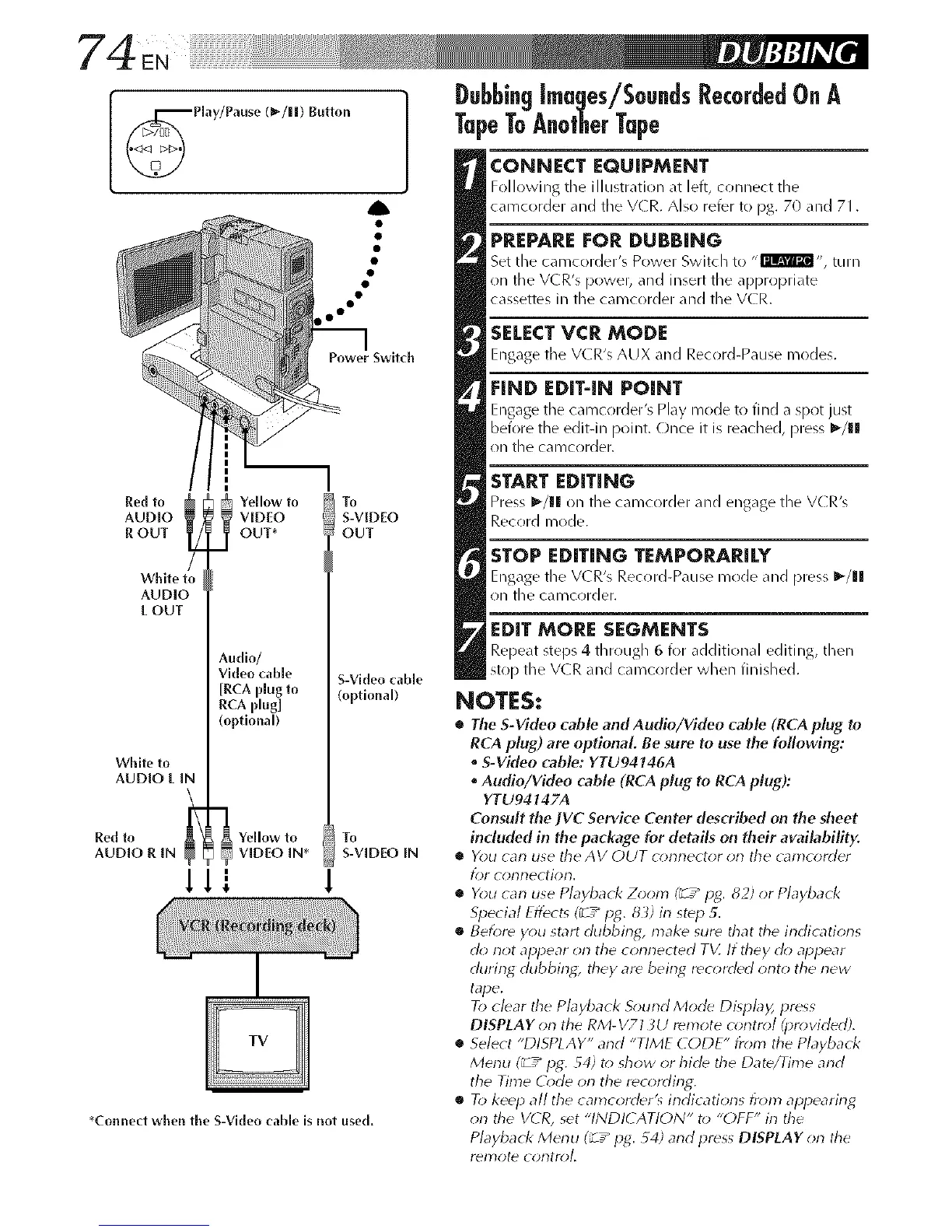
CONNECT EQUIPMENT
Following tile illustration at left, connect the
camcorder and tile V(R. Also refer to pg. 70 and 71.
PREPARE FOR DUBBING
Set the camcorder's Power Switch to ,, rllm_l,,, turn
on the VCR's power, and insert the appropriate
cassettes in the camcorder and the VCR.
SELECT VCR MODE
Engage tile V(R's AUX and Record-Pause modes.
FIND EDIT-IN POINT
Engage tile camcorder's Play mode to find a spot just
before the edit-in point. Once it is reached, press _/gl
on the camcorder.
START EDITING
Press 1_/111on the camcorder _md engage the V(R's
Record mode.
STOP EDITING TEMPORARILY
Engage tile V(R's Record-Pause mr)de and press I_/11
on the carocorder.
EDIT MORE SEGMENTS
Repeat steps 4 through 6 for additional editing, then
st()[) the V(R and carocorder when finished.
NOTES:
• The S-Video cable andAudio/Video cable (RCA plug to
RCA plug) are optional Be sure to use the following:
• S-Vkleo cable: YTU94146A
• Audio/VMeo cable (RCA plug to RCA plug):
YTU94147A
Consult the IV(?. Service Center described on the sheet
induded in the package for details on their availability.
• You carl use the AV OUT omnector orl the camcorder
for corlnectiorl.
• You can use Playback Zoom (_ / pg. 82) or Playback
Special Eflect_ (_7_ pg. 8 _) in step 5.
• Before you start dubbing, make sure that the indications
d_; not appear on the connected T_Z If they cl(_ appear
during dubbing; they are bein_ recorded orlto the new
tape.
To clear the Playback S_mnd Mode Display, press
DISPLAY on the RM-V713U remote c_;ntrol (provirledA
• Select "DISPLAY" and "TIME CODE" fr_m't the Playback
Merlu (_ T" pg,. 54) t() show or hide the Date/Time arid
the Time (()de on tile recoMing.
• R> keep all the camcorrter's irldic atiorls fr_m_ appearirlg
on the V( R, set "INDK ANON" to "OFF" in the
Playback Menu (_ 7_ p_. _4) and press DIfPLAY on the
Yel]3ote coDtroL



 To Next Page