To EDIT
Red to
AUDIO
R OUT
White to
AUDIO
L OUT
White to
AUDIO L IN
Red to
AUDIO
RIN
I
I Yellow to To
VIDEO S-VIDEO
OUT* OUT
S-Video
Audio/ cable
Video cable (optional)
[RCA plug to
RCA plug] Editing
(optional) cable
(provided/
To S-VIDEO
IN
To Remote
PAUSE or
R.A. EDIT
÷ .....
+ [] To PAUSE IN
FADE
ON/OFF
RM-V713U (provided)
* Connect when the S-Video cable is not use{b
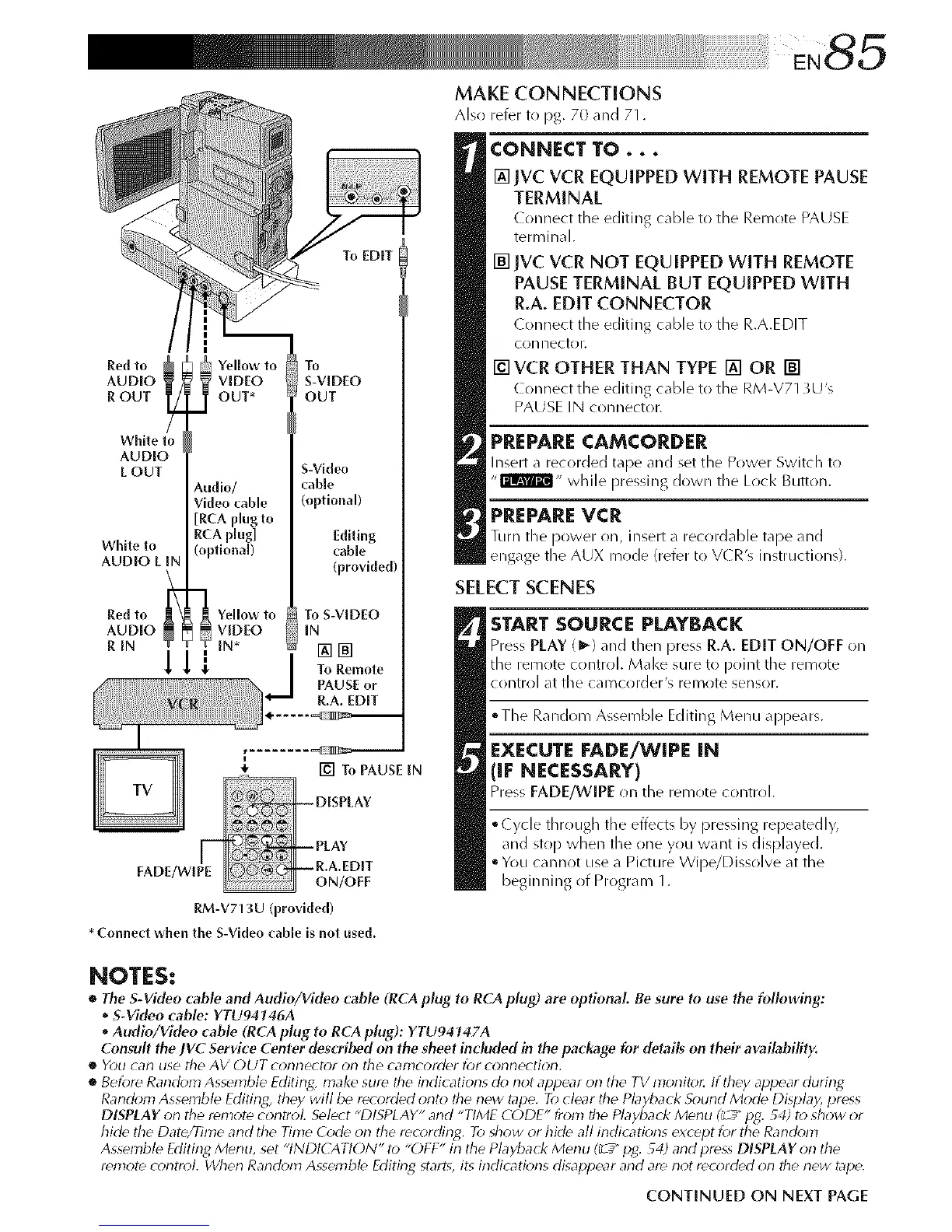
MAKE CONNECTIONS
Also refer to pg. 70 and 71.
CONNECT TO...
[] jvC VCR EQUIPPED WITH REMOTE PAUSE
TERMINAL
( onnect tile editing cable to tile Remote PAUSE
teriT_inal.
[] IVC VCR NOT EQUIPPED WITH REMOTE
PAUSE TERMINAl_ BUT EQUIPPED WITH
R.A. EDIT CONNECTOR
Connect the editing cable to tile R.A.EDIT
connector.
[] VCR OTHER THAN TYPE [] OR []
( onnect the editing cable to tile RM-V713U's
PAUSE IN connector.
PREPARECAMCORDER
Insert a recorded tape and set the Power Switch to
"rB&Tm,, while pressing down the Lock Button.
PREPAREVCR
Turn the power on, insert a recordable tape and
engage the AUX mode (refer to V(ZR's instructions).
SELECTSCENES
START SOURCE PLAYBACK
Press PLAY (1_) and then press R.A. EDIT ON/OFF on
the remote control. Make sure to point the remote
control at the camcorder's remote sensor.
°The Random Assemble Editing Menu appears.
EXECUTE FADE/WIPE IN
(IF NE¢ESSAERY)
Pre_ FADE/WIPE n the remote control,
°Cycle through the effects by pressing repeatedly,
and stop when the one you want is displayed.
• You cannot use a Picture Wipe/Dissolve at the
beginning of Program 1.
NOTES:
• The S-Video cable and Audio/Video cable (RCA plug to RCA plug) are optional. Be .sure to use the following:
• S-Video cable: YTU94146A
• Audio/Video cable (RCA plug to RCA plug): YTU94747A
Consult the JVC Service Center described on the sheet included in the package for details on their availability.
• YOU Car} []SO tho AV OUT COf_T_tOF Of} tbo can]corder for coi_i_ectioil.
• Before Random Assemble Editing, make sure the indications ck_not appear on the TV monito_ If they appear during
Random Assemble Editing, they will be recorded onto the new tape. To clear the Pbyback Sound Mode Display, press
DISPLAY on tile remote control Select "DISPLAY" and "TIME CODE" from the Playback Menu I_ _" pg. 54) to show or
hide tile Date/Time and the Time Code on the rec_)rding. To show or hide all indicatk_ns except for the Rand_m_
Assemble Editing Menu, set "INDICATION" to "OFF" in the Playback Menu (_" pg. 54) and press DISPLAY on the
remote c_*ntrol. Wllen Rand_*m Assemble Fditing, starts, its indicatk*ns disappear and are not rec_)rded on the new tape.
CONTINUED ON NEXT PAGE


 To Next Page
 Loading...









