Power Switch
M
__
Remote sensor
Random Assemble
Editing Menu
RM-V713U
(provided)
FADE/WiPE-
EFFECT-
EDiT iN/OUT--
A
q
©_
CANCEL
-- PLAY
--R,A£DiT
ON/OFF
SELECTSCENES(cont.)
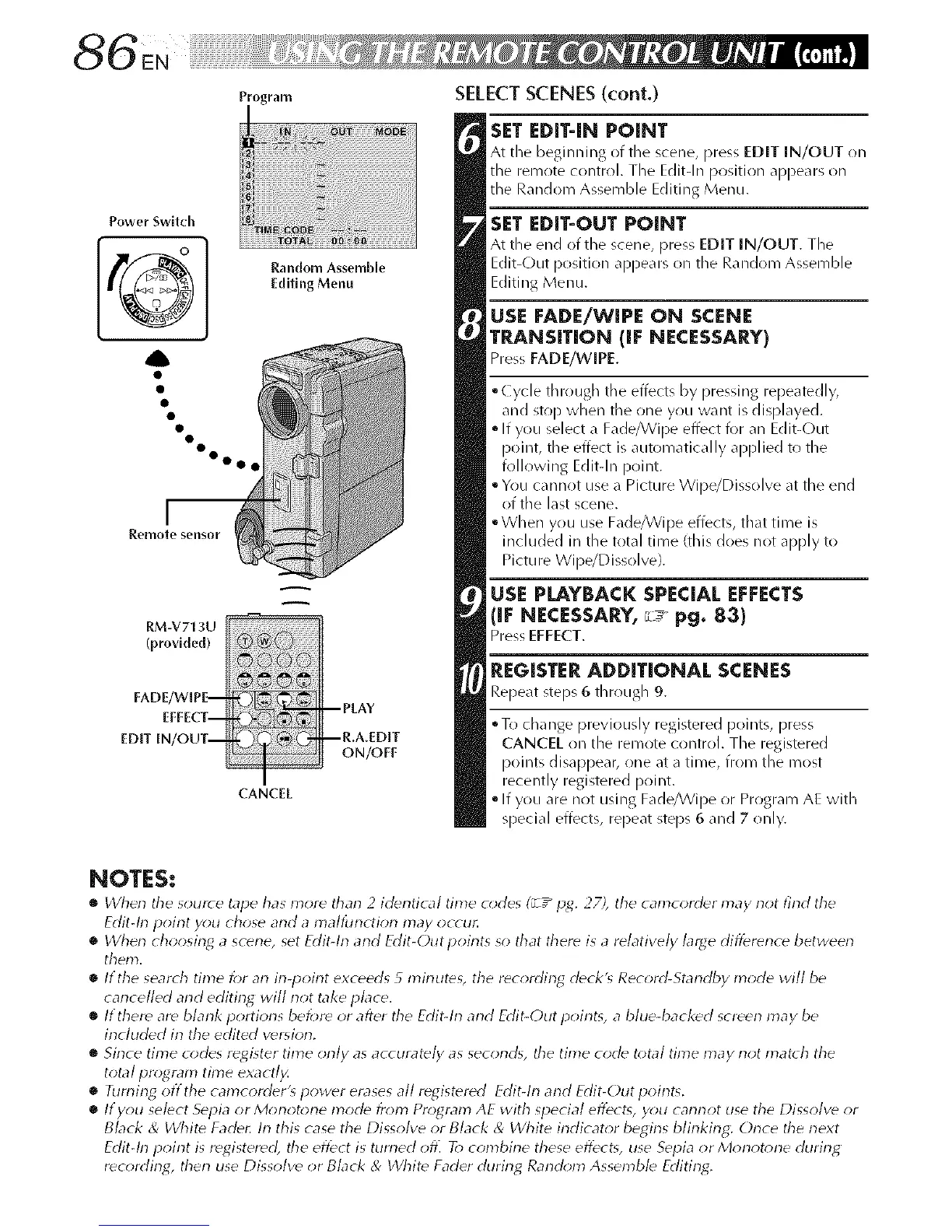
SET EDIT-IN POINT
At tile beginning of tile scene, press EDIT IN/OUT on
tile remote control. Tile Edit-In position appears on
the Random Assemble Editing Menu.
SET EDIT-OUT POINT
At tile end of the scene, press EDIT IN/OUT. Tile
Edit-Out position appears on tile Random Assemble
Editing Menu.
USE FADE/WIPE ON SCENE
TP,J_NSITION (iF NECESSARY)
Press FADE/WIPE.
°Cycle through tile effects by pressing repeatedly,
and stop when the one you want is displayed.
• If you select a Fade/Wipe effect for an Edit-Out
point, the effect is automatically applied to the
following Edit-In point.
• Y(lu cannot use a Picture Wipe/Dissolve at the end
of the last scene.
°When y(lu use Fade/Wipe effects, that time is
included in tile total time (this does not apply to
Picture Wipe/Dissolve).
USE PLAYBACK SPECIAL EFFECTS
(IF NECESSARY,r_ pg. 83)
Pres EFFECT.
REGISTER ADDITIONAL SCENES
Repeat steps 6 through 9.
oTo change previously registered points, press
CANCEL on the remote control. The registered
points disappear, one at a time, from the roost
recently registered point.
• If you are not using Fade/Wipe or Program AE with
special effects, repeat steps 6 and 7 only.
NOTES:
• dherl the s(mrce tape has more tharl 2 identical time o;des (_z" ijg. 27), the camcorder may not find the
Edit-lrl poirlt you chose arid a mallbrlction may occu_
• When choosing a scene, set Edit-lrl and Edit-Outpoirlts so that there is a relatively large difference between
them.
• If the seato h time for an in-point exceeds 5 minuteg the recording deck'_ Record-Standby mode will be
cancelled arid editing will not take place.
• If there are blarlk portions beJ;re or after the Edit-lrl and Edit-Out point_, a blue-backed screen may be
included in the edited version.
• Sirlce time codes register time orlly as accurately as second% the time code total time may riot match the
total pro;gram time exactl_
• Riming offthe camcorder'_ power erases all registered Edit-h-1 and Edit-Out poirlt_.
• If you select Sepia or Monotone mode from Program AE with special effects, y_m cannot use the Dissolve or
Black & Whit_ Fade_ In this case the Dissolve or Black & White indicator begins blinking: Once the next
Edit-In poirlt is registered], the effect is turrled ofl] To combirle these effect% use Sepia or Morlot*me durirlg
recording, therl use Dissolve or Black & _/Vhite Fader durirlg Rarld_;m Assemble Editing.


 To Next Page
 Loading...









