: ¸¸eN87
AUTOMATIC EDITING TO VCR
m
START/STOP
Button
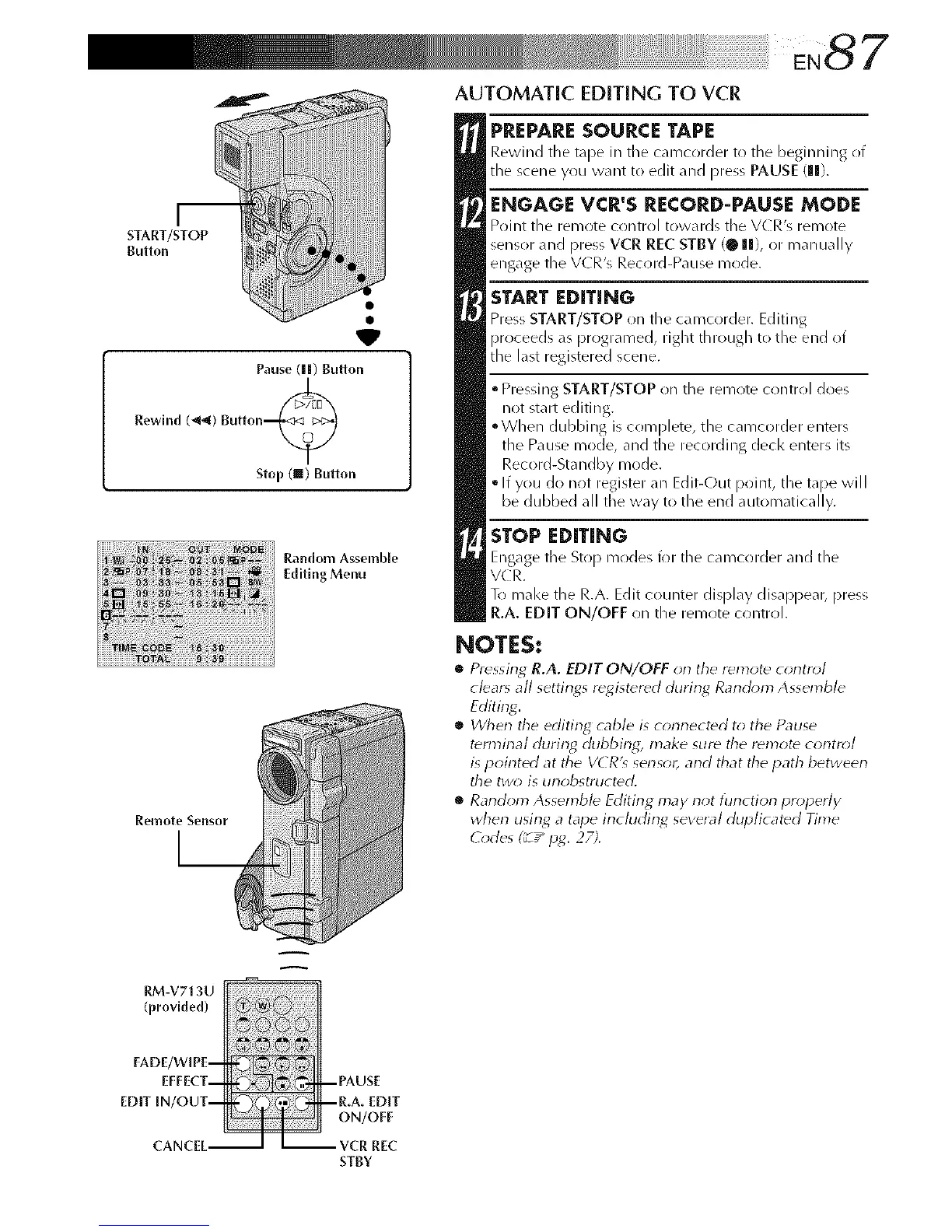
Pause (||) Button
Rewind (_) Bulton_
Stop (ll) Button
Remote Sensor
Random Assemble
Editing Menu
PREPARESOURCE TAPE
Rewind tile tape in the camcorder to tile beginning of
tile scene you want to edit and press PAUSE (Ill).
ENGAGE VCR'S RECORD-PAUSE MODE
Point tile remote control towards tile V(R's remote
sensor and press VCR REC STBY (@ Ill), or manuall,
engage the VCR's Record-Pause mode.
START EDITING
Press START/STOP on the camcorder. Editing
proceeds as prrlgramed, right through to tile end ot
tile last registered scene.
• Pressing START/STOP on tile remote control does
not start editing.
°When dubbing is complete, tile camcorder enters
tile Pause mode, and tile recording decl< enters its
Record-Sta ndby mode.
• If you do not register all Edit-Out point, tile tape will
be dubbed all tile way to the end automatically.
STOP EDITING
Engage tile Stop modes for the camcorder and the
VC R.
To mal<e the R.A. Edit counter display disappear, press
R.A. EDIT ON/OFF oil the remote control.
NOTES:
• Pressing R.A. EDIT ON/OFF on the remote control
clears all settings registered durin_ Ranchm_ Assemble
Editing.
• When the editing cable is connected to the Pause
termirlal during, dubbing, make sure the remote control
is pointed at tile VCR'_ sensor, and that the path between
the two; is unobstructed.
• Random Assemble Editing may not tunction properly
when using, a tape includin_ several duplicated Time
(_*des (_T"p_. 27;.
A
RM-V713U
FADE/WIPE-
EFFECT-
EDIT IN/OUT-
CANCEL-
--PAUSE
--R.A. EDIT
ON/OFF
- -- VCR REC
STBY



 To Next Page