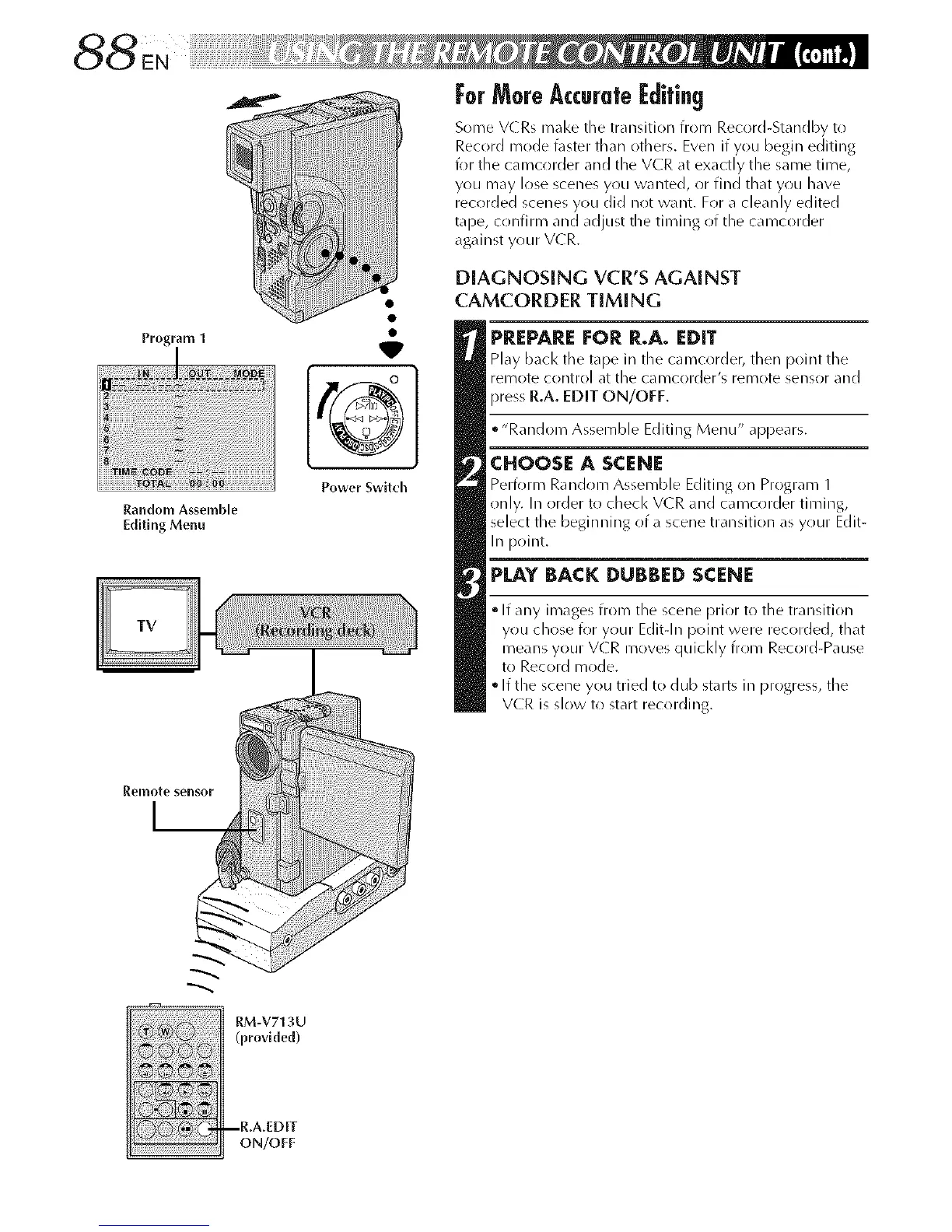
Program 1
Random Assemble
Editing Menu
W
Power Switch
ForMoreAccurate@ifin9
Some VCRs mal<e the transition from Record-Standby to
Record mode t\lster than others. Even if you begin editing
for tile caiT_crlrder and tile VCR at exactly tile same tii-oe,
you may lose scenes yrlu wanted, or find that yrlu have
recorded scenes you did not want. For a cleanly edited
tape, cr)nfirm and adjust tile timing of the cai_/corder
against your VCR.
DIAGNOSING VCR'S AGAINST
CAMCORDER TIMING
PREPARE FOR R.A. EDIT
Play bacl< tile tape in the camcorder, then point the
remote control at the cal_/corder's remote sensor and
press R.A. EDIT ON/OFF.
• "Random Assemble Editing Menu" appears.
CHOOSE A SCENE
Perform Random Assemble Editing on Program 1
only. In order to checl< V(R and camcorder timing,
select the beginning of a scene transition as your Edit-
In point.
PLAY BACK DUBBED SCENE
• If any images from the scene prior to the transition
you chose for your Editqn point were recorded, that
means your V(R moves quicl<ly from Record-Pause
to Record mode.
• If the scene you tried to dub starts in progress, tile
VCR is slow to start recording.
I_emote sensor
I__
RM-V713U
(provlded)
ON/OFF



 To Next Page