oo 4
V
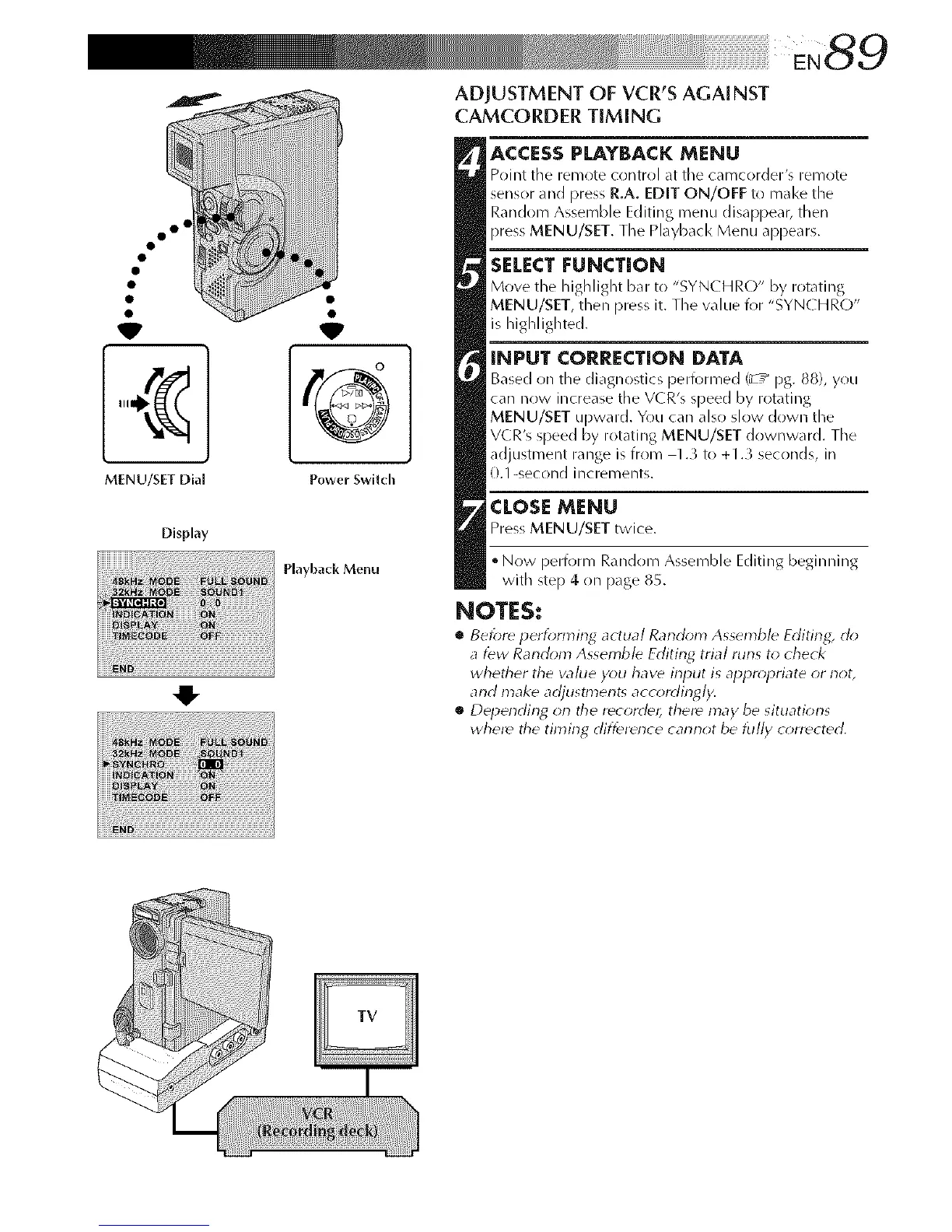
MENU/SET Dia[
Display
©
Power Swilch
Playback Menu
ADJUSTMENT OF VCR'S AGAINST
CAMCORDER TIMING
ACCESSPLAYBACK MENU
Point the remote control at tile camcorder's remote
sensor and press R.A. EDIT ON/OFF to make the
Random Assemble Editing menu disappear, then
press MENU/SET. The Playback Menu appears.
SELECT |:UNCTION
Move the highlight bar to "SYN(HR(-)" by rotating
MENU/SET, then press it. The value for "SYN( HRO"
is highlighted.
INPUT CORRECTION DATA
Based on the diagnostics performed/z / Pg. 88), you
car/now increase the VCR's speed by rotating
MENU/SET upward. You car/also slow down the
VCR's speed by rotating MENU/SET downward. The
adjustment range is from 1.3 to +1.3 seconds, in
0.1 -second increments.
CLOSEMENU
Press MENU/SET twice.
• Now perform Random Assemble Editing beginning
with step 4 on page 85.
NOTES:
• Before perfonl3ing actual Random Assemble Editing, clo
a few Random Assemble Editing trial runs to check
whether the wllue you haw input is appropriate or not,
and make adjustments accordingly.
• Depending orl the recordd¢_ there may be situations
where tile timing difference cannot be lu//y corrected,



 To Next Page