Lock Bu_on
Display
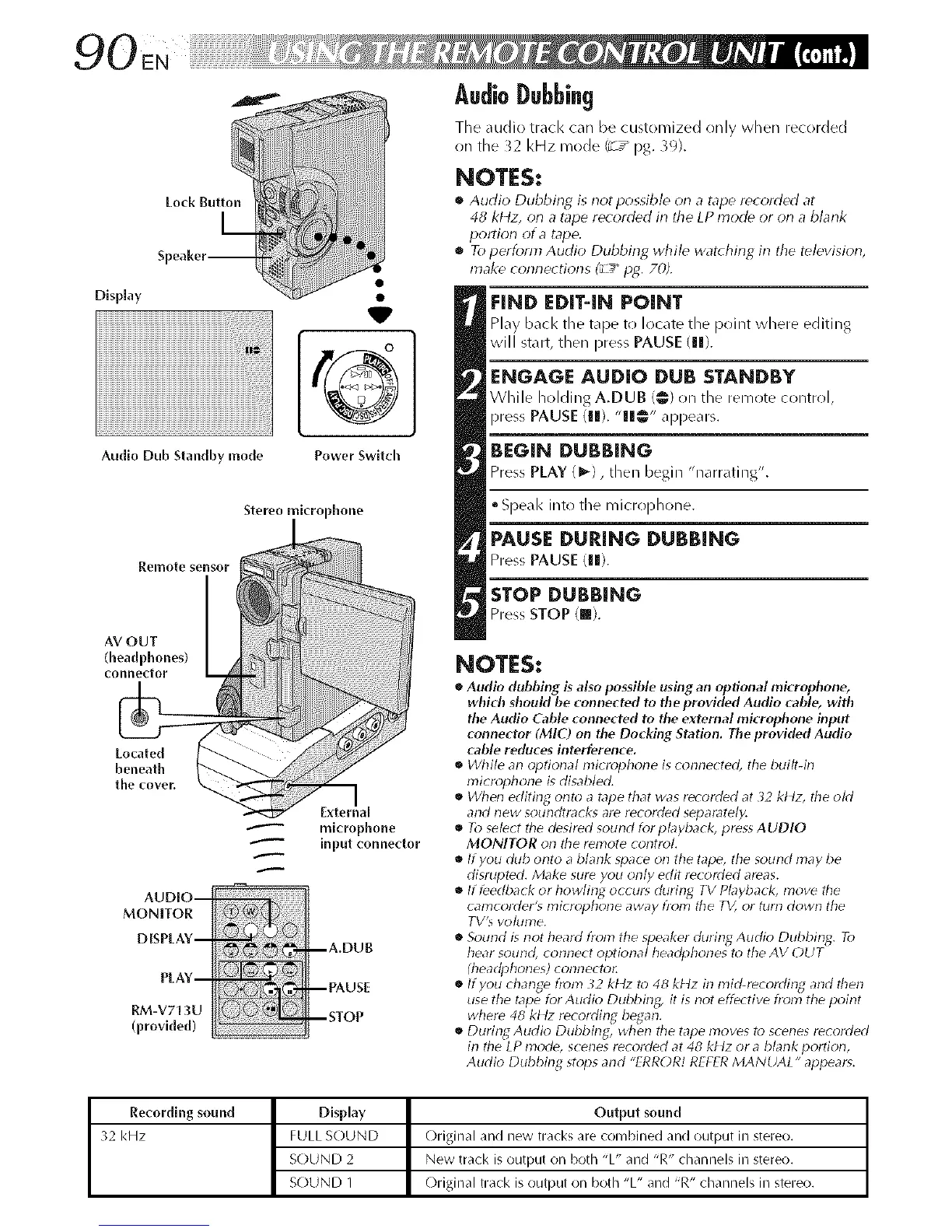
Audio Dub Standby mode
Power Switch
Stereo microphone
Remote sensor
connector _ _!
AUDIO--
MONITOR
DISPLAY--
PLAY--
RM-V713U
(provided)
microphone
input connector
--A,DUB
--PAUSE
--STOP
AudioDubbing
Tile ,ludio track can be customized only when recorded
on the _2 kHz mode/_ / pg. )9).
NOTES:
• Audio Dubbing is not possible on a tapo r_orded at
48 kl4z, on a tape recorded in the LP rhode or on a blank
portion of a tape.
• To perform Audio Dubbing while war(bins in the television,
make connections (_u-__P2. 70Z
EIND EDIT-IN POINT
Play back the tape to locate tlle point where editing
will start, then press PAUSE (Ill).
ENGAGE AUDIO DUB STANDBY
While holding A.DUB 1@1on the remote control,
press PAUSE (Ill). "Ill@" ,q_pears.
BEGIN DUBBING
PressPLAY (I_1, then begin "narrating".
• Speak into the microphone.
PAUSE DURING DUBBING
PressPAUSE (11).
STOP DUBBING
PressSTOPIra).
NOTES:
• Audio dubbing is also possible using an optional microphone,
which shouM be connected to the provided Audio ('able, with
the Audio Cable connected to the external microphone input
connector (MIC) on the Docking Station, The provided Audio
cable reduces interference,
• While an optional microphone is _onne_ted, the built-in
microphone is disab/ecL
• When editing onto a tape that was recorded at 32 kt4z, the okt
and new soundtracks are recorded separately.
• To select the desired sound for p Myback, press AUDIO
MONITOR on the remote control
• ffyou dub onto a blank space oil the tape, the sound may be
disrupted. Make sure you only edit recorded areas.
• If feedback or howlin_d occur_ during TV Playback, move the
calT_cordel-'_ lT_icropholle away h-olT_ the TV, or turll dowll the
TV% volurne.
• Sound is not heard fionl the speaker durin2 Audio Dubbin_q. To
hear sound, connect optional headphones to the AV OUT
(headphones) connectol:
• ffyou change fiom _2 kttz to 48 kt4z in mid-recoldin_q and then
use the tape for Audio Dubbin_q, it is not effe: tire from the point
where 48 kt tz recoldin_q began.
• Durin_ Audio Dubbing, when tile tape 17loves to scenes recolded
in the LP mode, s( enes recorded at 48 kt4z or a blank portion,
Audio Dubbing stops and "ERROR! REFER MANUAL" appears.
Recordlng sound Display Output sound
32 kHz FULL SOUND Original and new tracks are combined and output in stereo.
SOUND 2 New track is output on both "L" and "R" channels in stereo.
SOUND 1 ()riginal track is output on both "L" and "R" channels in stereo.


 To Next Page
 Loading...









