If, after following the steps in tile chart below, the problem still exists, ))lease cr)nsuh your nearest IVC dealer.
etc.) might i)revent it from functioning properly. In sucln cases, first disconnect its power supply unit (battery
pacl<, AC Power Adapter/Battery Charger, etc.) and wait a few rninutes; and then re-crlnnect it and i)roceed
as usual from the beginning.
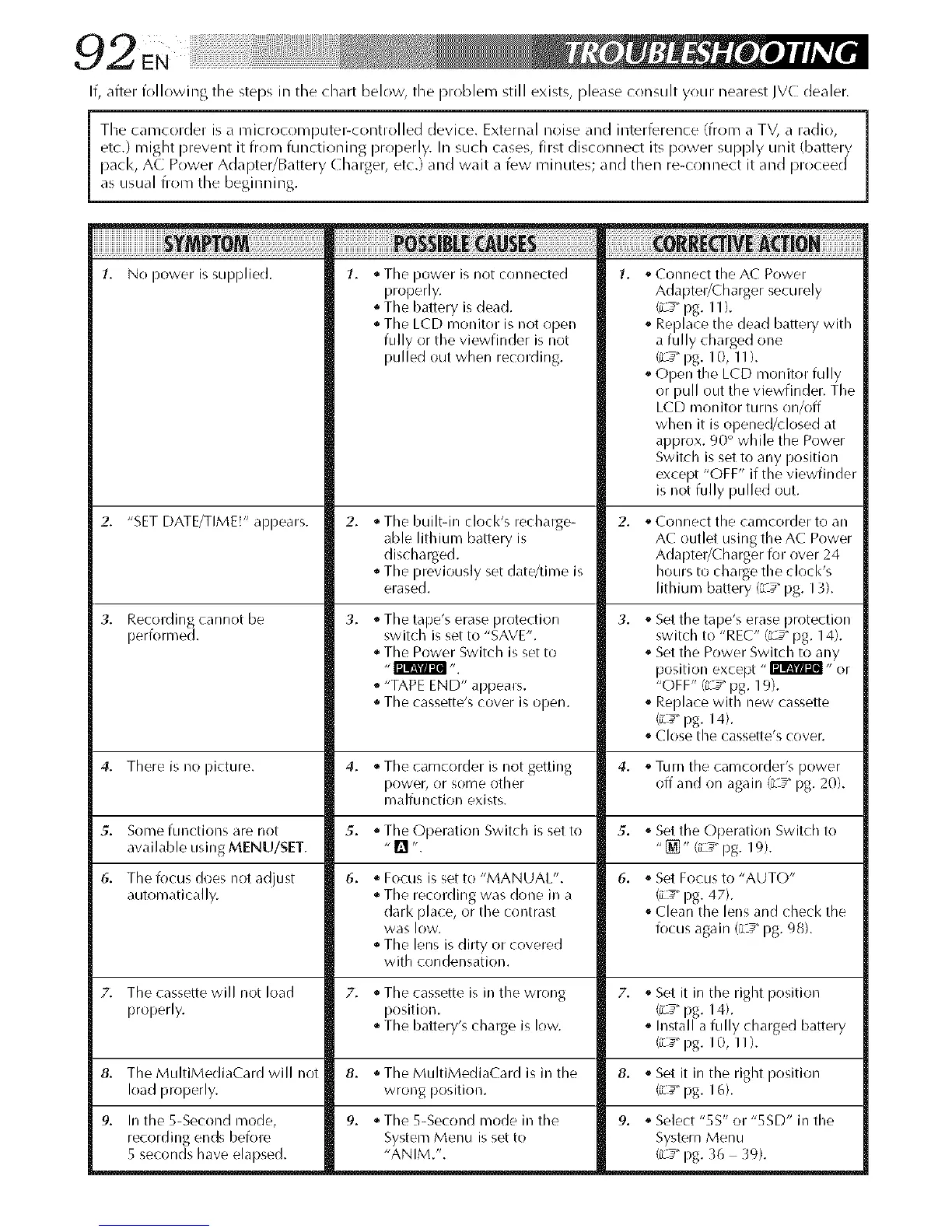
1. No power is supplied. 1.
2. "SET DATE/TIME!" appears.
Recording cannot be
i:lerformed.
1. * Tile power is not connected
properly.
• The battery is dead.
• The LCD monitor is not open
fully or the viewfinder is not
pulled out when recording.
8,
9. In the 5-Second mode,
recording ends before
5 seconds have elapsed.
• The built-in clocl<'s recharge-
able lithium battery is
discharged.
• The previously set date/time is
erased.
3. • The tape's erase protection
switch is set to "SAVE".
The Power Switch is set to
• "TAPE END" appears.
• The cassette's cover is open.
,_Connect the AC Power
Adapter/Charger securely
(*_:_"pg. 11 ).
° Replace the dead battery with
a fully charged one
(L_ pg. 10, 1 I ).
° Open the LCD n/onitor fully
or pull out the viewfinder. The
LCD monitor turns on/off
when it is opened/dosed at
approx. 90 ° while the Power
Switch is set to any position
except "OFF" if the viewfinder
is not fully pulled out.
Connect tile eameorder to an
AC outlet using the AC Power
Adapter/Charger for over 24
hours to charge the clock's
lithium battery (;L_" pg. 13).
Set the tape's erase protection
switch to "REC" (LS pg. 14).
Set the Power Switch to any
position except "_" or
"OFF" (L#" pg. 19).
Replace with new cassette
_ pg. 14).
Close the cassette's cover.
4. There is no picture. 4. • The camcorder is not getting 4. . Turn the camcorder's power
rlower, or some other off and on again {L_" pg. 20).
malfunction exists.
5. Some functions are not 5. • The Operation Switch is set to 5. ° Set the Operation Switch to
available using MENU/SET. "[] ". "_]" (iL_" pg. 19).
6. The focus does not adjust 6. • Focus is set to "MANUAL". 6. . Set Focus to "AUTO"
automatically. • The recording was done in a (L_ pg. 47).
dark place, or the contrast . Clean the lens and check the
was low. focus again {L_" pg. 98).
• The lens is dirty or covered
with condensation.
7. The cassette will not load 7. • The cassette is in the wrong 7. . Set it in the right position
properly, position. (_/_"pg. 14).
• The battery's charge is low. ° Install a fully charged battery
(iL_" pg. 10, 1 I ).
The MultiMediaCard will not 8. ,_Set it in the right position
load properly. (iL_"pg. 16).
8. ,, The MultiMediaCard is in the
wrong position.
9. * The 5-Second mode in the
System Menu is set to
"ANIM.".
9. ° Select "5S" or "5SD" in the
System Menu
(iL_"pg. 3t_ 39).


 To Next Page
 Loading...









