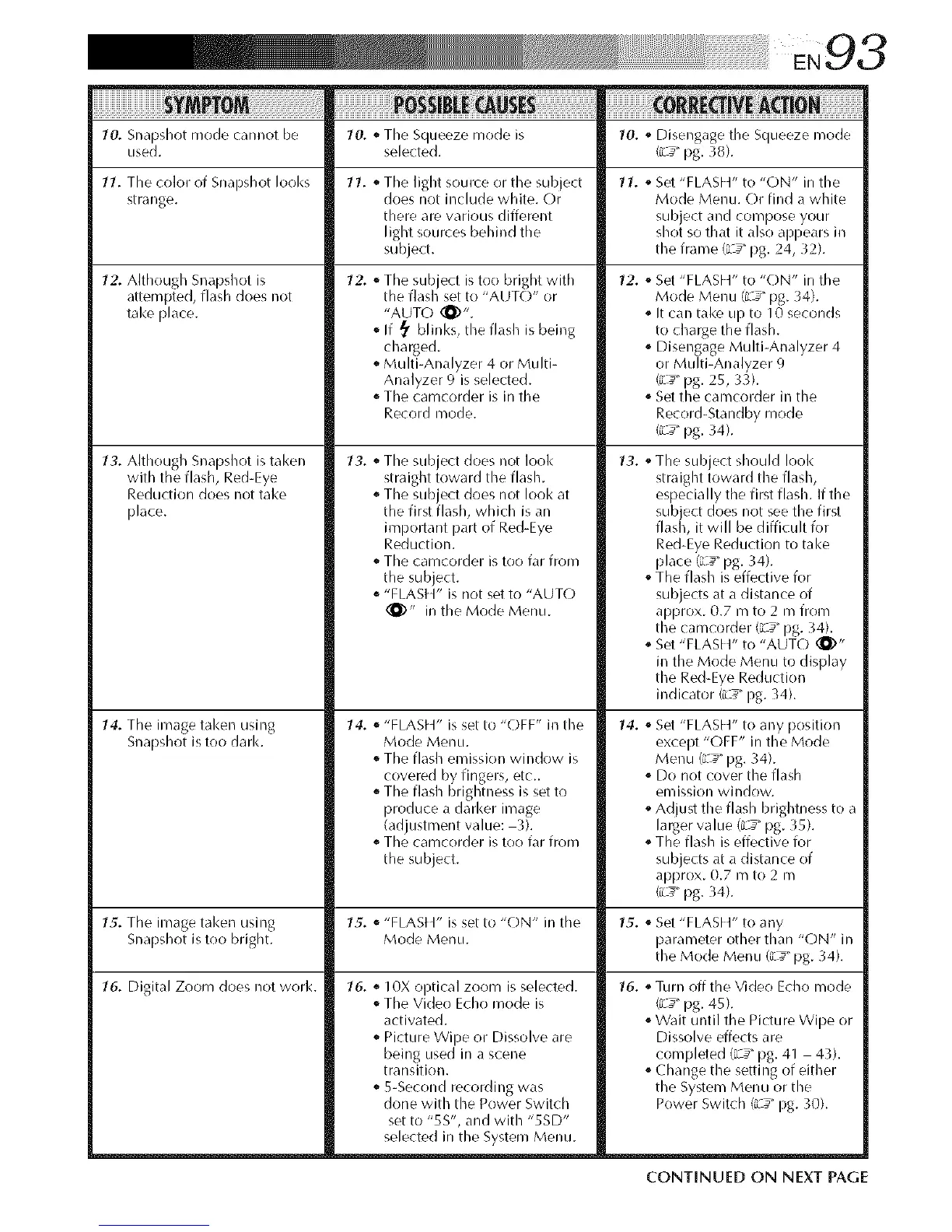
10. Snapshot mode cannot be 10. o The Squeeze mode is 10. o Disengage the Squeeze mode
used. selected. (iL_" pg. 38).
11. The color of Snapshot looks 11. o The light source or the subject 11. o Set "FLASH" to "ON" in the
strange, does not include white. Or Mode Menu. Or find a white
there are various different subject and compose your
light sources behind the shot so that it also apl)ears in
subject, the frame (L _" pg. 24, 32).
12. Although Snapshot is
attempted, flash does not
take place.
13. Although Snapshot is taken
with the flash, Red-Eye
Reduction does not take
place.
14. The image tal<en using
Snapshot is too dark.
12. o The sub ect is too bright with
t/e f asl set to "AUT(-)" or
"AUTO (_)".
If _ blinks, the flash is being
charged.
Multi-Analyzer 4 or Multi-
Analyzer 9 is selected.
o The camcorder is in the
Record mode.
13. o The subject does not look
straight toward the flash.
o The subject does not look at
the first flash, which is an
impollant part of Red-Eye
Reduction.
o The camcorder is too far from
the subject.
"FLASH" is not set to "AUTO
(_)" in the Mode Menu.
14. _ "FLASH" is set to "OFF" in the
Mode Menu.
o The flash emission window is
covered by fingers, etc_
o The flash brightness is set to
produce a darker image
(adjustment value: 3).
The camcorder is too far from
the subject.
12. _ Set "FLASH" to "ON" in the
Mode MenLI (Z_" pg. 34).
It can take up to 10 seconds
to charge the flash.
o Disengage Multi-Analyzer 4
or Multi-Analyzer 9
(;-_ pg. 25, 33).
o Set the camcorder in the
Record-Standby mode
(iL_" pg. 34).
13. oThe subject should look
straight toward the flash,
especially the first flash. If the
sub ect does not see the first
flas l, it will be difficult for
Red-Eye Reduction to take
place (_d__"pg. 34).
oThe flash is effective for
subjects at a distance of
approx. 0.7 m to 2 m from
the camcorder {L _" pg. 34).
Set "FLASH" to "AUTO (_)"
in the Mode Menu to display
the Red-Eye Reduction
indicator (iL_" pg. 34).
14.
o Set "FLASH" to any position
except "OFF" in the Mode
Menu (L_ _"pg. 34).
o Do not cover the flash
emission window.
oAdjust the flash brightness to a
larger value (L__"pg. 35).
oThe flash is effective for
subjects at a distance of
approx. 0.7 m to 2 m
(iL_" pg. 34).
15. The image taken using 15. _ "FLASt _" is set to "ON" in the 15. _ Set "FLASH" to any
Snapshot is too bright. Mode Menu. parameter other than "ON" in
the Mode Menu {L _" pg. 34).
16. Digital Zoom does not work. 16. _ 10X optical zoom is selected.
The Video Echo mode is
activated.
Picture Wipe or Dissolve are
being used in a scene
transition.
o 5-Second recording was
done with the Power Switch
set to "5S", and with "5SD"
selected in the System Menu.
16. _Turn off the Video Echo mode
{R___pg. 45).
Wait until the Picture Wipe or
Dissolve effects are
completed (i_"pg. 41 43).
oChange the setting of either
the System Menu or the
Power Switch (iL_" pg. 10).
CONTINUED ON NEXT PAGE


 To Next Page
 Loading...









