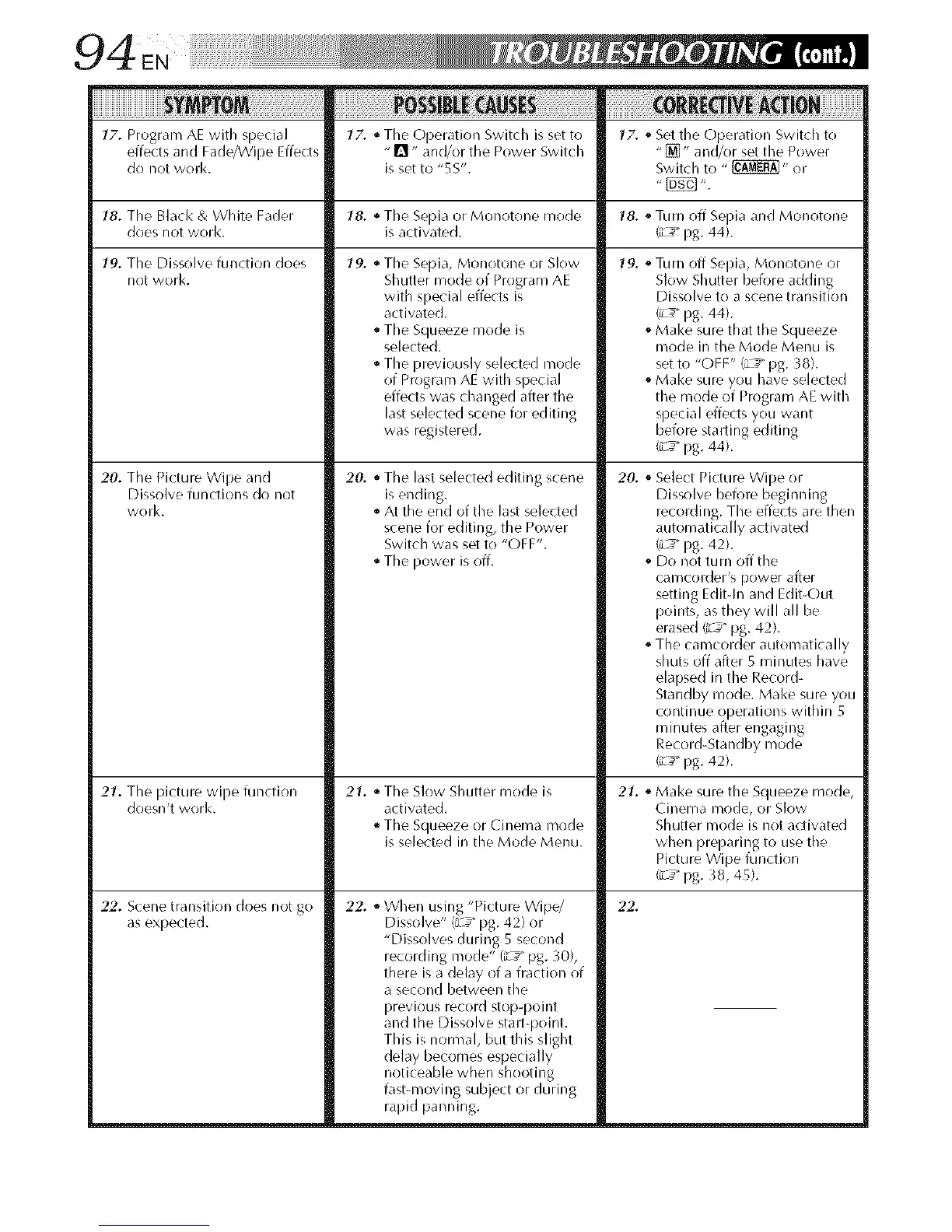
17. Program AE with special lY'. * The Operation Switch is set to lY'. ,_Set the Operation Switch to
effects and Fade/Wipe Effects - _'1" and/or the Power Switch "[]" and/or set the Power
do not work. is set to "5S". Switch to " _" or
18. The Black & White Fader 18. • The Sepia or Monotone mode 18. ° Turn off Sepia and Monotone
does not worl<, is activated. (iL_" pg. 44).
19. Tile Dissolve function does
not work.
20. The Picture Wipe and
Dissolve functions do not
work.
21. Tile picture wipe function
doesn't work.
22. Scene transition does not go
as expected.
19. • Tile Sepia, Monotone or Slow
Shutter mode of Program AE
with special effects is
activated.
The Squeeze mode is
selected.
The previously selected mode
of Program AE with special
effects was changed after the
last selected scene for editing
was registered.
20.
• The last selected editing scene
is ending.
• At the end of the last selected
scene for editing, the Power
Switch was set to "OFF".
The power is off.
21. • Tile Slow Shutter mode is
activated.
• The Squeeze or Cinema mode
is selected in the Mode Menu.
22. • When using "Picture Wipe/
Dissolve" (L_" pg. 42) or
"Dissolves during 5 second
recording mode" (L_" pg. _0),
there is a delay of a fraction of
a second between the
previous record stop-point
and the Dissolve stall-point.
This is normal, but this slight
delay becomes especially
noticeable when shooting
fast-moving subject or during
rapid panning.
19. _Turn off Sepia, Monotone or
Slow Shutter before adding
Dissolve to a scene transition
_ _ pg. 44).
Make sure that the Squeeze
mode in the Mode Menu is
set to "OFF" (_-4_"pg. _8).
. Make sure you have selected
the mode of Program AE with
special effects you want
before starting editing
(_L_"pg. 44).
20. ,_Select Picture Wipe or
Dissolve before beginning
recording. The effects are then
automatically activated
(L_ pg. 42).
,_Do not turn off the
cal_]COl(ter_s power after
setting Editdn and Edit-Out
points, as they will all be
erased (z_ _pg. 42).
° The camcorder automatically
shuts off after 5 minutes have
elapsed in the Record-
Standby mode. Make sure you
continue operations within 5
minutes after engaging
Record-Standby mode
(_L_"pg. 42).
21. ,_Make sure the Squeeze mode,
Cinema mode, or Slow
Shutter mode is not activated
when preparing to use the
Picture Wipe function
(iL_" pg. 38, 45).
22.


 To Next Page
 Loading...









