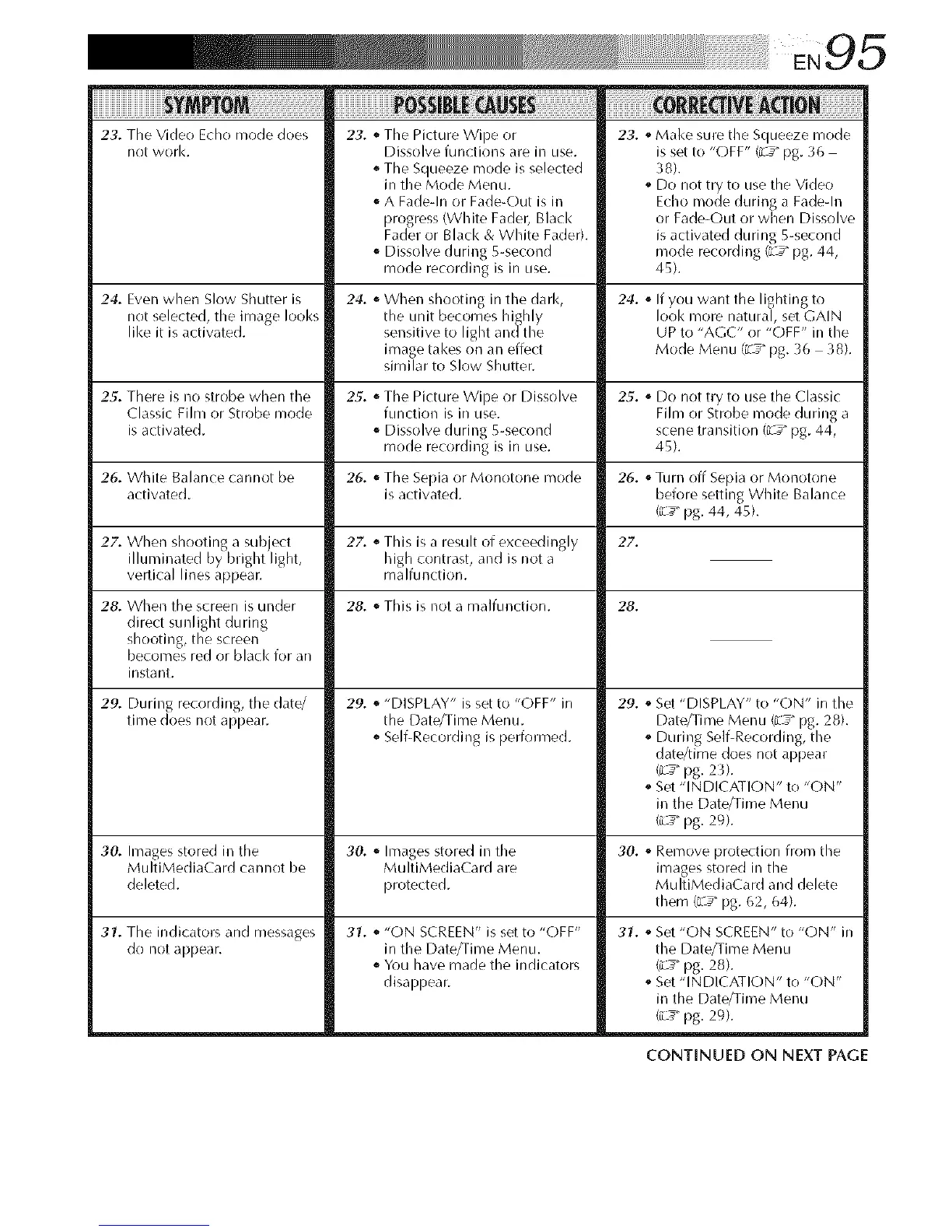
23.The Video Echo mode does
not work.
23. _ The Picture Wipe or 23. _Make sure tile Squeeze mode
27. When shooting a subject
illuminated by bright light,
vertical lines appear.
Dissolve functions are in use.
o The Squeeze mode is selected
in the Mode Menu.
A Fade-In or Fade_Out is in
progress (White Fader, Black
Fader or Black & White Fader).
o Dissolve during 5-second
mode recording is in use.
is set to "OFF" (L_ _pg. 3t_
38).
o Do not try to use the Video
Echo mode during a Fade-In
or Fade-Out or when Dissolve
is activated during 5-second
mode recording (iL_" pg. 44,
45).
24. Even when Slow Shutter is 24. ,_When shooting in the dark, 24. ,_If you want the lighting to
not selected, the image looks the unit becomes hishly Iool< more natural, set GAIN
like it is activated, sensitive to light andthe UP to "AGC" or "OFF" in the
image takes on an effect Mode Menu (L_" pg. 36 38).
similar to Slow Shutter.
25. There is no strobe when the 25. o The Picture Wipe or Dissolve 25. o Do not try to use the Classic
Classic Film or Strobe mode function is in use. Film or Strobe mode during a
is activated. _ Dissolve during 5-second scene transition (L_" pg. 44,
mode recording is in use. 45).
26. White Balance cannot be 26. ,_The Sepia or Monotone mode 26. ,_Turn off Sepia or Monotone
activated, is activated, before setting White Balance
(_L_"pg. 44, 45).
27. . This is a result of exceedingly 27.
high contrast, and is not a
malfunction.
28. When the screen is under
direct sunlight during
shooting, the screen
becomes red or black for an
instant.
28. _ This is not a malfunction.
29. _ "DISPLAY" is set to "OFF" in
the Date/Time Menu.
SelflRecording is performed.
29. During recording, the (late/
time does not appear.
28.
29. ,_Set "DISPLAY" to "ON" in the
Date/Time Menu {L_ _pg. 28).
o During SelfiRecording, the
date/time does not appear
(L_ pg. 2 3).
Set "INDICATION" to "ON"
in the Date/Time Menu
(iL_" pg. 29).
30. Images stored in the 30. ,_ Images stored in the 30. ,_Remove protection from the
MultiMediaCard cannot be MultiMediaCard are images stored in the
deleted, protected. MultiMediaCard and delete
them (L_" pg. 62, 64).
31. The indicators and messages
do not appear.
31. ,_"ON SCREEN" is set to "OFF"
in the Date/Time Menu.
o You have made the indicators
disappear.
31. _ Set "ON SCREEN" to "ON" in
the Date/Time Menu
C___pg. 28).
Set "INDICATION" to "ON"
in the Date/Time Menu
(i__" pg. 29).
CONTINUED ON NEXT PAGE


 To Next Page
 Loading...









