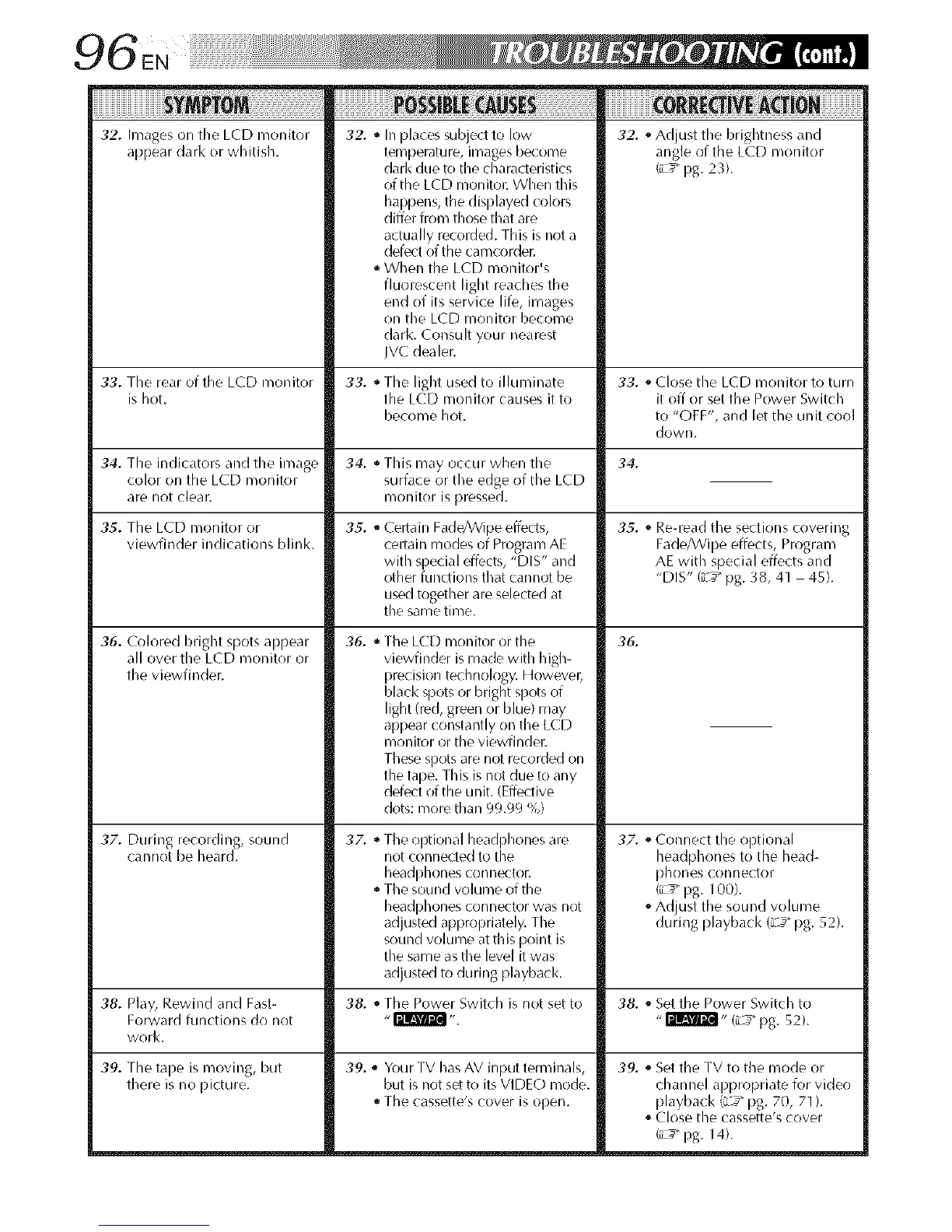
32. Images on the LCD monitor
appear dark or whitish.
i¸I¸I¸I¸I¸I¸I¸I¸I¸I¸I¸I¸I¸I¸I¸I¸I¸I¸I¸I¸I¸I¸I¸I¸i i ii ! i! i iE! i! ii ! it: ! iiiiiiiiiiiiiiiiiiiiiii
32. * In places subjed to low 32. ,_Adjust the brightness and
temperature, images become angle of the LCD monitor
dark due to the characteristics (iL_" pg. 23).
of the LCD monitor. When this
happens, the displayed colors
differ from those that are
actually recorded. This is not a
defect of the camcorder.
• When the LCD monitor's
fluorescent light reaches the
end of its service life, images
on the LCD monitor become
dark. Consult your nearest
IVC dealer.
33. The rear of the LCD monitor 33. • The light used to illuminate 33. ,_Close the LCD monitor to turn
is hot. the LCD monitor causes it to it off or set the Power Switch
become hot. to "OFF', and let the unit cool
down.
34. The indicators an(I the image 34. 34.
color on the LCD monitor
are not clear.
35. The LCD monitor or
viewfinder indications blink.
36. Colored bright spots appear
all over the LCD monitor or
the viewfinder.
3Z. During recording, sound
cannot be heard.
35.
This may occur when the
surface or the edge of the LCD
monitor is pressed.
Certain Fade/Wipe effects,
certain modes of Program AE
with special effects, "DIS" and
other functions that cannot be
used together are selected at
the same time.
36. • The LCD monitor or the
viewfinder is made with high-
precision technology. However;
black spots or bright spots of
light (red, green or blue) may
appear constantly on the LCD
monitor or the viewfinder.
These spots are not recorded on
the tape. This is not due to any
defect of the unit. (Effective
dots: more than 99.99 %)
37.
• The optional headphones are
not connected to the
headphones connector.
The sound volume of the
headl:_hones connector w__snot
adjusted appropriately. The
sound volume at this point is
the same as the level it was
adjusted to during playback.
35. ,_Re-read the sections covering
Fade/Wipe effects, Program
AE with special effects and
"DIS" (_-_"pg. 38, 41 45).
39. ,_ Your TV has AV input terminals,
but is not set to its VIDEO mode.
The cassette's cover is oflen.
36.
37. ,_Connect the optional
headphones to the head-
phones connector
(_L_" pg. 100).
oAd ust the sound volume
during p ay)ac < (L:_"pg. 52).
38. Play, Rewind and Fast- 38. _,The Power Switch is not set to 38. ,_Set the Power Switch to
Forward functions do not "_ ". "_" (L_" pg. 52).
work.
39. The tape is moving, but
there is no picture.
39. ,_Set the TV to the mode or
channel appropriate for video
playback (L _" pg. 70, 71 ).
oClose the cassette's cover
(_L_" pg. 14).


 To Next Page
 Loading...









