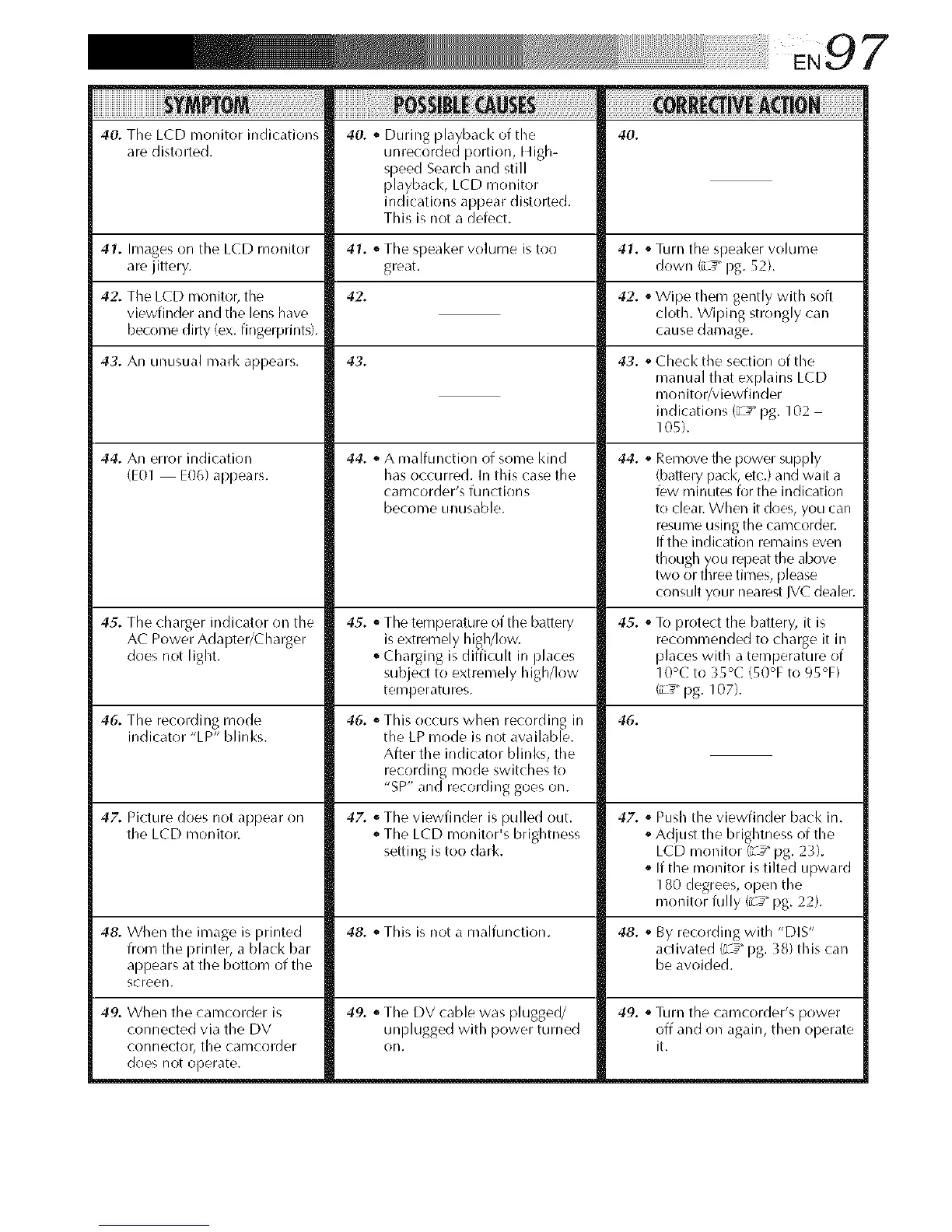
40. The LCD monitor indications
are distolled.
40. o During playback of tile
unrecorded portion, High-
speed Search and still
playbacl<, LCD monitor
indications appear distorted.
This is not a defect.
40.
41. Images on tile LCD monitor 41. ,, TILe speal<er volume is too 41. "Turn tile speal<er volume
are jittery, great, down (iL_" pg. 52).
42.
42. TILe LCD monitor, tile
viewfinder and tile lens have
become dirty (ex. fingerprints).
43. An unusual rnark appears.
44. An error indication
(E0I E06) appears.
45. TILe charger indicator on tile
AC Power Adapter/Charger
does not light.
46. TILe recording mode
indicator "LP" blinks.
43.
47. Picture does not appear on
tile LCD monitor.
44. ,, A malfunction of some kind
has occurred. In this case tile
camcorder's functions
become unusable.
45. '_TILe temperature of tile batiery
is extremely higMow.
o Charging is difficult in places
subject to extremely high/low
temperatures.
46. "This occurs when recording in
tile LP mode is not available.
After tile indicator blinks, tile
recording mode switches to
"SP" and recording goes oil.
47. o TILe viewfinder is pulled out.
o TILe LCD monitor's brightness
setting is too dark.
42. oWipe them gently with soft
cloth. Wiping strongly call
cause damage.
49. When tile carncorder is
connected via tile DV
connector, tile earncorder
does not operate.
43. ,,Checl< tile section of tile
manual that explains LCD
monitor/viewfinder
indications (L _" pg. 102
105).
44. ,, Remove tile power supply
{battery pack, etc.) and wait a
few minutes for tile indication
to clear. When it does, you carl
resume using tile camcorder.
If the indication remains even
though you repeat tile above
two or three times, please
consult your nearest IVC dealer.
45. ,,To protect tile battery, it is
recornmended to charge it in
places with a temperature of
10°C to 35°C (50°F to 95°F)
(iL_" pg. 107).
46.
47. o Push tile viewfinder back in.
oAdjuq tile brightness of tile
LCD monitor (z_ _pg. 23).
o If tile monitor is tilted upward
180 degrees, open tile
monitor fully (iL_" pg. 22).
48. When tile image is printed 48. '_This is not a malfunction. 48. '_By recording with "DIS"
from tile printer, a black bar activated (iL_" pg. 38) this can
appears at tile bottom of tile be avoided.
screen.
49. o TILe DV cable was plugged/ 49. oTurn tile camcorder's power
unplugged with power turned off and on again, then operate
on. it.


 To Next Page
 Loading...









