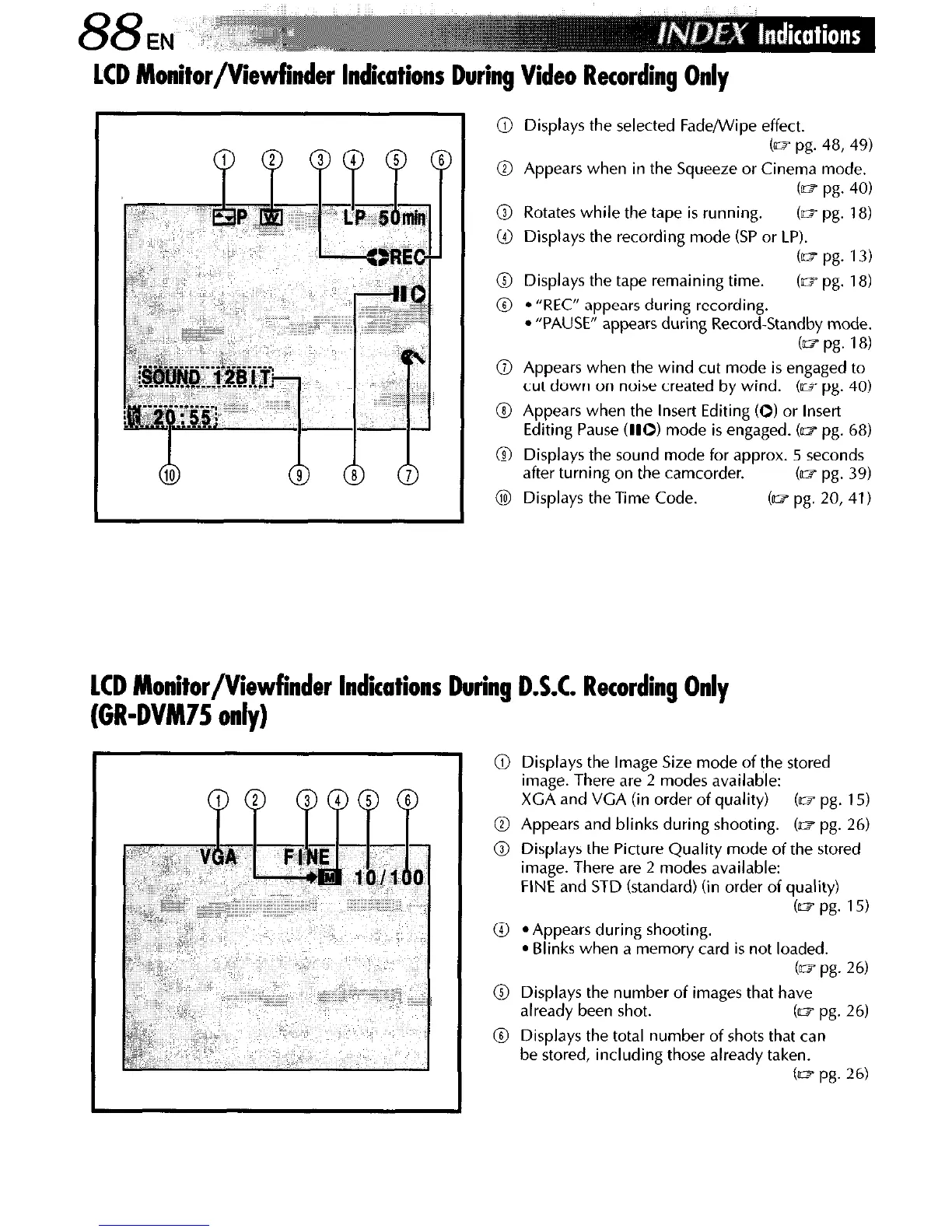
LCD Monitor/Viewfinder Indications
Dkg Video Recording Only
@ Displays the selected Fade/Wipe effect.
b- pg. 48,49)
@ Appears when in the Squeeze or Cinema mode.
cm pg. 40)
@ Rotates while the tape is running.
(m pg. 18)
@ Displays the recording mode (SP or LP).
(as pg. 13)
@ Displays the tape remaining time.
(m pg. 18)
@
l
“REC” appears during recording.
l
“PAUSE” appears during Record-Standby mode.
(~a pg. 18)
@ Appears when the wind cut mode is engaged to
cut down on noise created by wind. (e pg. 40)
8 Appears when the Insert Editing (0) or Insert
Editing Pause 010) mode is engaged. (II? pg. 68)
8 Displays the sound mode for approx. 5 seconds
after turning on the camcorder.
b- pg. 39)
@I Displays the Time Code.
b pg. 20, 41)
LCD Monitor/Viewfinder Indications During D.S.C. Recording Only
(GR-DVM75 only)
@ Displays the Image Size mode of the stored
image. There are 2 modes available:
XGA and VGA (in order of quality)
(03 pg. 15)
@ Appears and blinks during shooting. (n? pg. 26)
0 Displays the Picture Quality mode of the stored
image. There are 2 modes available:
FINE and STD (standard) (in order of quality)
(IL7 pg. 15)
0 *Appears during shooting.
l
Blinks when a memory card is not loaded.
b pg. 26)
0 Displays the number of images that have
already been shot.
Cm pg. 26)
0 Displays the total number of shots that can
be stored, including those already taken.
b pg. 26)



 To Next Page