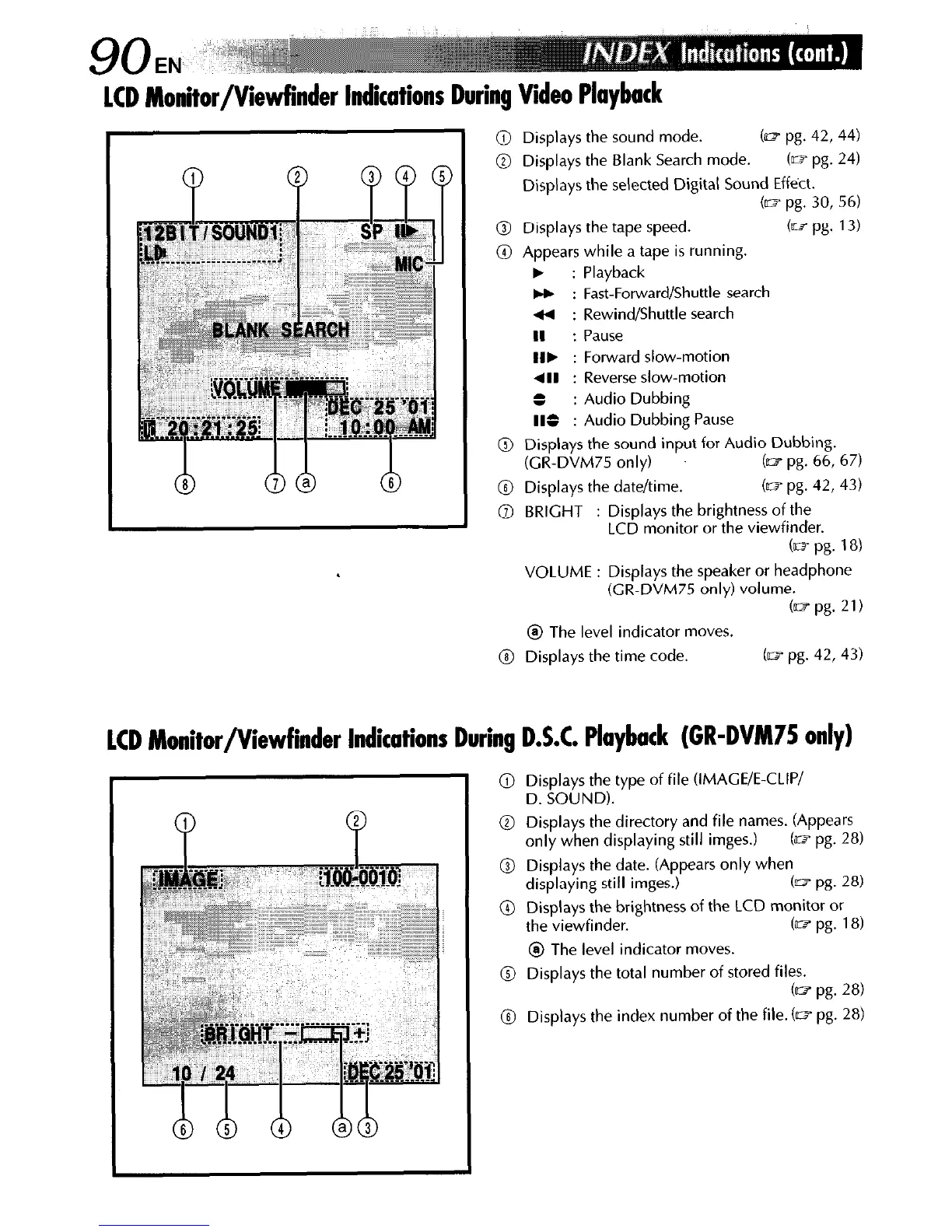
LCD Monitor/Viewfinder Indications During Video Playback
@ Displays the directory and file names. (Appears
only when displaying still imges.)
Cm pg. 28)
@ Displays the date. (Appears only when
displaying still imges.) b pg. 28)
@ Displays the brightness of the LCD monitor or
the viewfinder.
(lw pg. 18)
@ The level indicator moves.
@ Displays the total number of stored files.
(a? pg. 28)
@ Displays the index number of the file. (m pg. 28)
@ Displays the sound mode. b pg. 42, 44)
@ Displays the Blank Search mode. (e pg. 24)
Displays the selected Digital Sound Effect.
(= pg. 30, 56)
@ Displays the tape speed. b pg. 13)
@ Appears while a tape is running.
b : Playback
* : Fast-Forward/Shuttle search
44 : Rewind/Shuttle search
II : Pause
IIF : Forward slow-motion
411 : Reverse slow-motion
S
: Audio Dubbing
IIS
: Audio Dubbing Pause
@ Displays the sound input for Audio Dubbing.
(GR-DVM75 only)
b pg. 66, 67)
@ Displays the date/time.
(ID pg. 42,43)
@ BRIGHT : Displays the brightness of the
LCD monitor or the viewfinder.
Cm pg. 18)
VOLUME : Displays the speaker or headphone
(GR-DVM75 only) volume.
(II? pg. 21)
@ The level indicator moves.
@ Displays the time code.
(~1 pg. 42,43)
LCD Monitor/Viewfinder Indications During D.S.C. Playback (GR-DVM75 only)
@ Displays the type of file (IMAGE/E-CLIP/
D. SOUND).



 To Next Page