12
MENU SETTINGS
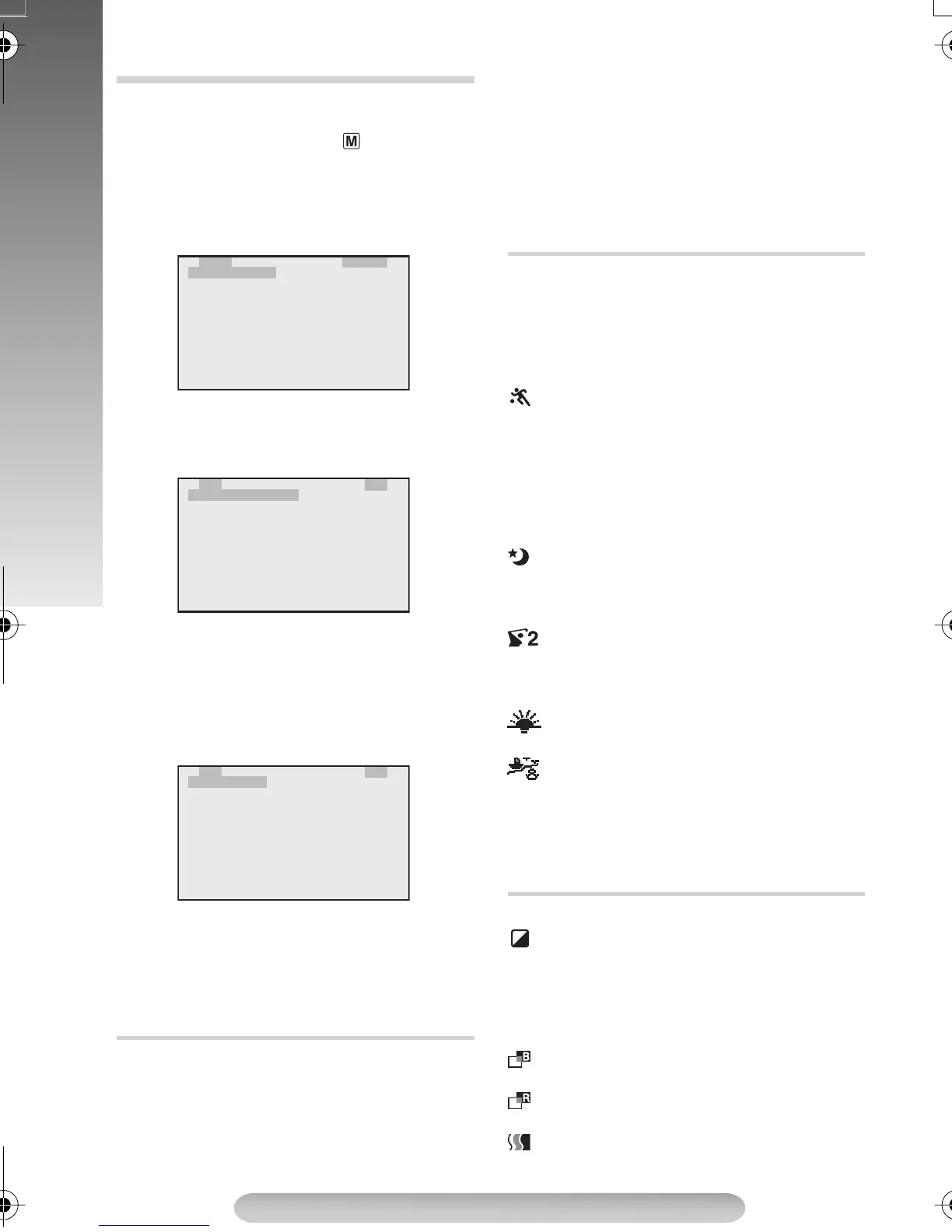
The Menu Screen cannot be accessed while
recording.
1) Set the Power Switch
#
to “ ” while pressing
down the Lock Button
"
.
2) Press the MENU Wheel
1
in. The TOP MENU
Screen appears. Rotate the MENU Wheel
1
to select the desired menu or function and
press it.
• To go from TOP MENU to CAMERA MENU,
rotate the MENU Wheel
1
to select “3 TO
CAMERA MENU” and press it.
• To go from TOP MENU to SYSTEM MENU,
rotate the MENU Wheel
1
to select “3 TO
SYSTEM MENU” and press it. SYSTEM
MENU has 2 pages. To go to the next page,
rotate the MENU Wheel
1
to select “3 TO
SYSTEM MENU 2” and press it.
3) Rotate the MENU Wheel
1
to select the
desired setting and press it.
4) Press "3 EXIT" to exit from any menu.
TOP MENU
Manual exposure adjustment is recommended in
the following situations:
• When shooting using reverse lighting or when
the background is too bright.
• When shooting on a reflective natural
background such as at the beach or in the
snow.
• When the background is overly dark or the
subject light.
1) Rotate the MENU Wheel
1
to select
“MANUAL”, then press it.
2) To brighten the image, rotate the MENU
Wheel
1
downward.
To darken the image, rotate the MENU Wheel
1
upward.
The exposure control level increases/decreases
(maximum ±06).
• In the “High Speed Shutter” or “Sports” modes,
picture colour may be adversely affected if the
subject is lit by alternating discharge-type light
sources such as flourescent or mercury-
vapour lights.
OFF: To cancel the effect.
SPORTS: High shutter speed clearly
captures fast-moving action.
ND EFFECT: A black mist darkens the picture, as
when an ND filter is used. Helps to counter the
effects of glare on the subject.
FOG: Makes the picture look misty white, as
when an external fog filter is attached to the lens.
Softens the image and gives it a “fantasy” look.
TWILIGHT: Dusk, twilight scenery, fireworks,
etc., look more natural and dramatic. In this
mode, the Auto Focus (pg. 9) and S.LX (pg.
13) may not work.
1/2000 (1/2000 sec. High Speed Shutter):
Captures faster action than Sports mode. The
screen becomes slightly dark. Use in well-lit
environment.
SUNSET: Makes scenes look like a sunset
with reddish tint.
SURF&SNOW: Compensates for subjects
that may otherwise appear too dark when
shooting in extremely bright surroundings such as
in the snow or beach. In this mode, the fast-
moving images can be recorded since the shutter
speed becomes fast.
OFF: To cancel the effect.
SEPIA: Recorded scenes have a brownish
tint like old photos. Combine this with WIDE in
CAMERA MENU for a classic look.
B/W:MONO: Like black and white films, your
footage is shot in B/W. Combine this with WIDE in
CAMERA MENU for a classic look.
B. FILTER: Recorded scenes have a bluish
tint.
R. FILTER: Recorded scenes have a reddish
tint.
SOLARI: The picture is recorded with an
effect similar to a painting.
MENU SETTINGS
EXPOSURE
E
P
D
F
R
2
2
2
X
.
I
A
E
T
T
E
P
A
G
D
C
O
O
X
O
E
I
E
I
S
F
/
M
C
S
T
T
U
E
W
O
A
Y
O
R
C
I
D
M
S
P
E
T
P
E
E
T
E
R
E
M
A
M
E
A
O
O
O
S
N
U
F
F
F
P
M
M
U
T
F
F
F
E
E
O
N
N
U
U
S
S
D
W
T
2
2
2
2
T
.
.
I
E
M
T
T
E
A
L
Z
D
L
.
I
I
X
B
X
O
E
E
W
T
T
I
C
I
O
.
L
L
T
A
L
M
M
B
E
E
M
I
A
.
E
Z
C
S
R
E
R
E
A
R
O
TU
M
O
N
5
O
O
P
E
F
O
0
F
F
N
F
R
x
F
F
AUT
U
M
O
A
L
D
O
2
2
2
I
S
D
T
E
S
D
A
O
X
P
T
I
S
L
O
E
S
T
Y
A
A
U
/
Y
S
Y
T
T
S
T
P
I
T
E
U
M
E
M
T
E
2 DATE/T I ME
M
M
S
M
E
S
O
E
E
N
I
N
T
N
U1
M
DISP.
U
PLE
TPELENGTH
C
LDBRIGTH
T30
2
P.AE (Programme AE with special effects)
DIGIFECT (Digital Effects)
GR-FXM41EN(EK).fm Page 12 Monday, November 8, 2004 10:40 AM


 To Next Page