EN 9
GETTING STARTED
MasterPage: Start_Right
GETTING STARTED
G : Spot Exposure Control Indicator
(墌 pg. 42)
: Backlight Compensation Indicator
(墌 pg. 42)
±: Exposure Adjustment Indicator (墌 pg. 41)
H Iris Lock Indicator (墌 pg. 42)
I Approximate Zoom Ratio (墌 pg. 19)
J Zoom Indicator (墌 pg. 19)
K Self-Timer Recording Indicator (墌 pg. 40)
L O: (Appears when taking snapshot.)
(墌 pg. 25, 39)
M Brightness Control Indicator (墌 pg. 16)
N Battery Remaining Power Indicator
(墌 pg. 54)
O Date/Time (墌 pg. 15, 36)
P Manual Focus Adjustment Indicator
(墌 pg. 41)
Q Flash Indicator (墌 pg. 39)
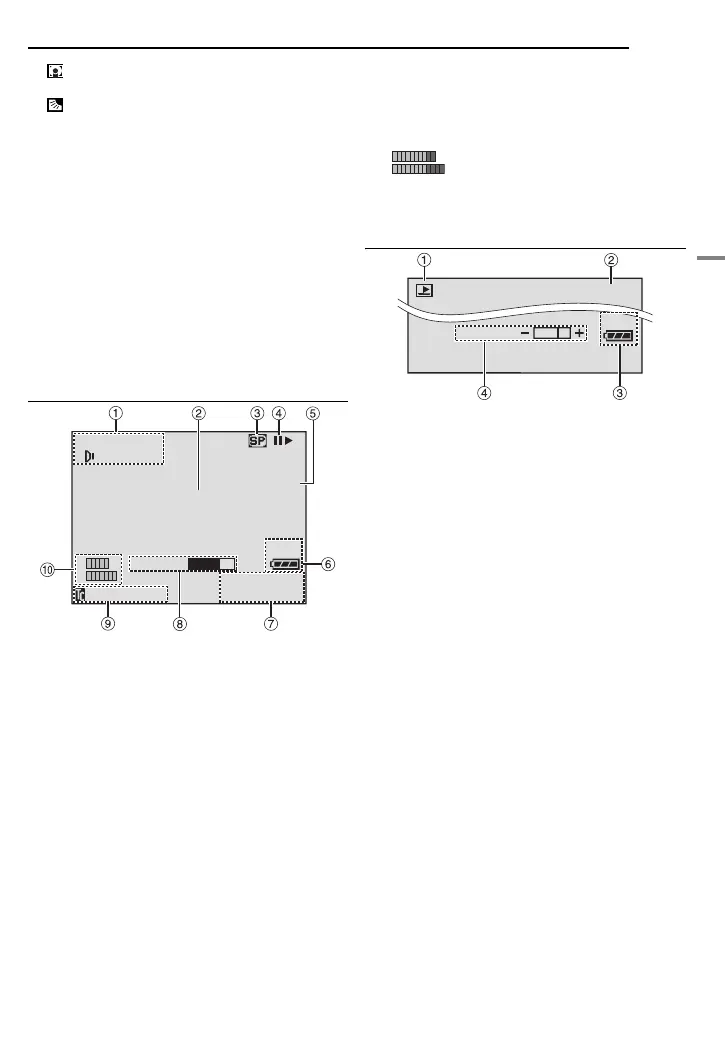
During Video Playback
A Sound Mode Indicator (墌 pg. 37)
B Blank Search Indicator (墌 pg. 21)
C Tape Speed (墌 pg. 34)
D 4: Playback
5
: Fast-Forward/Shuttle Search
3
: Rewind/Shuttle Search
9: Pause
9 U: Forward Frame-By-Frame Playback/
Slow-Motion
Y 9: Reverse Frame-By-Frame Playback/
Slow-Motion
D: Audio Dubbing
9D: Audio Dubbing Pause
(Appear while a tape is running.)
E Sound Input for Audio Dubbing (墌 pg. 50)
F Battery Remaining Power Indicator
(墌 pg. 54)
G Date/Time (墌 pg. 38)
H VOLUME: Volume Level Indicator (speaker or
headphone) (墌 pg. 20)
BRIGHT: Brightness Control Indicator
(墌 pg. 16)
I Time Code (墌 pg. 19, 36)
J : Auxiliary Microphone Level
Indicator
(Appears when an optional microphone is
connected during audio dubbing. 墌 pg. 50)
During D.S.C. Playback
A Operation Mode Indicator (墌 pg. 27)
B Folder/File Number (墌 pg. 27)
C Battery Remaining Power Indicator
(墌 pg. 54)
D Brightness Control Indicator (墌 pg. 16)
L
R
BLANK SEARCH
PUSH "STOP" BUTTON
TO CANCEL
NOV 10 '05
10:00
AM
12BIT/MIX
20:21:25
VOLUME
L
50m
MIC
L
R
100-0013
50m
BRIGHT
GR-X5US.book Page 9 Thursday, April 7, 2005 8:13 AM


 To Next Page