EasyManua.ls Logo

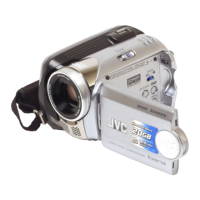
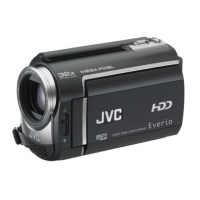
JVC GZ-MG364E - User Manual

JVC GZ-MG364E
40 pages
Print Icon
To Next Page IconTo Next Page
Loading...
GZ-MG364
GZ-MG344
GZ-MG334
E/EK
E/EK
E/EK
ENGLISH
EN
HARD DISK CAMCORDER
INSTRUCTIONS
Dear Customer
Thank you for purchasing this hard
disk camera. Before use, please read
the safety information and precautions
contained in pages 4 and 5 to ensure
safe use of this product.

Other manuals for JVC GZ-MG364E

Questions and Answers

  • T
    taylorandersonSep 17, 2025
    How to fix digital zoom on JVC GZ-MG364E?
    • J
      Jonathan BernardSep 18, 2025
      If the digital zoom isn't working on your JVC Camcorder, change the settings in [ZOOM]. Note that digital zoom is not available in still image recording mode.
  • Z
    Zachary LopezAug 25, 2025
    What to do if JVC Camcorder has no power?
    • S
      Sheila CollinsAug 25, 2025
      If your JVC Camcorder has no power, ensure the AC adapter is securely connected. Try detaching and reattaching the battery pack firmly. If that doesn't work, replace the battery with a fully charged one.
  • G
    Gary AustinAug 26, 2025
    What to do if my JVC Camcorder has no power?
    • Z
      zmaldonadoAug 26, 2025
      If your JVC Camcorder isn't getting power, ensure the AC adapter is securely connected. Try detaching and reattaching the battery pack firmly. If that doesn't work, replace the battery with a fully charged one.
  • C
    Christine CarlsonAug 27, 2025
    Why JVC Camcorder power does not turn on, or the battery operation time is extremely short?
    • K
      Kimberly ButlerAug 27, 2025
      If your JVC Camcorder doesn't turn on, or the battery life is very short even after a full charge, make sure you're using the camera within appropriate operating temperatures. It's also possible that the battery is worn out and needs to be replaced with a new one.
  • K
    Katherine JohnstonSep 18, 2025
    What to do if the [CREATE DVD] screen is displayed in the LCD monitor, and no other operations can be performed on JVC GZ-MG364E?
    • B
      beth42Sep 18, 2025
      If the [CREATE DVD] screen is displayed on your JVC Camcorder's LCD monitor and no other operations can be performed, it means another operation is being attempted while a turned-on DVD burner is connected. Turn off the camera connected to the DVD burner, or disconnect the USB cable.
  • B
    Brooke UnderwoodSep 23, 2025
    Why the data process is too slow after the power is switched on or the mode is changed on JVC GZ-MG364E Camcorder?
    • J
      Julie CoffeySep 23, 2025
      The data processing might be slow on your JVC Camcorder after powering on or changing modes if there are a large number of still images (approximately 1,000 or more) stored on the recording medium. Copy the stored files to other devices, and then delete them from the recording medium.
  • M
    Michelle WallaceSep 9, 2025
    Why does JVC GZ-MG364E Camcorder remaining battery power differ from actual time?
    • R
      Rebecca WilliamsonSep 9, 2025
      If the displayed amount of remaining battery power differs from the actual operating time on your JVC Camcorder, fully charge the battery and then run it down. If the problem persists, the battery is likely worn out and needs to be replaced. Please purchase a new one.
  • S
    sarahmcdonaldSep 10, 2025
    Why during recording date/time does not appear on JVC GZ-MG364E?
    • J
      Jerry SimpsonSep 10, 2025
      To display the date/time during recording on your JVC Camcorder, touch the DISP button once.
  • S
    Sabrina HallSep 3, 2025
    What to do if JVC GZ-MG364E Camcorder touch sensor does not function?
    • C
      Christina HansenSep 3, 2025
      If the touch sensor on your JVC Camcorder does not function, make sure to touch the sensors with your finger. The sensors won't work if you touch them with your fingernail or while wearing gloves.
  • C
    Christopher HuynhSep 1, 2025
    What to do if JVC GZ-MG364E image color looks strange?
    • P
      Patrick BaileySep 1, 2025
      If the color of the image looks strange on your JVC Camcorder: * Wait for the color to become natural as the camera automatically adjusts the white balance, though this may take some time. * Try manual white balance adjustment. * Avoid using [PROGRAM AE] set to [NIGHT] or a slow speed in bright places. * If the recorded image is too dark, try backlight compensation or adjust the brightness. If the recorded image is too bright, try adjusting the brightness.

JVC GZ-MG364E Specifications

General IconGeneral
BrandJVC
ModelGZ-MG364E
CategoryCamcorder
LanguageEnglish

Related product manuals