EasyManua.ls Logo

JVC GZ-MG365H - User Manual

JVC GZ-MG365H
80 pages
Print Icon
To Next Page IconTo Next Page
Loading...
HARD DISK CAMCORDER
VIDEOCÁMARA CON DISCO DURO
Dear Customer
Thank you for purchasing this hard
disk camera. Before use, please read
the safety information and precautions
contained in pages 2 and 3 to ensure
safe use of this product.
For Future Reference:
Enter the Model No. (located on the
bottom of the camera) and Serial No.
(located on the battery pack mount of
the camera) below.
Model No.
Serial No.
INSTRUCTIONS
MANUAL DE INSTRUCCIONES
GZ-MG365
GZ-MG335
GZ-MG330
U
U
U
Apreciado cliente
Muchas gracias por haber adquirido
esta cámara con disco duro integrado.
Antes de usarla, lea la información de
seguridad y las precauciones contenidas
en las páginas 2 y 3 para garantizar un
uso seguro de este producto.
Para futuras consultas:
Escriba a continuación el número
de modelo (situado en la base de la
cámara) y el número de serie (situado
en el compartimiento de la batería de
la cámara).
Número de modelo
Número de serie
ENGLISH ESPAÑOL
SPEN

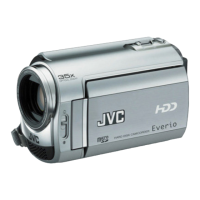
Table of Contents

Questions and Answers

  • K
    Katherine GonzalezSep 18, 2025
    Why is JVC Camcorder data process too slow?
    • C
      cordovajohnSep 18, 2025
      If the data process is too slow on your JVC Camcorder after turning it on or changing the mode, it may be due to a large number of still images (approximately 1,000 or more) stored on the recording medium. Try copying these files to other devices and then deleting them from the recording medium.
  • J
    johnsonmariaAug 25, 2025
    How to fix JVC Camcorder when no power is supplied?
    • L
      Logan WestAug 25, 2025
      To resolve the issue of no power being supplied to your JVC Camcorder: * Ensure the AC adapter is securely connected. * Detach and reattach the battery pack firmly. * Replace the battery with a fully charged one.
  • B
    Brian ThomasAug 26, 2025
    Why no display appears on my JVC GZ-MG365H?
    • D
      Debra PhillipsAug 26, 2025
      If no display appears on your JVC Camcorder, it might have turned off automatically to save power. If using the battery, close and reopen the LCD monitor. If using the AC adapter, try zooming. You might also need to adjust the brightness of the LCD monitor.
  • G
    Garrett WhiteAug 26, 2025
    Why my JVC GZ-MG365H Camcorder power does not turn on or the battery life is short?
    • E
      Eric TerrellAug 27, 2025
      If your JVC Camcorder doesn't turn on or the battery life is short, ensure you're using the camera within appropriate operating temperatures. The battery might also be worn out and need replacing.
  • S
    Sheila HardinSep 18, 2025
    How to display date and time during recording on JVC GZ-MG365H Camcorder?
    • S
      Susan LewisSep 18, 2025
      If the date/time does not appear during recording on your JVC Camcorder, touch the DISP button once.
  • V
    Valerie RodriguezSep 23, 2025
    Why the touch sensor does not function on JVC Camcorder?
    • K
      Karen ArellanoSep 23, 2025
      If the touch sensor or sensor button does not function on your JVC Camcorder, make sure to touch the sensors with your finger. The sensors will not work if you touch them with your fingernail or while wearing gloves.
  • T
    tmillerSep 9, 2025
    How to fix JVC Camcorder if the focus is not adjusted automatically?
    • M
      Michael EspinozaSep 9, 2025
      If the focus on your JVC Camcorder isn't adjusting automatically, ensure that [FOCUS] is set to [AUTO]. Also, try cleaning the lens and checking the focus again.
  • A
    Amy WoodSep 10, 2025
    How to change aspect ratio on JVC Camcorder for TV?
    • M
      Mary MurphySep 10, 2025
      If the aspect ratio looks strange when watching images from your JVC Camcorder on TV, change the settings in [SELECT TV TYPE] to match the image's aspect ratio with your TV screen size.
  • W
    walkerloriSep 3, 2025
    Why is JVC Camcorder data processing so slow?
    • S
      Sean MoranSep 3, 2025
      If your JVC Camcorder is processing data slowly after being switched on or when the mode is changed, and you have a large number of still images (approximately 1,000 or more) stored on the recording medium, copy the stored files to other devices and then delete them from the recording medium.
  • M
    Mark WellsSep 1, 2025
    What does it mean when 7REC indicator flashes on JVC GZ-MG365H Camcorder?
    • D
      Donald ConleySep 1, 2025
      If the 7REC indicator flashes during video recording on your JVC Camcorder, it means the temperature of the camera is increasing. If the camera continues to heat up, recording may stop to protect the recording medium. Turn off the power and wait until the camera cools down.

JVC GZ-MG365H Specifications

General IconGeneral
Recording MediaHard disk drive
Video FormatMPEG-2
Optical Zoom35x
Digital Zoom800x
Focus AdjustmentAutomatic, manual
Image StabilizerElectronic
Display TypeLCD
Microphone Operation ModeStereo
LCD Screen Size2.7 inches
Camcorder Media TypeHard disk drive
Optical Sensor Resolution0.8 MP
Shooting ProgramsSpotlight, sports mode, snow
White BalanceAuto, Manual
White Balance PresetsIncandescent, fluorescent
Connector TypeUSB
Battery TypeLithium ion
Storage MediaHard drive

Related product manuals