April 9, 2002 2:16 pm Page 6
— 6 —
Master Page: Right
A
Check contents
Make sure the package contains all of the accessories listed in
“Specifications” (
墌
12).
B
Situate player
Place the player on a stable, horizontal surface.
C
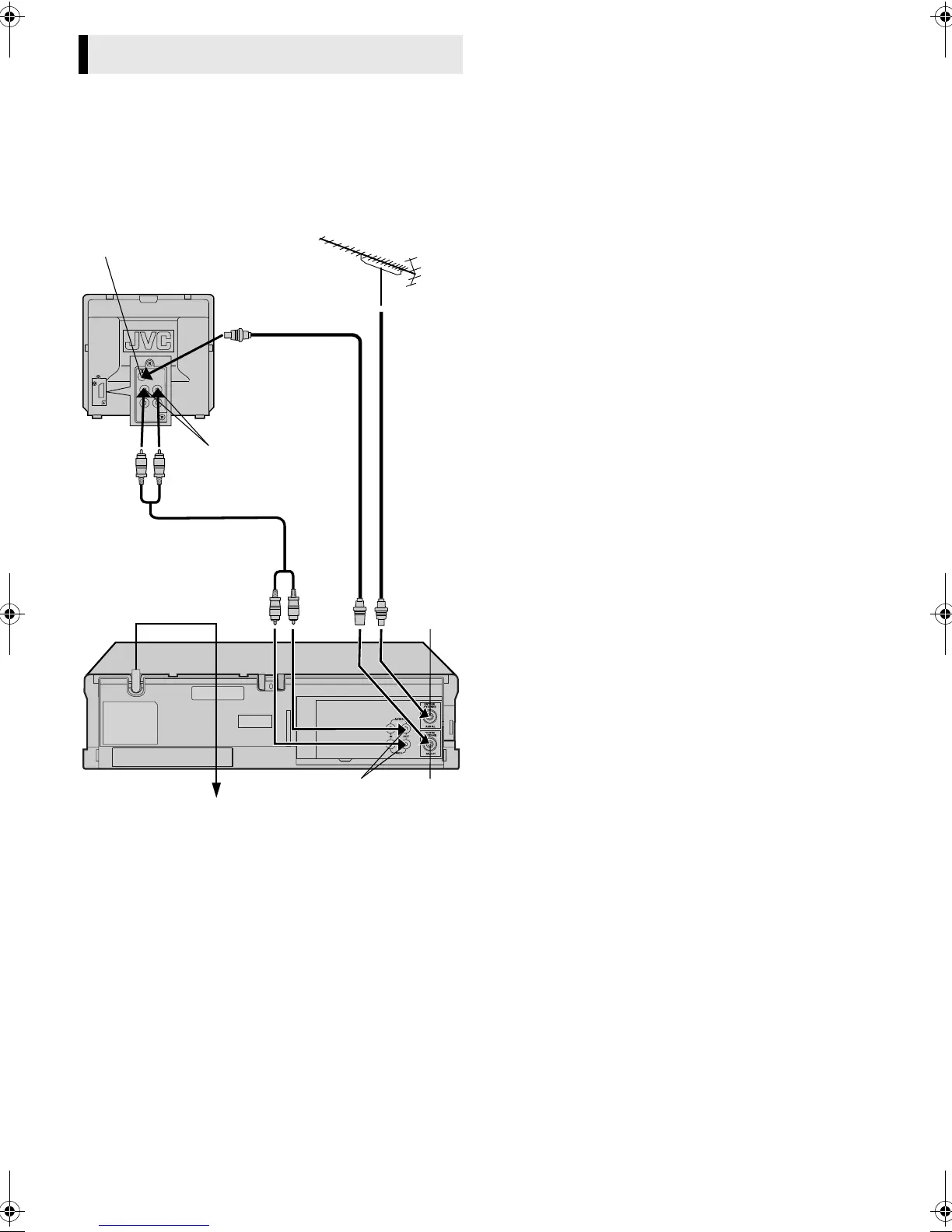
Connect player to TV
RF Connection
A
Disconnect the TV aerial cable from the TV.
B
Connect the TV aerial cable to the AERIAL connector on the
rear of the player.
C
Connect the provided RF cable between the RF. OUT
connector on the rear of the player and the TV’s aerial connector.
● Before using the player, refer to “Video Channel Set” (
墌
7).
AV Connection
If your TV is equipped with audio/video input connectors, perform
AV connection to improve picture quality during tape playback.
A
Connect an optional audio/video cable between AUDIO/
VIDEO OUT connectors on the rear of the player and the TV’s
audio/video input connectors.
Basic Connections
Aerial connector
Back of TV
TV aerial
cable
RF cable
(provided)
Audio/video cable
(not provided)
Mains power cord
Mains outlet
Back of player
AUDIO/VIDEO
OUT
RF. OUT
AERIAL
Audio/video input
connectors
HR-p55_56A-001EN.fm Page 6 Tuesday, April 9, 2002 2:16 PM



 To Next Page
 Loading...