EasyManua.ls Logo

JVC KD-A725 - Bluetooth Device Configuration; Managing Connections and Pairing; Phonebook and PIN Management

JVC KD-A725
46 pages
Print Icon
To Next Page IconTo Next Page
To Previous Page IconTo Previous Page
Loading...
•
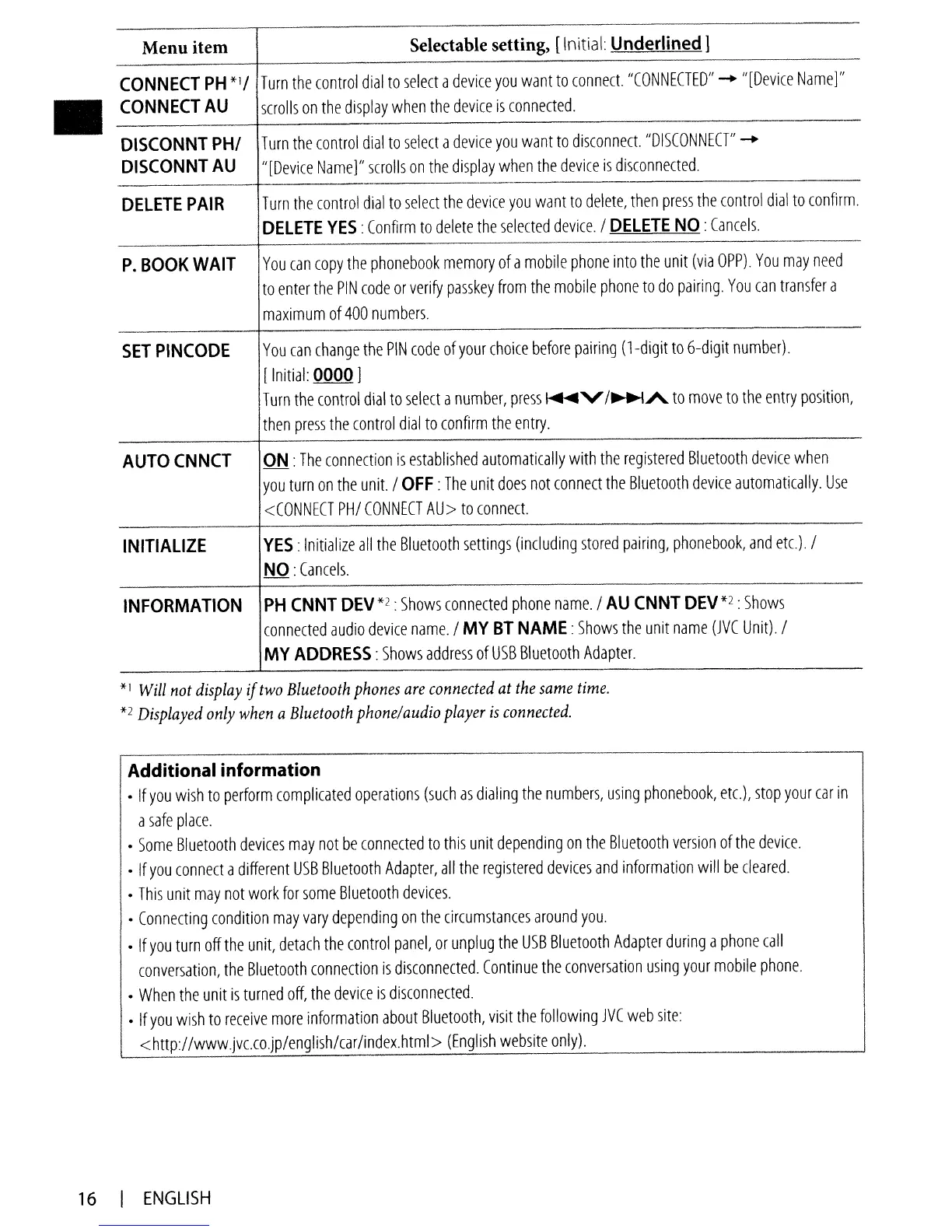
Menu item
Selectable setting,
[Initial:
Underlined]
CONNECT
PH*II
Turn
the
control
dial
to
select
a
device
you
want
to
connect.
"CONNECTED"
-
"[Device
Name]"
CONNECT
AU
scrolls
on
the
display
when
the
device
is
connected.
-
DISCONNT
PHI
Turn
the
control
dial
to
select
a
device
you
want
to
disconnect.
"DISCONNECT"
-
DISCONNTAU
"[Device
Name]"
scrolls
on
the
display
when
the
device
is
disconnected.
DELETE
PAIR
T
urn
the
control
dial
to
select
the
device
you
want
to
delete,
then
press
the
control
dial
to
confirm.
DELETE
YES:
Confirm
to
delete
the
selected
device.
/
DELETE
NO:
Cancels.
P.BOOKWAIT
You
can
copy
the
phonebook
memory
of
a
mobile
phone
into
the
unit
(via
OPP).
You
may
need
to
enter
the
PIN
code
or
verify
passkey
from
the
mobile
phone
to
do
pairing.
You
can
transfer
a
maximum
of
400
numbers.
SETPINCODE
You
can
change
the
PIN
code
of
your
choice
before
pairing
(l-digit
to
6-digit
number).
[
Initial:
0000 ]
T
urn
the
control
dial
to
select
a
number,
press
~v
/~A
to
move
to
the
entry
position,
then
press
the
control
dial
to
confirm
the
entry.
AUTOCNNCT
ON
:
The
connection
is
established
automatically
with
the
registered
81
uetooth
device
when
you
turn
on
the
unit.
I
OFF:
The
unit
does
not
connect
the
81uetooth
device
automatically.
Use
<CONNECT
PHI
CONNECT
AU>
to
connect.
INITIALIZE
YES:
Initialize
all
the
Bluetooth
settings
(including
stored
pairing,
phonebook,
and
etc).
I
NO
:
Cancels.
INFORMATION
PH
CNNT
DEV
*2 :
Shows
connected
phone
name.
I
AU
CNNT
DEV
*2 :
Shows
connected
audio
device
name./
MY
BT
NAME:
Shows
the
unit
name
(JVC
Unit).
I
MY
ADDRESS:
Shows
address
of
USB
Bluetooth
Adapter.
*I
Will
not
display
if
two
Bluetooth
phones
are
connected
at
the
same
time.
*2
Displayed
only
when
a
Bluetooth
phone/audio
player
is
connected.
Additional information
•
If
you
wish
to
perform
complicated
operations
(such
as
dialing
the
numbers,
using
phonebook,
etc.),
stop
your
car
in
a
safe
place.
•
Some
81uetooth
devices
may
not
be
connected
to
this
unit
depending
on
the
Bluetooth
version
of
the
device.
•
If
you
connect
a
different
USB
Bluetooth
Adapter,
all
the
registered
devices
and
information
will
be
cleared.
•
This
unit
may
not
work
for
some
Bluetooth
devices.
•
Connecting
condition
may
vary
depending
on
the
circumstances
around
you.
•
If
you
turn
off
the
unit,
detach
the
control
panel,
or
unplug
the
USB
Bluetooth
Adapter
during
a
phone
call
conversation,
the
81uetooth
connection
is
disconnected.
Continue
the
conversation
using
your
mobile
phone.
•
When
the
unit
is
turned
off,
the
device
is
disconnected.
•
If
you
wish
to
receive
more
information
about
8luetooth,
visit
the
follOWing
JVC
web
site:
<http://www.jvc.co.jp/english/car/index.html>
(English
website
only).
16
I
ENGLISH

Table of Contents