EasyManua.ls Logo

JVC KD-A725 - Menu Operations and Customization; General Menu Navigation; Clock and Time Zone Settings; Display and Button Illumination Colors

JVC KD-A725
46 pages
Print Icon
To Next Page IconTo Next Page
To Previous Page IconTo Previous Page
Loading...
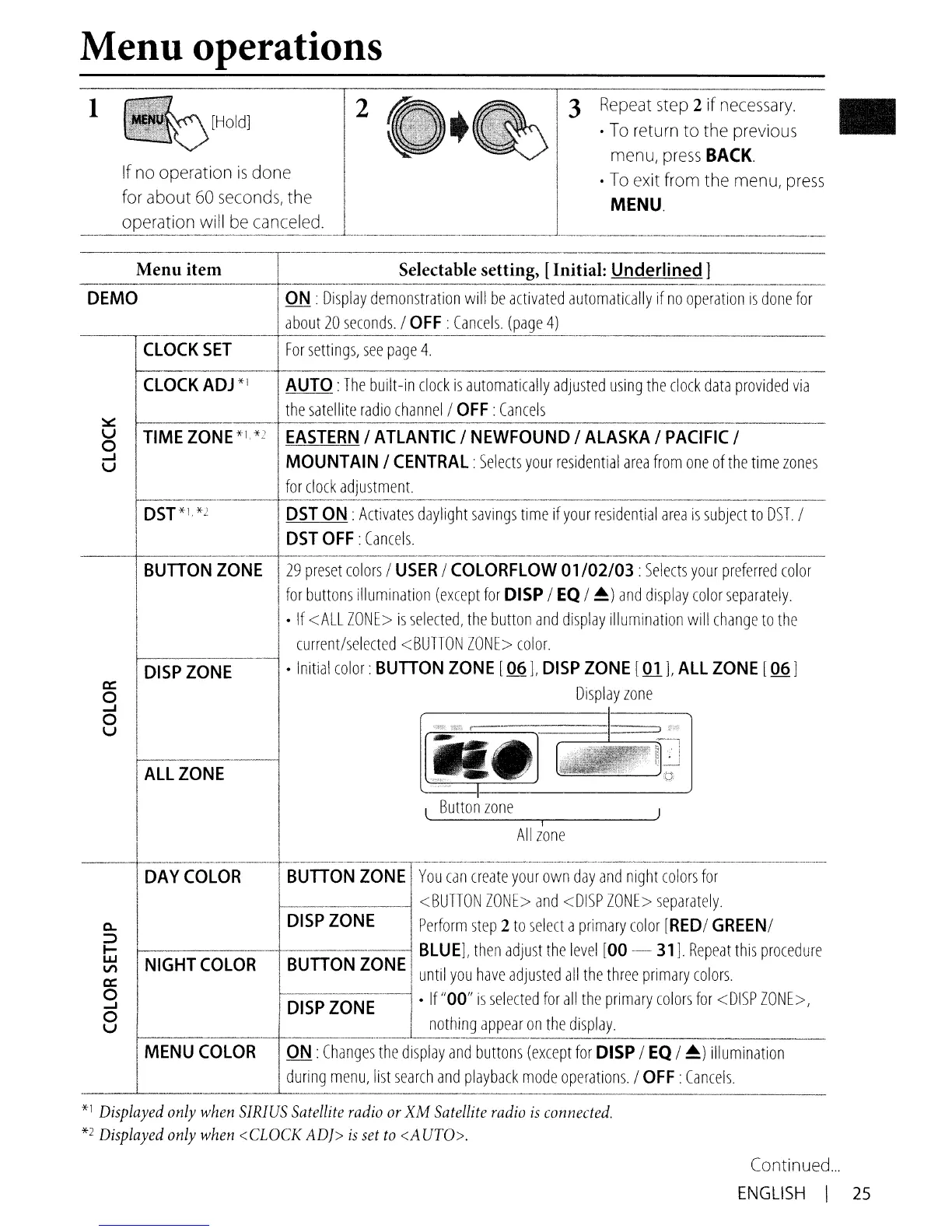
Menu operations
1
[Hold]
If
no
operation
is
done
for about
60
seconds,
the
OPE?ratlOn
will
be
canceled
.
2
3
Repeat
step
2 if
necessary.
To
return to the previous
menu,
press
BACK.
To
exit from the
menu,
press
MENU.
.- ..
--.----.·~·----···--··r·-······-··--·····--·--·----
--
..
-.-.-
----
--.-
..
--.-.-----.--
-----.--.---
Menu item Selectable setting, [Initial: Underlined]
_
...•...
_--
•..
_
..•...
_
..•.•
_
.•
_._
....•._ _
__
..
-.[_
__
•........
_ _.................•.._ _ _
..
_ - _
-._
__
.
__
•....
__
..•.
_..............•....
_._._
..
_._-
_-_
_ _
.................•.......
DEMO
ON
:
Display
demonstration
will
be
activated
automatically
if
no
operation
IS
done
for
about
20
seconds.!
OFF:
Cancels.
(page
4)
-~
··-·1---···--·····-------·-·
.--
...
--.--.--
..
----
....
-.---.--.-.
CLOCK
SET
I
For
settings,
see
page
4.
~-~
~~---------_
..
__
._-----_._----
CLOCK
ADJ
*1 AUTO:
The
built-in
clock
is
automatically
adjusted
using
the
clock
data
proVided
via
the
satellite
radio
channel!
OFF:
Cancels
:::r:::
u
o
...J
U
Continued
...
ENGLISH
I
25

Table of Contents

Related product manuals