EasyManua.ls Logo

JVC KD-A805 - Disc Playback Features; Playback Modes and Track Selection

JVC KD-A805
69 pages
Print Icon
To Next Page IconTo Next Page
To Previous Page IconTo Previous Page
Loading...
•
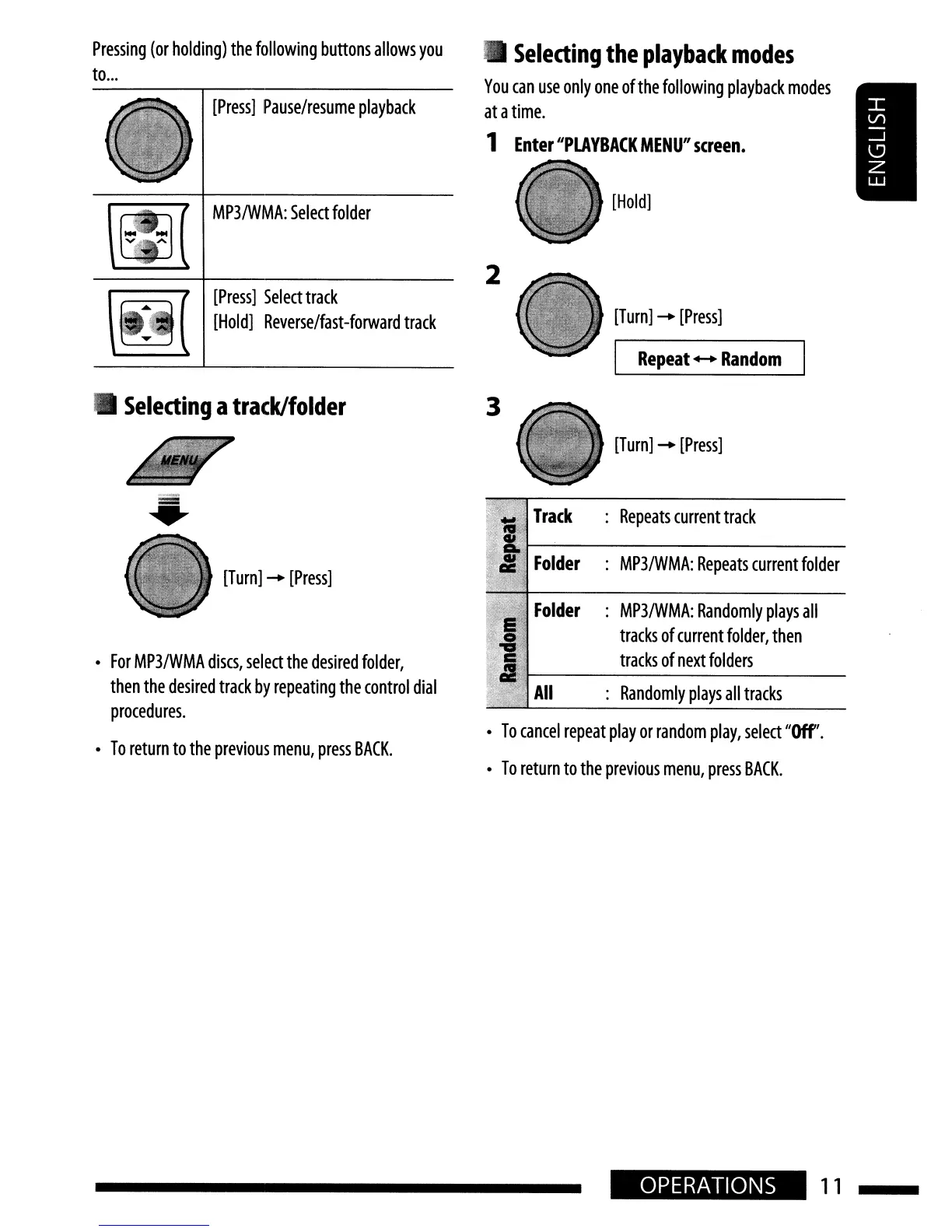
Selecting
the
playback
modes
You
can
use
only
one
of
the
folloWing
playback
modes
at
a
time.
1
Enter
"PLAYBACK
MENU"
screen.
[Turn]
-
[Press]
I
Repeat
+-+
Random
[Hold]
2
[Press]
Pause/resume
playback
MP3/WMA:
Select
folder
~
[Press]
Select
track
\M.i
[Hoi
d]
Reverse/fast
-forward
track
Pressing
(or
holding)
the
following
buttons
allows
you
to
...
•
Selecting
a
track/folder
•
[Turn]
-
[Press]
•
For
MP3/wMA
discs,
select
the
desired
folder,
then
the
desired
track
by
repeating
the
control
dial
procedures.
•
To
return
to
the
previous
menu,
press
BACK.
3
[Turn]
-
[Press]
Track
:
Repeats
current
track
Folder
:
MP3/WMA:
Repeats
current
folder
Folder
:
MP3/WMA:
Randomly
plays
all
tracks
of
current
folder,
then
tracks
of
next
folders
All
:
Randomly
plays
all
tracks
•
To
cancel
repeat
play
or
random
play,
select
"Off'.
•
To
return
to
the
previous
menu,
press
BACK.
OPERATIONS
11
•
Selecting
the
playback
modes
You
can
use
only
one
of
the
folloWing
playback
modes
at
a
time.
1
Enter
"PLAYBACK
MENU"
screen.
[Turn]
-
[Press]
I
Repeat
+-+
Random
[Hold]
2
[Press]
Pause/resume
playback
MP3/WMA:
Select
folder
~
[Press]
Select
track
\M.i
[Hoi
d]
Reverse/fast
-forward
track
Pressing
(or
holding)
the
following
buttons
allows
you
to
...
•
Selecting
a
track/folder
•
[Turn]
-
[Press]
•
For
MP3/wMA
discs,
select
the
desired
folder,
then
the
desired
track
by
repeating
the
control
dial
procedures.
•
To
return
to
the
previous
menu,
press
BACK.
3
[Turn]
-
[Press]
Track
:
Repeats
current
track
Folder
:
MP3/WMA:
Repeats
current
folder
Folder
:
MP3/WMA:
Randomly
plays
all
tracks
of
current
folder,
then
tracks
of
next
folders
All
:
Randomly
plays
all
tracks
•
To
cancel
repeat
play
or
random
play,
select
"Off'.
•
To
return
to
the
previous
menu,
press
BACK.
OPERATIONS
11