32
ENGLISH
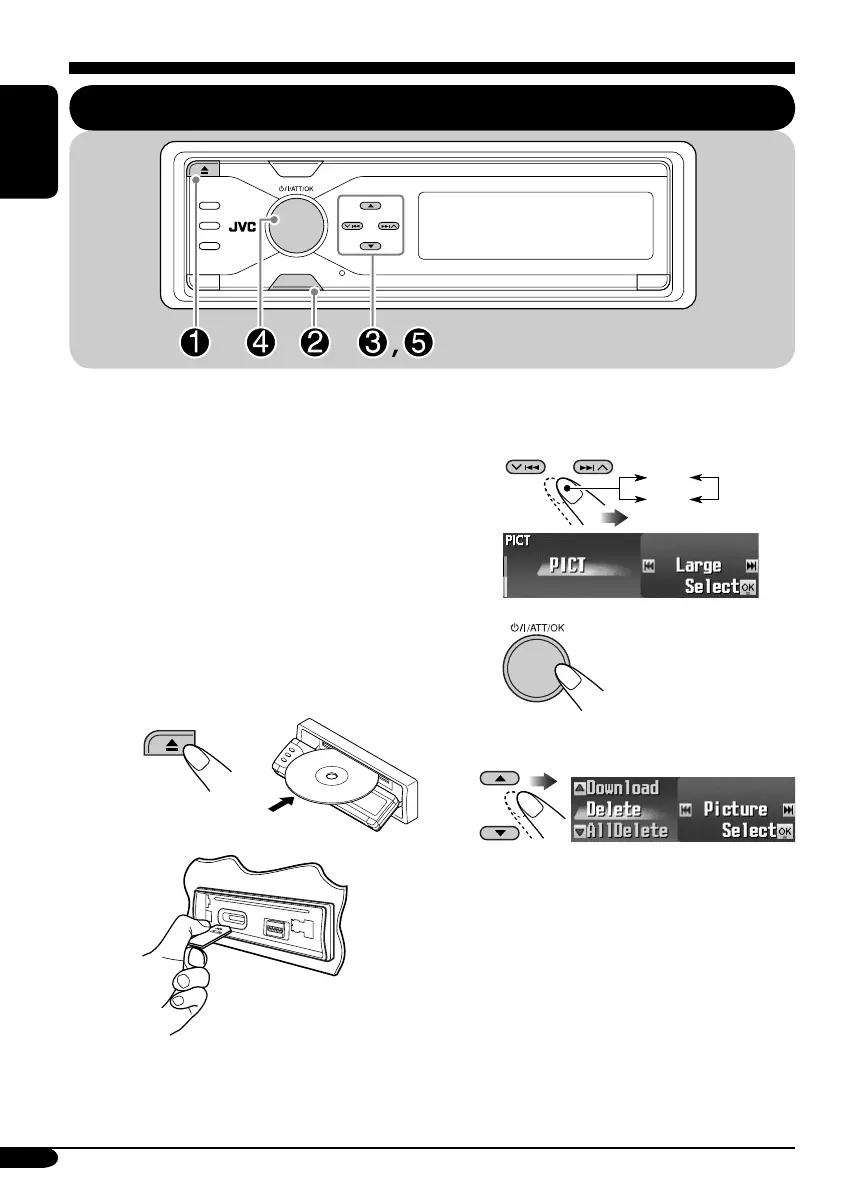
! Select the picture size—“Large”
or “Small.”
⁄
@ Select the item.
Ex.: When “Delete” is selected
• To download the file(s):
\ “Download” (see page 33)
• To delete the file(s):
\ “Delete” (see page 34)
• To delete all files:
\ “AllDelete” (see page 35)
• To activate the file(s):
\ Activating the downloaded files
(see page 36)
Graphic displays
Basic procedure
MENU
Before starting the following procedure,
prepare a CD-R or an SD card including still
images (pictures) and animations (movies).
• With Image Converter (Color Ver. 2.0)
included in the supplied CD-ROM, you can
create your own images and animations.
(Samples are included in the CD-ROM.)
• You can store two sizes of picture and
animation—“Large” and “Small” as the
graphic display (see page 5).
~ Insert a CD-R, an SD card, or the
supplied CD-ROM.
• CD-R/supplied CD-ROM
• SD card
Ÿ Enter the PICT menu (see page 5).
• If you press PICT, you can enter the
PICT menu directly.
Large
Small
EN32-36_KD-AR8500[J]f.indd 32EN32-36_KD-AR8500[J]f.indd 32 05.4.8 2:35:08 PM05.4.8 2:35:08 PM



 To Next Page