46
ENGLISH
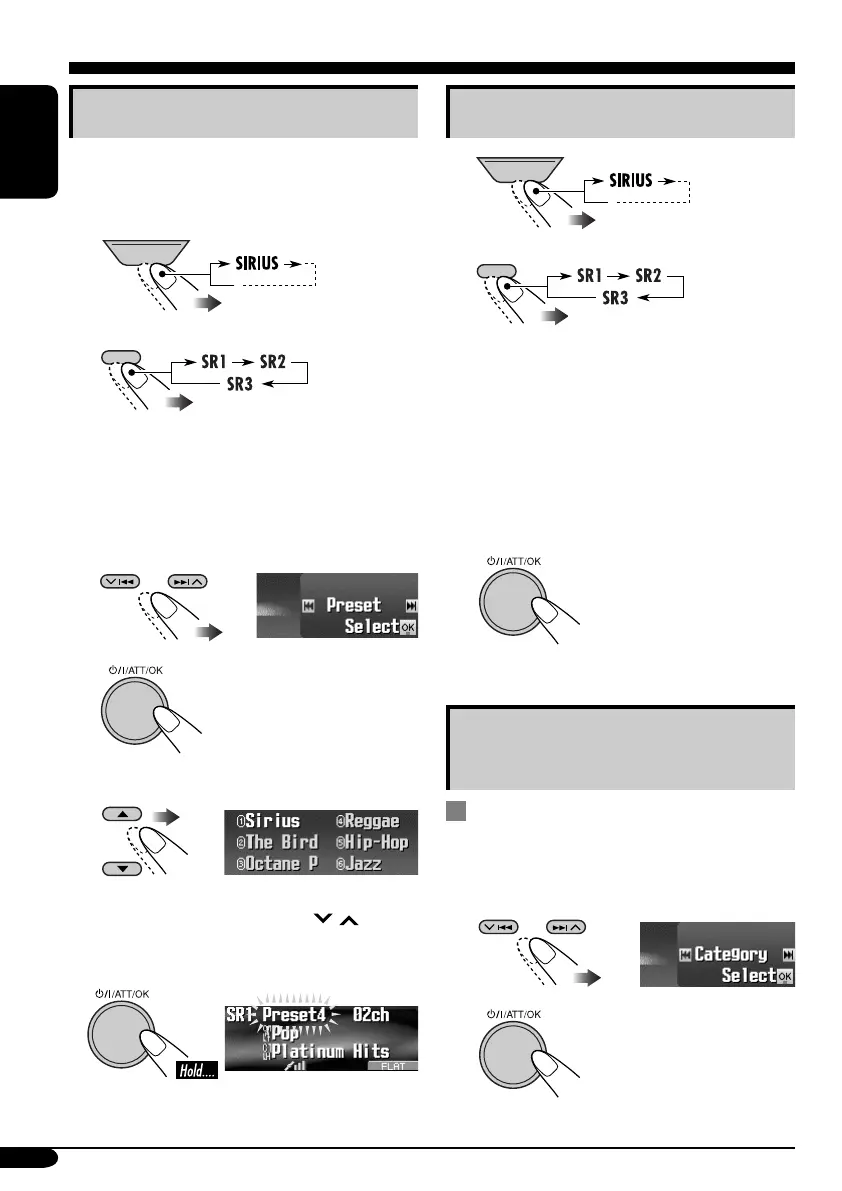
Storing user channels in memory
You can preset six channels for each band.
Ex.: Storing a channel into preset number 4.
1
2
• Holding the button displays the User
Preset Channel List (see step 6 below).
3 Enter the MODE menu (see page
5).
4 Select “Preset.”
5
6 Select a user preset number.
• You can move to the lists of the other SIRIUS
bands by pressing 4/¢ (
/ ).
7 Store the channel.
Listening to a user preset channel
1
2
• Holding this button displays the User
Preset Channel List (see step 6 on the left
column).
3 Perform steps 3 to 6 (on the left
column) to select a user preset
channel.
4 Finish the procedure.
Selecting a category/channel on
the list
Selecting a category from the list
1
Enter the MODE menu (see page
5).
2 Select “Category.”
3
SOURCE
BACK
BAND
SOURCE
BACK
BAND
EN41-48_KD-AR8500[J]f.indd 46EN41-48_KD-AR8500[J]f.indd 46 05.4.8 2:37:55 PM05.4.8 2:37:55 PM



 To Next Page