ENGLISH
6
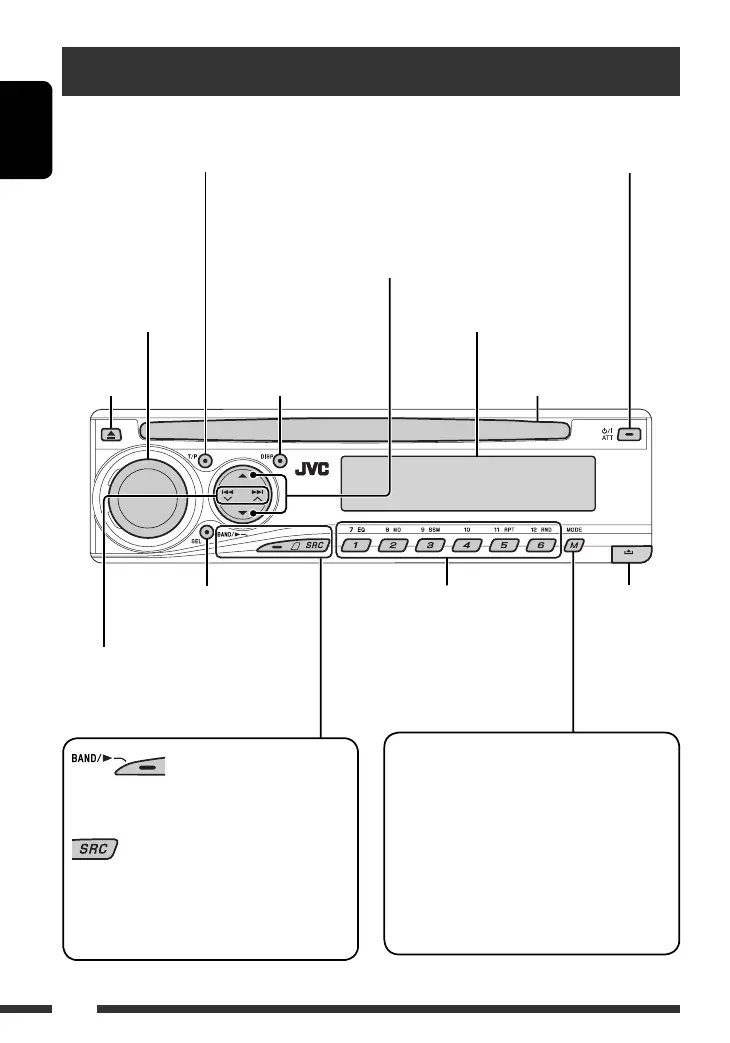
Basic operations — Control panel
• FM/AM/DAB: Select the bands.
• DISC: Start playback.
Select the source.
FM/AM
= DAB * = DISC * = CD-CH */IPOD */
D.PLAYER * (or EXT IN) = LINE IN = (back to
the beginning)
Display window
• DISC: Select title/folder.
• IPOD/D.PLAYER: Enter the main menu/
Pause or stop playback/Confirm selection.
• DAB: Select service.
Eject disc.
Detach the
panel.
• Adjust the sound mode.
• Enter the PSM settings [Hold].
Enter functions mode.
Press M MODE, then one of the following buttons
(within 5 seconds)...
EQ : Select the sound mode.
MO : Turn on/off monaural reception.
SSM : Automatic station presetting [Hold].
RPT : Select repeat play.
RND : Select random play.
5/∞ : Skip 10 chapters/tracks.
• FM/AM/DAB: Select preset station/
service.
• DISC: Select chapter/title/folder/
track/disc (for CD changer).
• Turn on the power.
• Turn off the power [Hold].
• Attenuate the sound (if the power is on).
Change the display
information.
• Activate/deactivate TA Standby Reception.
• Enter RDS programme search [Hold].
• FM/AM/DAB: Search for station/
ensemble.
• DISC: Select chapter/track.
• IPOD/D.PLAYER: Select track.
Volume control [Turn]
Loading slot
* You cannot select these sources if they are not ready or not connected.
EN06-13_DV5302_003A_f.indd 6EN06-13_DV5302_003A_f.indd 6 12/13/06 4:10:28 PM12/13/06 4:10:28 PM



 To Next Page