11OPERATIONS
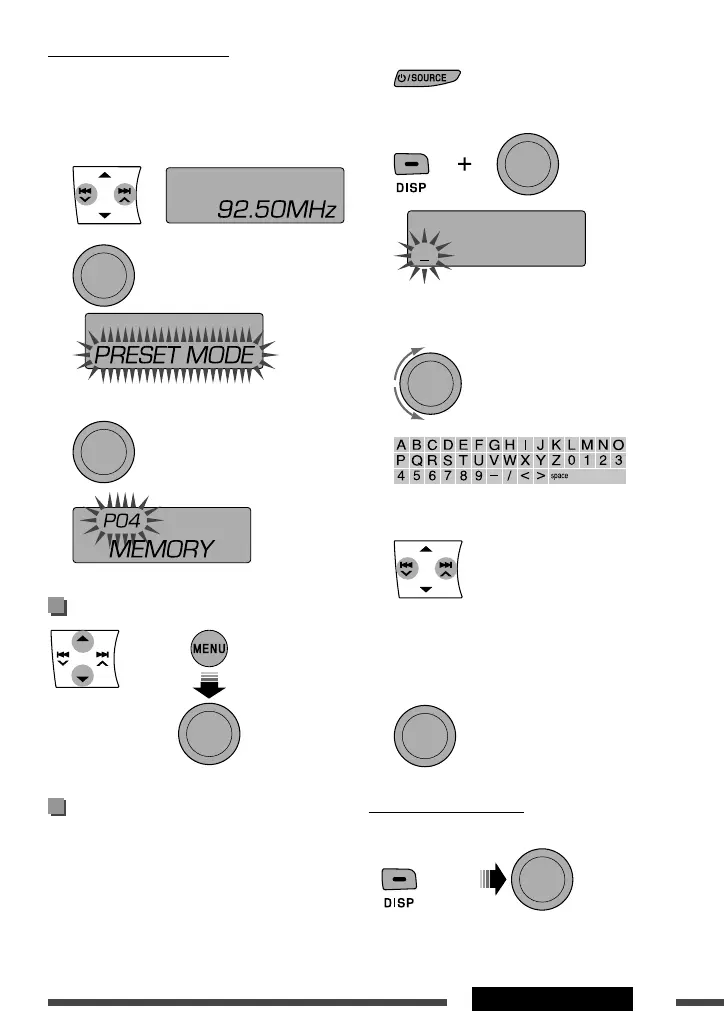
[Press]
1 Select “
FM
” or “
AM
.”
2 Show the title entry screen.
3 Assign a title.
1 Select a character.
2 Move to the next (or previous) character
position.
3 Repeat steps 1 and 2 until you finish
entering the title.
4 Finish the procedure.
To erase the entire title
After step 2 above...
Manual presetting (FM/AM)
You can preset up to 18 stations for FM and 6 stations
for AM.
Ex.: Storing FM station of 92.50 MHz into preset
number “04.”
1
2
3 Select preset number “04” and store.
Selecting preset station
|
or
|
|
|
|
|
Title assignment
You can assign titles to 30 station frequencies (FM and
AM) using 8 characters (maximum) for each title.
• If you try to assign titles to more than 30 station
frequencies, “NAME FULL” appears. Delete unwanted
titles before assignment.
[Turn]
[Hold]
[Hold]
[Hold] [Press]
[Turn]
= [Press]
[Turn] = [Press]
EN10-21_KD-DV5606_001A_1.indd 11EN10-21_KD-DV5606_001A_1.indd 11 12/12/09 4:23:04 PM12/12/09 4:23:04 PM


 To Next Page
 Loading...