13OPERATIONS
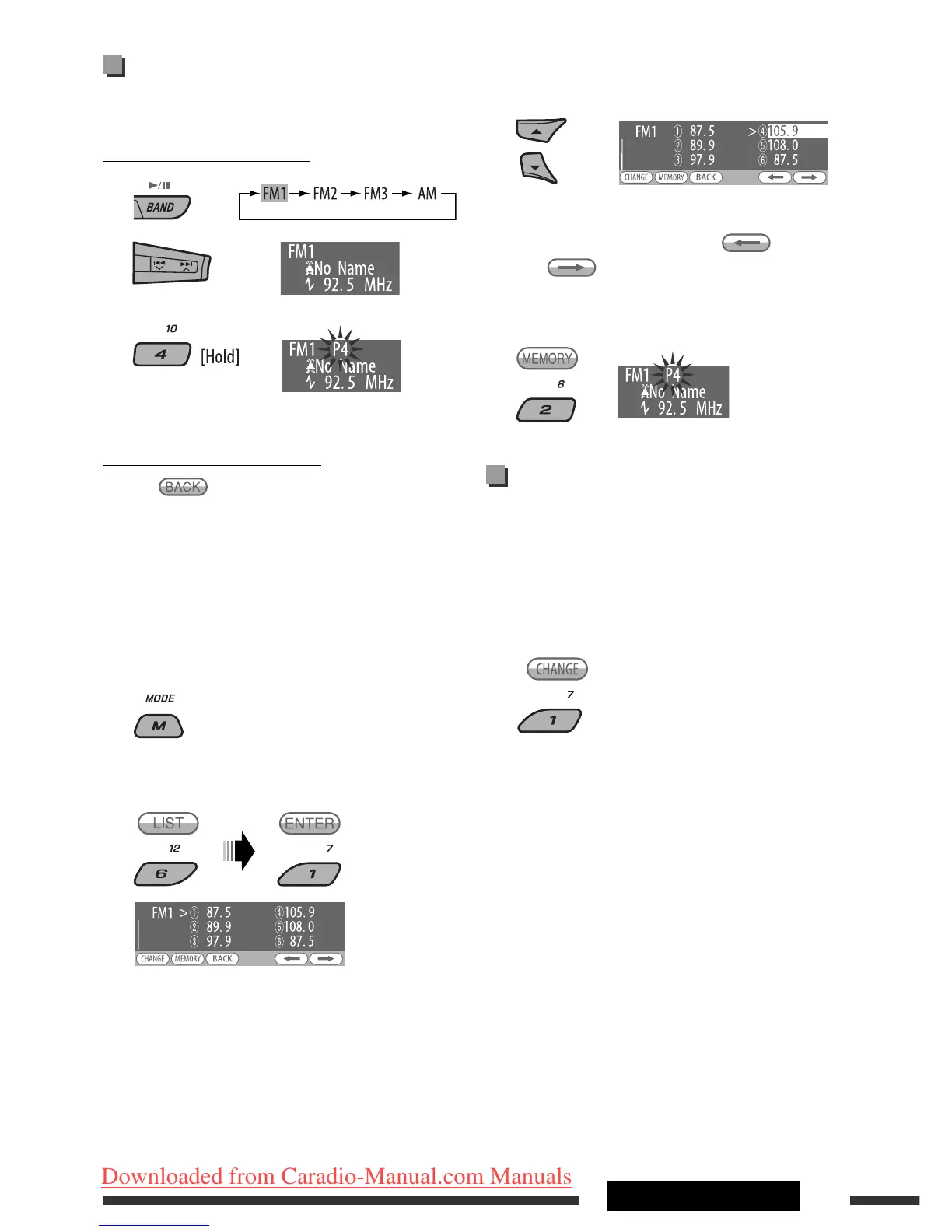
Manual presetting
Ex.: Storing FM station of 92.5 MHz into preset number
4 of the FM1 band.
Using the number buttons
1
2
3
Using the Preset Station list
• When is shown on the display, you can move
back to the previous screen by pressing number
button 3.
1 Follow steps 1 and 2 of “Using the number
buttons” above.
• By holding 5 / ∞, the Preset Station List will
also appear (go to step 4).
2
3
Display the Preset Station List.
4 Select the preset number you want to store
into.
• You can move to the lists of the other FM bands
by pressing number button 5 (
) or
6 ( ) repeatedly.
5 Store the station.
Listening to the preset station on
the Preset Station List
1 Display the Preset Station List, then select
the preset station you want to listen to.
2 Change to the selected station.
Preset number flashes for a while.
EN10-17_KD-DV9406_005A_1.indd 13EN10-17_KD-DV9406_005A_1.indd 13 22/4/08 4:10:31 PM22/4/08 4:10:31 PM
Downloaded from Caradio-Manual.com Manuals


 To Next Page