(No.MA232)1-11
3.1.10 Removing the switch board
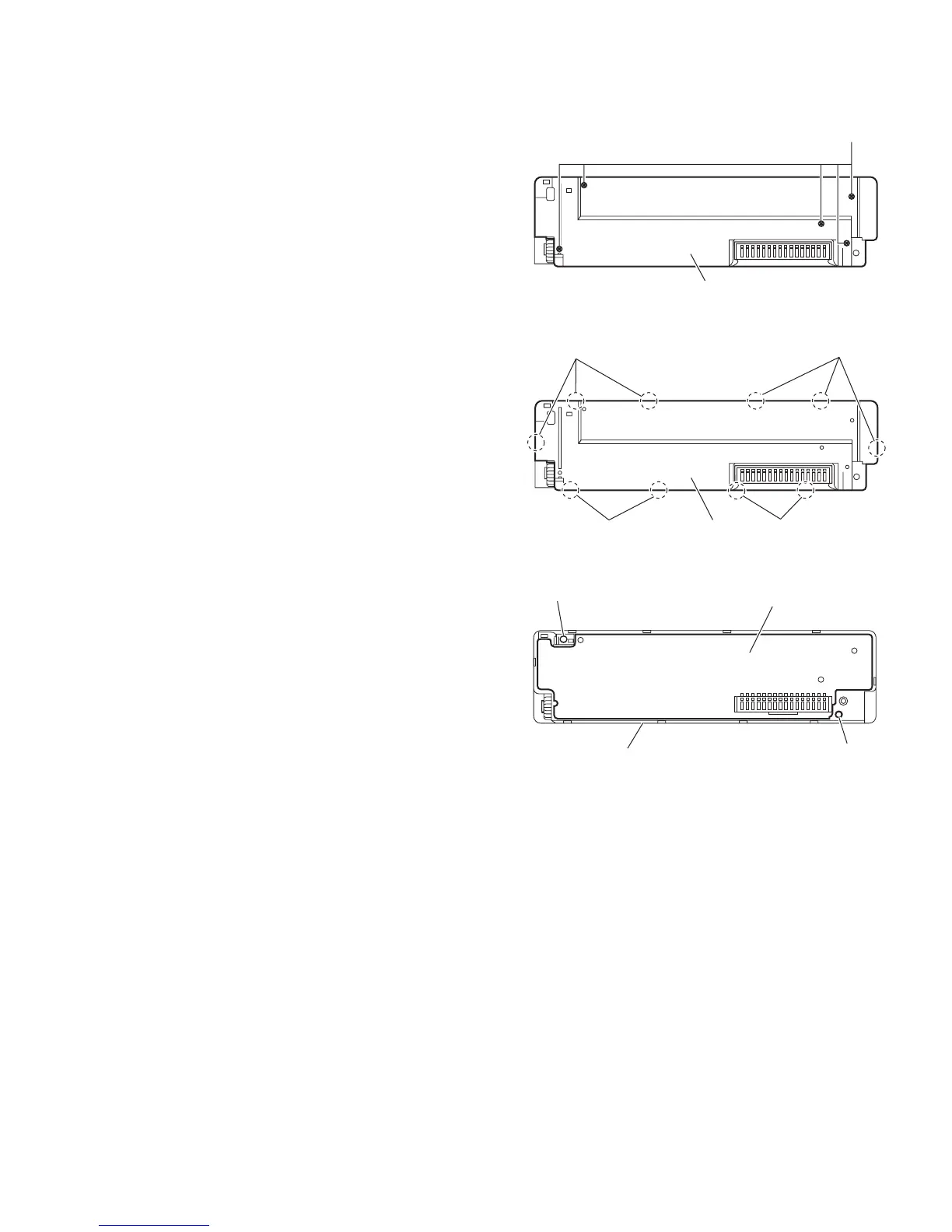
(See Figs.10 to 12)
• Remove the front panel assembly.
(1) Remove the five screws N attaching the front panel assem-
bly. (See Fig.10)
(2) Release the ten joints h and take out the rear cover. (See
Fig.11)
(3) Lift the switch board from the front panel assembly little by
little and take out the switch board. (See Fig.12)
Reference:
The volume knob is removed from the front side simultaneous-
ly.
Note:
When removing the rear cover assembly and switch board, be
careful not to lose the compression spring and comp. spring.
(See Fig.12)
Fig.10
Fig.11
Fig.12
N
Rear cover
Rear cover
h
h
h
h
Switch board
Compression spring
Comp. spring
Front panel assembly



 To Next Page
 Loading...