8
ENGLISH
To check other information while listening
to the radio
* If no name is assigned to a station, “NO NAME”
appears. To assign a title to a station, see page 15.
Disc operations
Playing a disc in the unit
All tracks will be played repeatedly until you change the
source or eject the disc.
To stop play and eject the disc
• Press SRC to listen to another
playback source.
Playing discs in the CD changer
All discs in the magazine will be played repeatedly until
you change the source.
• Ejecting the magazine will also stop playback.
~
* If you have changed the external input setting
to “EXT IN” (see page 14), you cannot select the
CD changer.
3
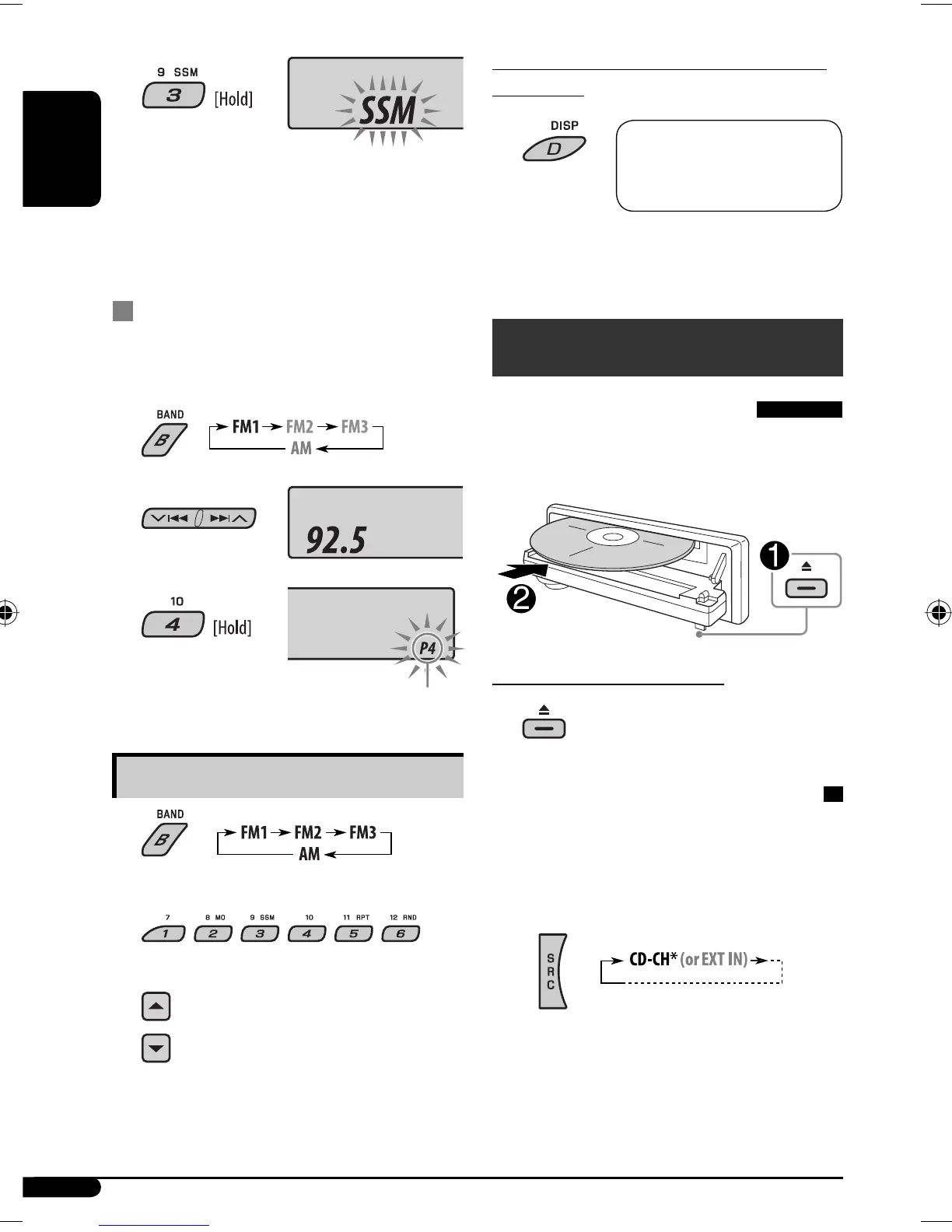
“SSM” flashes, then disappears when automatic
presetting is over.
Local FM stations with the strongest signals are
searched and stored automatically in the FM band.
Manual presetting
Ex.: Storing FM station of 92.5 MHz into preset number
4 of the FM1 band.
1
2
3
Listening to a preset station
1
2 Select the preset station (1 – 6) you want.
or
Preset number flashes for a while.
Clock = Station name* =
Frequency = (back to the
beginning)
EN06-11KD-G536[U_UH]3.indd 8EN06-11KD-G536[U_UH]3.indd 8 11/9/06 7:19:34 PM11/9/06 7:19:34 PM


 To Next Page