ENGLISH
32
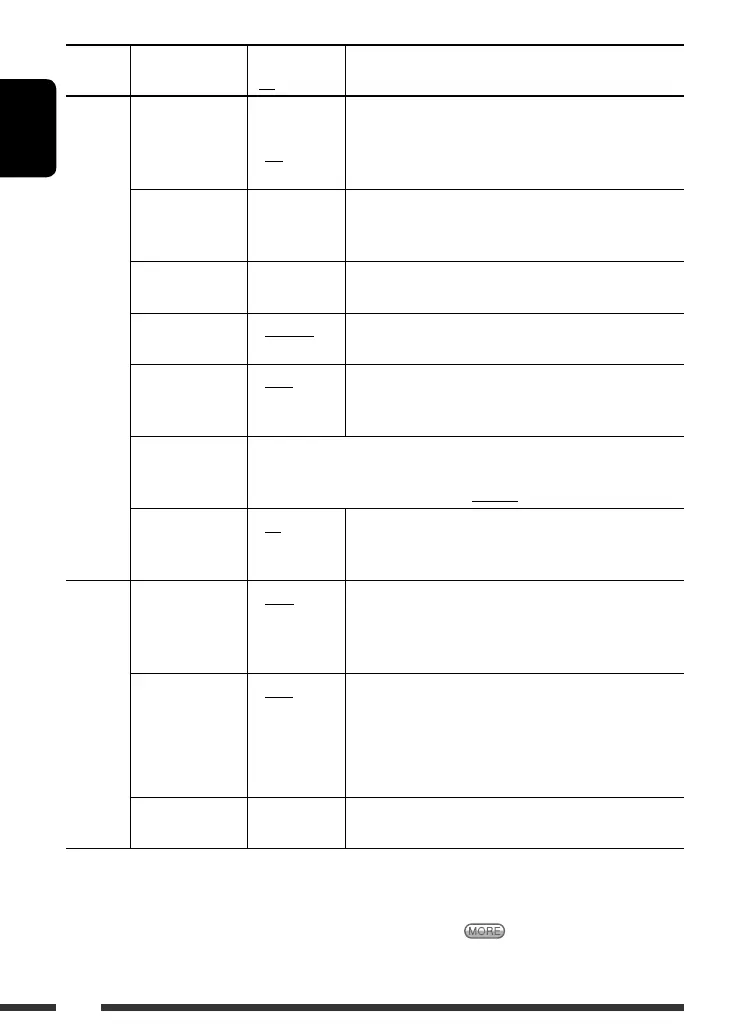
Category Indication Item
( : Initial)
Setting, [reference page]
CLOCK
Clock Disp *
1
Clock display
• On
• Off
: Clock time is shown on the display at all times when the
power is turned off.
: Cancels; pressing D DISP will show the clock time for about
5 seconds when the power is turned off, [6].
Clock Hr
Hour adjustment
1 – 12AM/
1 – 12PM
(0 – 23)
: Initial: 1 (1:00AM), [6].
Clock Min
Minute adjustment
00 – 59 : Initial: 00 (1:00AM), [6].
24H/12H
Time display mode
• 12Hours
• 24Hours
: See also page 6 for setting.
Clock Adj *
2
Clock adjustment
• Auto
• Off
: The built-in clock is automatically adjusted using the clock
data provided via the satellite radio channel.
: Cancels.
Time Zone *
2,
*
3
Time zone
: Select your residential area from one of the following time zones for clock
adjustment.
Alaska, Pacific, Mountain, Central, Eastern, Atlantic, Newfound
DST *
2,
*
3
Daylight savings
time
• On
• Off
: Activates daylight savings time if your residential area is
subject to DST.
: Cancels.
DISPLAY
Scroll *
4
Scroll
• Once
• Auto
• Off
: Scrolls the track information once.
: Repeats scrolling (at 5-second intervals).
: Cancels. (Holding D DISP can scroll the display regardless of
the setting.)
Dimmer
Dimmer
• Auto
• Off
• On
• Time Set
: Dims the display when you turn on the headlights.
: Cancels.
: Dims the display and button illumination.
: Set the timer for dimmer, [34].
From – To *
5
— : Initial: 6PM – 7AM.
Contrast
Contrast
1 – 10
Initial: 5
: Adjust the display contrast to make the display indications
clear and legible.
*
1
If the power supply is not interrupted by turning off the ignition key of your car, it is recommended to select “Off” to
save the car’s battery.
*
2
Displayed only when SIRIUS Satellite radio or XM Satellite radio is connected.
*
3
Adjustable only when “Clock Adj” is set to “Auto.” Press number button 1 ( ) to show the setting display.
*
4
Some characters or symbols will not be shown correctly (or will be blanked) on the display.
*
5
Adjustable only when “Dimmer” is set to “Time Set.”
EN28-37_KD-AR780_G730[J]f.indd 32EN28-37_KD-AR780_G730[J]f.indd 32 2/2/07 9:54:30 AM2/2/07 9:54:30 AM


 To Next Page