15
ENGLISH
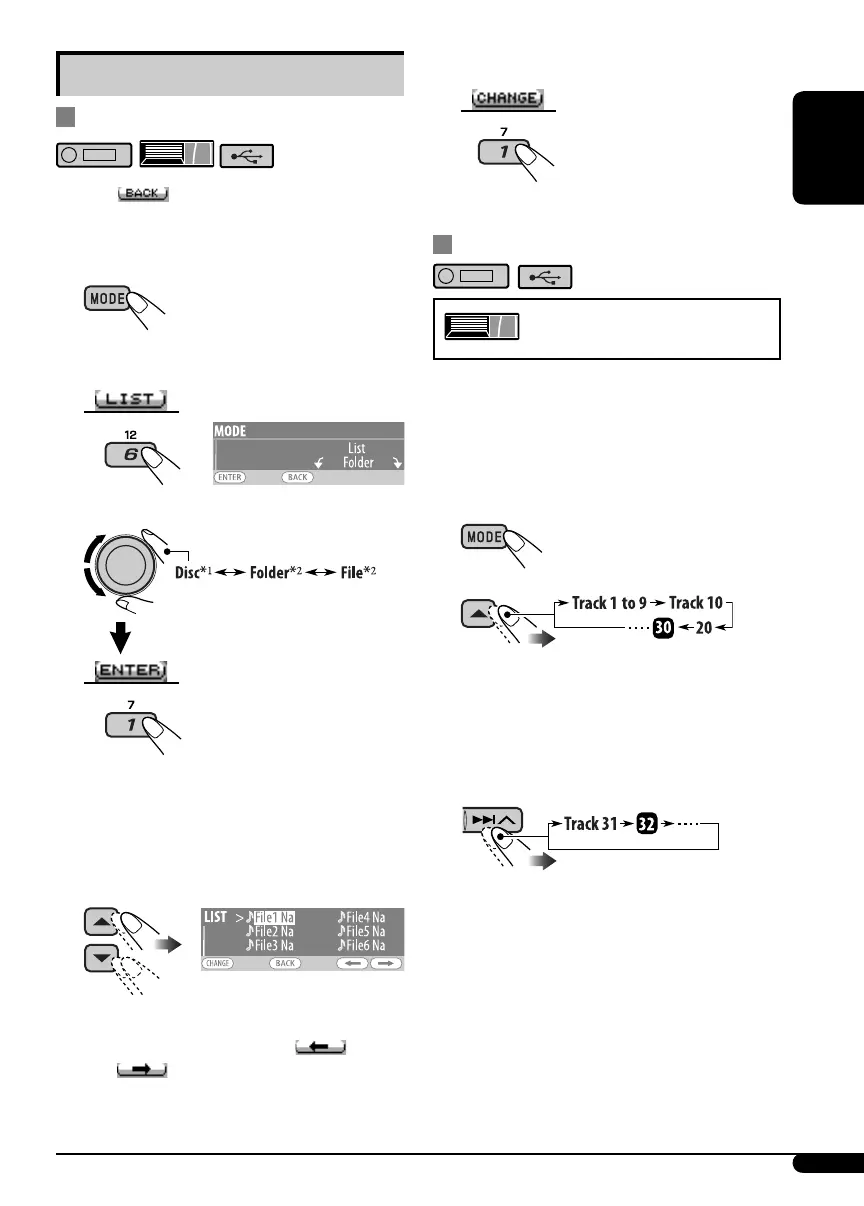
5 Change to the selected item.
• The list disappears and playback starts.
Skipping tracks quickly during play
Only possible on JVC
MP3-compatible CD changer
• For MP3/WMA/USB, you can skip tracks
within the same folder.
Ex.: To select track 32 while playing a track
whose number is a single digit (1 to 9).
1
2
Each time you press the button, you can
skip 10 tracks.
• After the last track, the first track will be
selected and vice versa.
3
Other main functions
Selecting a disc/folder/track on the list
• When appears on the display, you can
move back to the previous display by pressing
number button 3.
1
2
Select “LIST.”
3 Select the list type.
*
1
Selectable only when the source is
“CD-CH.”
*
2
Selectable only when the media is MP3,
WMA, or USB.
4 Select an item.
EX.: When “File” is selected in step 3
• You can move to the other lists by
pressing number button 5 (
) or
6 (
) repeatedly.
EN06-17KD-G821[EX_EU]2.indd 15EN06-17KD-G821[EX_EU]2.indd 15 9/12/05 3:58:46 pm9/12/05 3:58:46 pm


 To Next Page