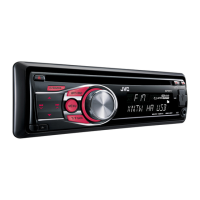
How to stop noise during iPod/iPhone playback on JVC KD-R421?
- CChristopher DunnAug 31, 2025
If noise is generated during iPod/iPhone playback on your JVC Car Receiver, turn off (uncheck) the “VoiceOver” feature of the iPod.
How to stop noise during iPod/iPhone playback on JVC KD-R421?
If noise is generated during iPod/iPhone playback on your JVC Car Receiver, turn off (uncheck) the “VoiceOver” feature of the iPod.
How to fix distorted sound on JVC Car Receiver during iPod/iPhone playback?
If you are experiencing distorted sound on your JVC Car Receiver during iPod/iPhone playback, deactivate the equalizer either on the car receiver or the iPod/iPhone.
How to eliminate static noise on JVC KD-R421 Car Receiver radio?
If you experience static noise while listening to the radio on your JVC Car Receiver, ensure that the aerial is firmly connected.
What does 'NO FILE' mean on my JVC KD-R421 Car Receiver during iPod/iPhone playback?
If your JVC Car Receiver displays “NO FILE” during iPod/iPhone playback, check whether the device contains playable files.
How to fix JVC KD-R421 when sound is interrupted during USB playback?
To resolve interrupted sound while playing a track on your JVC Car Receiver via USB, the tracks may not have been properly copied to the USB device. Copy the tracks again to the USB device, and then try again.
Why is my iPod/iPhone not working with my JVC KD-R421 Car Receiver?
If your JVC Car Receiver does not turn on or work with your iPod/iPhone, check the connecting cable and its connection. Also, update the firmware version of the iPod/iPhone, charge its battery, reset it, and check whether the setting is appropriate.
What to do if my JVC KD-R421 says 'CANNOT PLAY' or 'NO USB'?
If your JVC Car Receiver displays “CANNOT PLAY” or “NO USB” or the unit cannot detect the USB device, check whether the connected USB device is compatible with this unit. You can also try reattaching the USB device.
What to do if my JVC KD-R421 Car Receiver displays 'MISWIRING CHK WIRING THEN RESET UNIT'?
If your JVC Car Receiver displays “MISWIRING CHK WIRING THEN RESET UNIT” and you can't do anything, check that the terminals of the speaker leads are properly covered with insulating tape, and then reset the unit. If the message persists, consult your JVC IN-CAR ENTERTAINMENT dealer or a company supplying kits.
Explains the operation of buttons like /SOURCE, Control dial, EQ, and DISP.
How to connect a USB device and start playback.
Important warnings regarding USB device usage, data backup, and potential connection issues.
How to connect an iPod/iPhone and important usage warnings.
Guide to navigating the unit's menu for various settings like DEMO, CLOCK, DIMMER.
Detailed settings for audio equalization, speaker balance, loudness, and volume adjustment.
Explanation of what each button on the remote controller does.
Solutions for common issues like no sound, unit failure, or radio static.
Solutions for disc playback errors and problems with MP3/WMA files.
Solutions for issues encountered with USB and iPod/iPhone playback.
Steps to register a Bluetooth device and configure the unit's source selection.
Technical details for the audio amplifier, tuner, and CD player sections.
Technical details for USB compatibility, operating requirements, dimensions, and mass.
Explains the operation of buttons like /SOURCE, Control dial, EQ, and DISP.
How to connect a USB device and start playback.
Important warnings regarding USB device usage, data backup, and potential connection issues.
How to connect an iPod/iPhone and important usage warnings.
Guide to navigating the unit's menu for various settings like DEMO, CLOCK, DIMMER.
Detailed settings for audio equalization, speaker balance, loudness, and volume adjustment.
Explanation of what each button on the remote controller does.
Solutions for common issues like no sound, unit failure, or radio static.
Solutions for disc playback errors and problems with MP3/WMA files.
Solutions for issues encountered with USB and iPod/iPhone playback.
Steps to register a Bluetooth device and configure the unit's source selection.
Technical details for the audio amplifier, tuner, and CD player sections.
Technical details for USB compatibility, operating requirements, dimensions, and mass.
| MP3 playback | Yes |
|---|---|
| Tuner type | HS-IV |
| FM band range | 87.5 - 108 MHz |
| Audio output channels | 4.0 channels |
| Equalizer bands quantity | 3 |
| Maximum power per channel | 50 W |
| Weight | 121 g |
|---|
Loading...