EasyManua.ls Logo

JVC KD-R450 - Getting Started; Cancel Demonstration Mode; Clock Setup Procedure; Basic Settings Configuration

JVC KD-R450
23 pages
Print Icon
To Next Page IconTo Next Page
To Previous Page IconTo Previous Page
Loading...
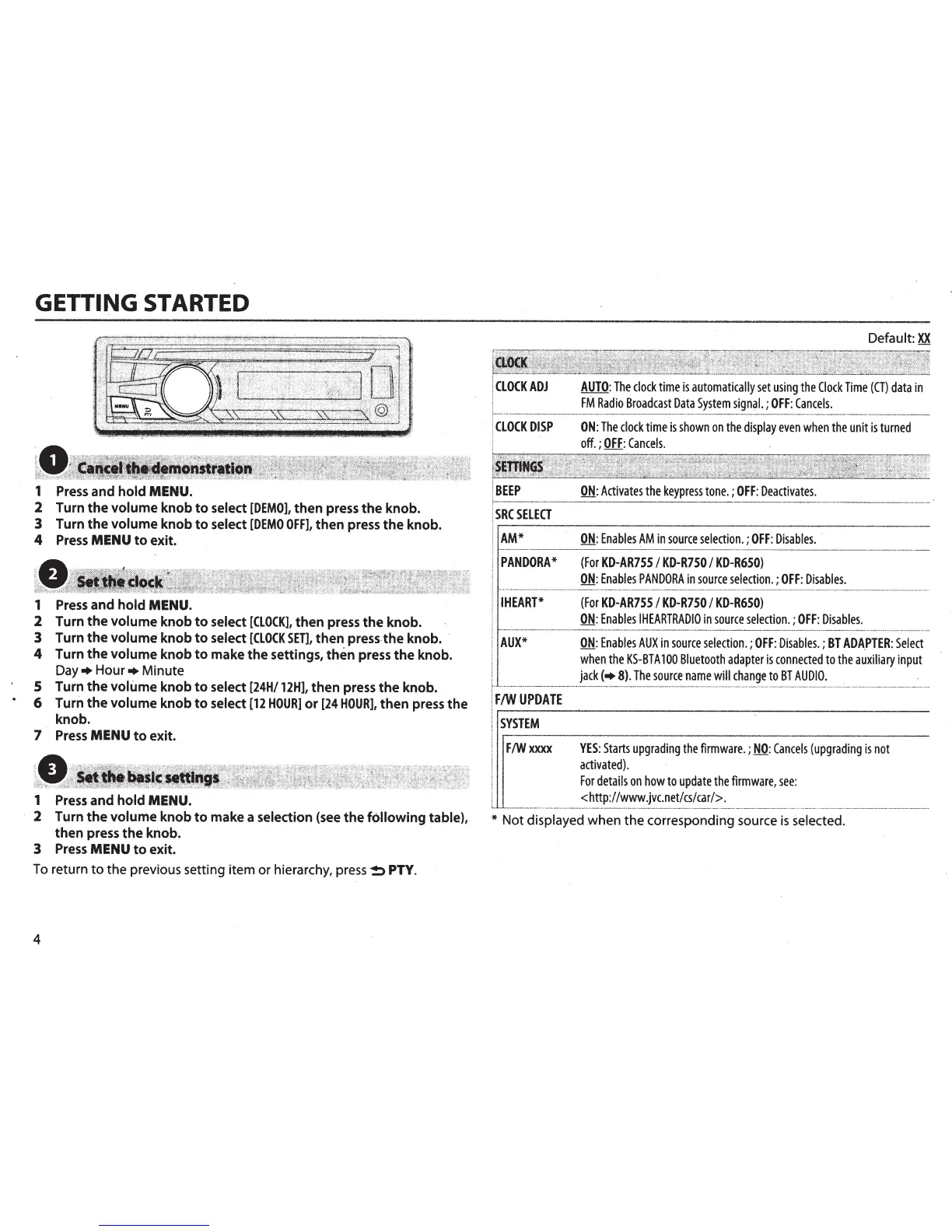
GETTING
STARTED
1
Press
and
hold
MENU.
2 Turn
the
volume
knob
to
select
[DEMO],
then
press
the
knob.
3 Turn
the
volume
knob
to
select
[DEMO
OFF],
then
press
the
knob.
4
Press
MENU
to
exit.
1
Press
and
hold
MENU.
2 Turn
the
volume
knob
to
select
[CLOCK],
then
press
the
knob.
3 Turn
the
volume
knob
to
select
[CLOCK
SET],
then
press-
the
knob.
·
4 Turn
the
volume
knob
to
make
the
settings,
then
press
the
knob.
Day+
Hour+
Minute
5 Turn
the
volume
knob
to
select
[24H/12H],
then
press
the
knob.
6
Turn
the
volume
knob
to
select
[12
HOUR)
or
[24
HOUR],
then
press
the
knob.
7
Press
MENU
to
exit.
1
Press
and
hold
MENU.
2 Turn
the
volume
knob
to
make a selection
(see
the
following
table),
then
press
the
knob.
3
Press
MENU
to
exit.
To
return
to
the previous setting item or hierarchy,
press~
PTY.
4
CLOCKADJ
CLOCK
DISP
BEEP
SRCSELEa
AM*
Default:
XX
AUTO:
The
clock
time
is
automatically
set
using
the
Clock
Time
(CT)
data
in
FM
Radio
Broadcast
Data
System
signal.;
OFF:
Cancels.
ON:
The
clock
time
is
shown
on
the
display
even
when
the
unit
is
turned
off.
;
OFF:
Cancels.
ON:
Activates
the
keypress
tone.;
OFF:
Deactivates.
QN:
Enables
AM
in
source
selection.;
OFF:
Disables.
·
PANDORA*
(For
KD-AR7SS
I
KD-R750
I
KD-R6SO)
ON:
Enables
PANDORA
in
source
selection.;
OFF:
Disables.
I
HEART*
(For
KD-AR7SS
I
KD-R7SO
I
KD-R6SO)
ON:
Enables
IHEARTRADIO
in
source
selection.;
OFF:
Disables.
AUX*
ON:
Enables
AUXin
source
selection.;
OFF:
Disables.;
BT
ADA.PTER:
Select
when
the
KS-BTA
100
Bluetooth
adapter
is
connected
to
the
auxiliary
input
jack
(+
8).
The
source
name
will
change
to
BT
AUDIO.
F/W
UPDATE
SYSTEM
F/Wxxxx
YES:
Starts
upgrading
the
firmware.;
NO:
Cancels
(upgrading
is
not
activated).
For
details
on
how
to
update
the
firmware,
see:
<http:llwww.jvc.netlcslcarl>.
*
Not displayed when the corresponding source
is
selected.

Related product manuals