Need help?
Do you have a question about the JVC KD-R432 and is the answer not in the manual?
Identifies unit as Class 1 laser product and warns about radiation when open.
Guidance on volume, car temperature, and condensation issues.
Instructions for control panel removal, attachment, and unit reset.
Procedure for forcible disc ejection and how to read the manual.
Steps to turn off display demonstration and set the unit's clock.
How to change and scroll through the unit's display information.
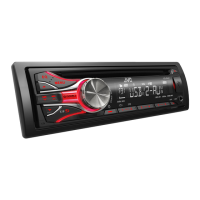
Identification of panel components and detailed functions of buttons and the control dial.
Methods for searching, manually presetting, and auto-presetting radio stations.
Instructions for selecting preset stations and setting the Radio Timer.
Finding programs by PTY code and activating Traffic/News standby reception.
Automatically tuning to stronger signals or searching for programs.
Connecting and starting playback from CD or USB devices.
Navigating folders/tracks and choosing playback modes like REPEAT/RANDOM.
Connecting and initiating playback, selecting control modes (HEAD/IPOD/EXT).
Selecting individual tracks and playback modes for iPod/iPhone.
Connecting external components via AUX and pairing Bluetooth devices.
Customizing brightness levels for button and display zones.
Selecting preset sound modes and adjusting equalizer settings.
Configuring display demonstration, clock, and illumination adjustments.
Settings for display scrolling, tag display, and professional equalizer.
Adjusting speaker balance, loudness, and preset volume for sources.
Configuring subwoofer output, low-pass/high-pass filters, and tone levels.
Managing telephone muting, keypress tone, and amplifier gain.
Settings for SSM, AF-REG, News Standby, PTY Search, Mono, and IF Band.
Enabling/disabling AM, AUX inputs, and configuring iPod/Bluetooth source.
Instructions for battery replacement, safe operation, and aiming the remote.
Explanation of the functions of each button on the remote controller.
Information regarding playable and unplayable disc types and audio file formats.
Best practices for handling media and precautions for USB device usage.
Important cautions regarding USB device connection, playback, and potential issues.
List of compatible iPod/iPhone models and operational notes.
Legal information regarding trademarks and licenses for software and accessories.
Troubleshooting steps for general sound, connection, and operation problems.
Solutions for common issues encountered with CD, USB, iPod, and iPhone playback.
Technical details of the unit's audio amplifier and FM/AM tuner capabilities.
Technical specifications for the CD playback functionality and USB interface.
General technical specifications including power, dimensions, and operating conditions.
 General
| Power Output | 50W x 4 |
|---|---|
| RMS Power | 22W x 4 |
| Tuner | FM/AM |
| CD Playback | Yes |
| USB Port | Yes |
| Bluetooth | No |
| Aux Input | Yes |
| Display Type | LCD |
| MP3 Playback | Yes |
| WMA Playback | Yes |
| Subwoofer Output | Yes |
| Detachable Face | Yes |
| Channels | 4 |
| Remote Control | Yes |


 To Next Page