EasyManua.ls Logo

JVC KD-R520 - Menu Settings - Display and Audio; Color, Dimmer, Display, and Audio Adjustments

JVC KD-R520
30 pages
Print Icon
To Next Page IconTo Next Page
To Previous Page IconTo Previous Page
Loading...
.•.
w~._,
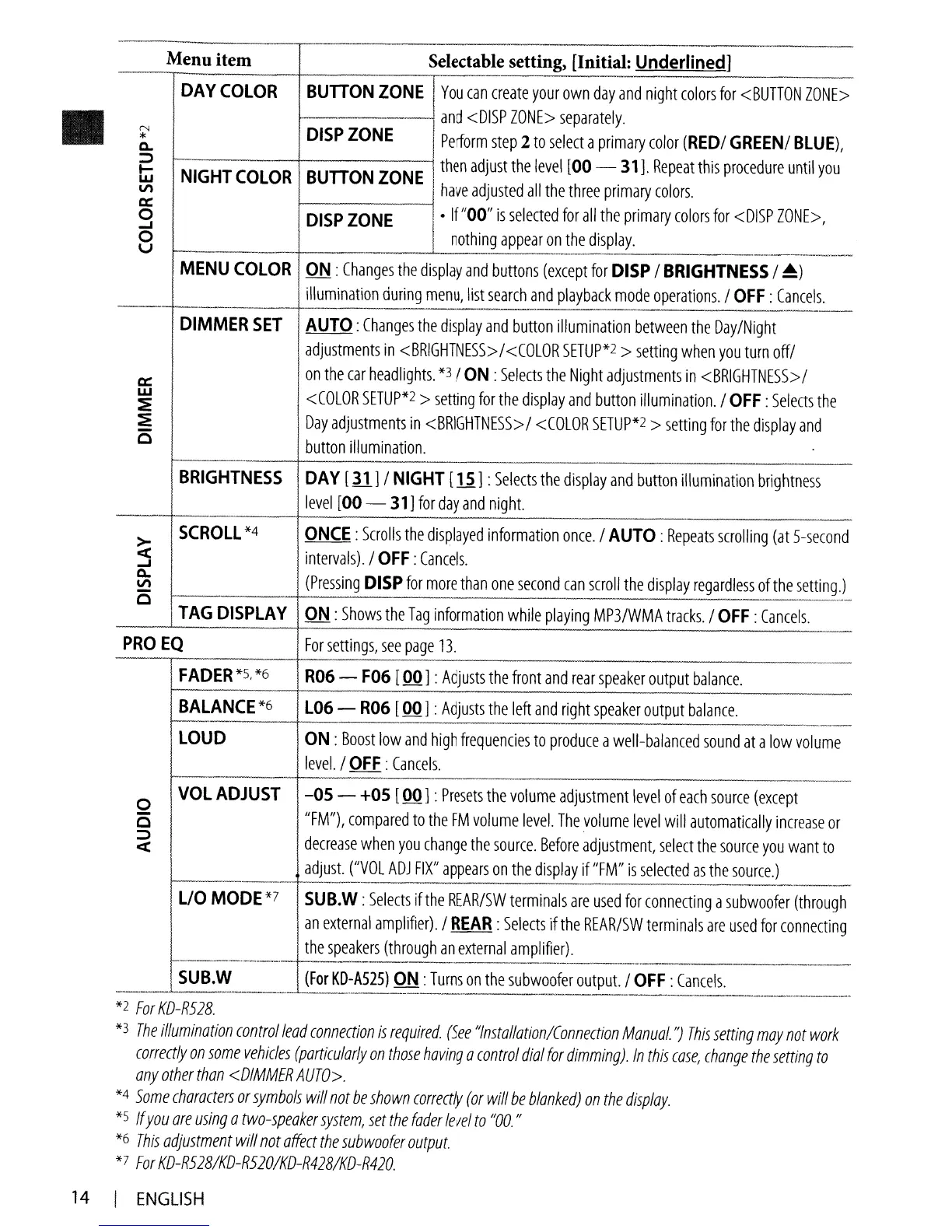
Menu item
Selectable setting) [Initial: Underlined]
DAY
COLOR
BUnONZONE
You
can
create
your
own
day
and
night
colors
for
<BUTTON
ZONE>
._-_._._
.....
_
.......
__
.-
and
<DISP
ZONE>
separately
.
N
DISP
ZONE
*
Perform
step
2
to
select
a
primary
color
(RED/
GREEN/
BLUE),
Q.
:;:)
then
adjust
the
level
[00
- 31].
Repeat
this
procedure
until
you
~
NIGHT
COLOR
BUnONZONEw
have
adjusted
all
the
three
primary
colors.
V)
0::
0
DISPZONE
If
"00"
is
selected
for
all
the
primary
colors
for
<DISP
ZONE>,
-I
0
nothing
appear
on
the
display.
u
----_."
......
>._._.,.
..
_
.•.
_.
__
._
...
_
..
_
...
_-----
-_._-_
...
_
....
_
...
_
..
_
........
_
......
_
...
__
._
..
_.--------_
............
-
......
_.._
....•.
_
........
_---
MENU
COLOR
ON:
Changes
the
display
and
buttons
(except
for
DISP
/
BRIGHTNESS
/
~)
illumination
during
menu,
list
search
and
playback
mode
operations.
/
OFF:
Cancels.
----
~.
-_.
--'
DIMMER
SET
AUTO:
Changes
the
display
and
button
illumination
between
the
Day/Night
adjustments
in
<BRIGHTNESS>/<COLOR
SETUP*2
>
setting
when
you
turn
off/
0::
on
the
car
headlights.
*3/
ON:
Selects
the
Night
adjustments
in
<BRIGHTNESS>/
w
<COLOR
SETUP*2
>
setting
for
the
display
and
button
illumination.
/
OFF:
Selects
the
:E
:E
Day
adjustments
in
<BRIGHTNESS>
/
<COLOR
SETUP*2
>
setting
for
the
display
and
c
button
illumination.
-
BRIGHTNESS
DA
Y [31 ] /
NIGHT
[li]
:
Selects
the
display
and
button
illumination
brightness
level
[00 - 31]
for
day
and
night.
.-
>-
SCROll
*4
ONCE:
Scrolls
the
displayed
information
once.
/
AUTO:
Repeats
scrolling
(at
5-second
<t
intervals).
/
OFF:
Cancels.
-I
Q.
(Pressing
DISP
for
more
than
one
second
can
scroll
the
display
regardless
of
the
setting.)
V)
c
..
_-----
TAG
DISPLAY
ON:
Shows
the
Tag
information
while
playing
MP3/WMA
tracks.
/
OFF:
Cancels.
PROEQ
For
settings,
see
page
13.
FADER
*5.
*6
R06
-
F06
[00] :
Adjusts
the
front
and
rear
speaker
output
balance.
BALANCE
*6
l06
-
R06
[00] :
Adjusts
the
left
and
right
speaker
output
balance.
--
LOUD
ON
:
Boost
low
and
high
frequencies
to
produce
a
well-balanced
sound
at
a
low
volume
level.
/
OFF:
Cancels.
..
--
-"--"--'
-~-_
...
_"_.
0
VOL
ADJUST
-05 -
+05
[00] :
Presets
the
volume
adjustment
level
of
each
source
(except
c
"FM"),
compared
to
the
FM
volume
level.
The
volume
level
will
automatically
increase
or
:;:)
decrease
when
you
change
the
source.
Before
adjustment,
select
the
source
you
want
to
<t
adjUSt.
("VOL
ADJ
FIX"
appears
on
the
display
if
"FM"
is
selected
as
the
source.)
-_._
.............
_._
...
-
f---------.---.-.-
..
--
..
-.
"n
••
.
.....
_--~~~
.......
"
L/O
MODE*7
SUB.W
:
Selects
if
the
REAR/SW
terminals
are
used
for
connecting
a
subwoofer
(through
an
external
amplifier).
/
REAR:
Selects
if
the
REAR/SW
terminals
are
used
for
connecting
the
speakers
(through
an
external
amplifier).
_
..
_____
·_n.
___
._
-------
---~-----~.
-----
SUB.W
(For
KD-A525)
ON
:
Turns
on
the
subwoofer
output.
/
OFF:
Cancels.
_._-----~-_._._-----_
..
_-
---_._-------------
-_._~--_._-_._-_.
__
._-~
..
,,~----~_
......
_--_.
*2
For
KD-R528.
*3
The
illumination
control
lead
connection
is
reqUired.
(See
"Installation/Connection
Manual.
")
This
setting
may
not
work
correctly
on
some
vehicles
(particularly
on
those
haVing
a
control
dial
for
dimming).
In
this
ease,
change
the
setting
to
any
other
than
<DIMMER
AUTO>.
*4
Some
characters
or
symbols
will
not
be
shown
correctly
(or
will
be
blanked)
on
the
display.
*5 If
you
are
using
a
two-speaker
system,
set
the
fader
level
to
"00.
II
*6
This
adjustment
will
not
affect
the
sub
woofer
output.
*7
For
KD-R528/KD-R520/KD-R428/KD-R420.
14
I
ENGLISH

Other manuals for JVC KD-R520

Related product manuals