EasyManua.ls Logo

JVC KD-R520 - Menu Settings - Tuner and Source; Subwoofer, Tuner, and Source Selection

JVC KD-R520
30 pages
Print Icon
To Next Page IconTo Next Page
To Previous Page IconTo Previous Page
Loading...
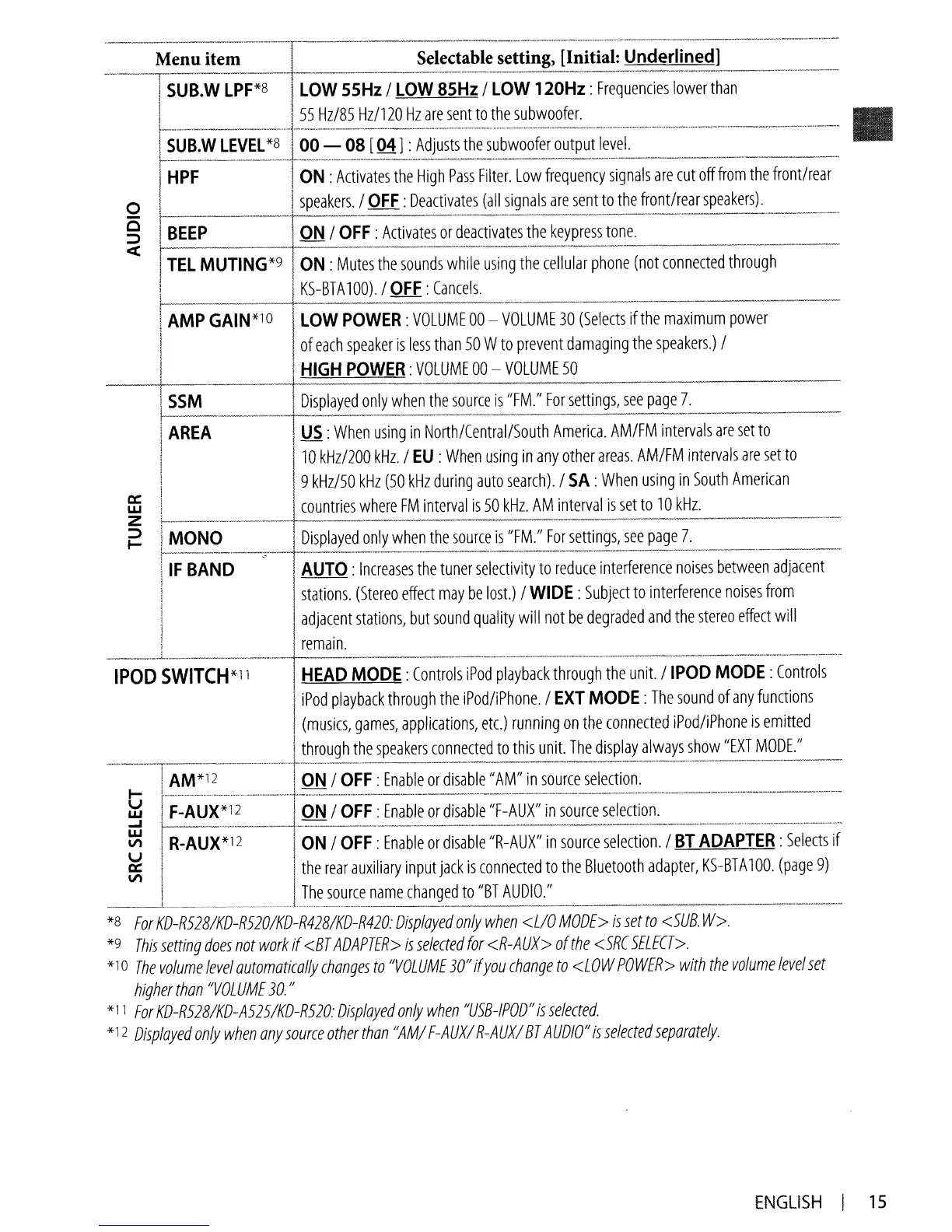
Selectable setting, [Initial:
Underlined]
---------------_._--_
..
_-_
..
_
..
_------------_._._--
LOW
55Hz
/
LOW
85Hz
/
LOW
120Hz:
Frequencies
lower
than
55
Hz/85
Hz/120
Hz
are
sent
to
the
subwoofer.
Menu item
-'--,
i
SUB.
W
LPF*8
I
SUB.W
LEVEL
*8
00
-
08
[04] :
Adjusts
the
subwoofer
output
level.
1-------_._--_
1----._-
..
-----.-
..
- - -
..
---------
--.--.-.---
HPF
ON
:
Activates
the
High
Pass
Filter.
Low
frequency
signals
are
cut
off
from
the
front/rear
I
speakers.
/
QEE:
Deactivates
(all
signals
are
sent
to
the
front/rear
speakers).
1-------+--
BEEP
QN
/
OFF:
Activates
or
deactivates
the
keypress
tone.
____
._,
,_,
••"
.•
'______
'
'U"'_"'-~~_N
TEL
MUTING*9
ON:
Mutes
the
sounds
while
using
the
cellular
phone
(not
connected
through
KS-BTA
100)_
/
OFF:
Cancels.
I
AMP
GAIN*lO
I
LOW
POWER:
VOLUME
00
-
VOLUME
30
(Selects
if
the
maximum
power
I
of
each
speaker
is
less
than
50
W
to
prevent
damaging
the
speakers.)
/
HIGH
POWER:
VOLUME
00
-
VOLUME
50
Displayed
only
when
the
source
is
/lFM./I
For
settings,
see
page
7.
-------
i
AREA
I
US:
When
using
in
North/Central/South
America.
AM/FM
intervals
are
set
to
I
1~0
kHz/200
kHz.
/
EU
:
When
using
in
any
other
areas.
AM/FM
intervals
are
set
to
! 9
kHz/50
kHz
(50
kHz
during
auto
search).
/
SA:
When
using
in
South
American
I
~
~_
..
__
...
cou.ntries
where
F~erv~~
50
k~.~:
AM~terv~1
is
set
to
10
kHz
...
___.
__
~
j
MONO
I
Displayed
only
when
the
source
is
"FM./I
For
settings,
see
page
7.
rIFBAND~AUTO
:
In~~;ase~~he
~~;r
seledivity
to
reduce
inte~';;nce
noises
betwe~n
adjace;-'-
!
stations.
(Stereo
effect
may
be
lost.)
/
WIDE:
Subject
to
interference
noises
from
,
adjac~nt
stations,
but
sound
quality
will
not
be
degraded
and
the
stereo
effect
will
___
._1...
..
_.
..
remaln~
_.
__
.
..
__
_
..
_
_._._._.
..
__
__
_
IPOD
SWITCH*ll
HEAD
MODE:
Controls
iPod
playback
through
the
unit.
/
IPOD
MODE:
Controls
iPod
playback
through
the
iPod/iPhone.
/
EXT
MODE:
The
sound
of
any
functions
(musics,
games,
applications,
etc.)
running
on
the
conneded
iPod/iPhone
is
emitted
I
i
thrOUgh
the
speakers
connected
to
this
unit.
The
display
always
show
"EXT
MODE."
··------T······-··-···-········--···········---·-·····
..
-
..
--.---
..
-
---
-.---
-"
--
--
..
---
..
"
..
" -
---
-----
.
I
AM*12
ON
/
OFF:
Enable
or
disable"
AM/I
in
source
selection.
J-- -
--
..
-.-.-
_-
- ==-
--
------
..
--.-.-- -
---
- -
----
..
----
--
..
--
-.-
---
~
~~i~i-~:~--]'
~~
;
~::
:
:~::::
:~
:;:::;;~~~:~~;-;~
::~~::
::II:~ii:~-/BTADA·PTER~~i~dSif-
ffi
I
the
rear
auxiliary
input
jack
is
connected
to
the
Bluetooth
adapter,
KS-BT
A
100.
(page
9)
I
The
source
name
changed
to
"BT
AUDIO."
__
.--L-
_.
~
..
_
..
_.
__
.. ..
_ _
*8
For
KD
..
R528IKD
..
R520IKD-R428IKD-R420:
Displayed
only
when
<LlO
MODE>
is
set
to
<SUB.
W>.
*9
This
setting
does
not
work
if
<BT
ADAPTER>
is
selected
for
<R-AUX>
of
the
<SRC
SELECT>.
*10
The
volume
level
automatically
changes
to
"VOLUME
30"
if
you
change
to
<LOW
POWER>
with
the
volume
level
set
higher
than
"VOLUME
30.
"
*11
For
KD-R528IKD-A525/KD-R520:
Displayed
only
when
"U5B-IPOD"
is
selected.
*12
Displayed
only
when
any
source
other
than
"AMI
F-AUXI
R-AUXI
BT
AUDIO"
is
selected
separately.
ENGLISH
I
15

Other manuals for JVC KD-R520

Related product manuals