ENGLISH
11
Data Size: B6L (182 mm x 128 mm)
Book Size: B6L (182 mm x 128 mm)
D.T.EXP
(Digital Track
Expander)
ON
:Creates realistic sound by compensating the high-frequency
components and restoring the rise-time of the waveform that are lost in
audio data compression.;
OFF
:Cancels.
TEL
MUTING
*
5
ON
:Mutes the sounds while using the cellular phone (not connected
through KS-BTA100).;
OFF
:Cancels.
SPK/PRE
OUT
Selects the appropriate setting to get the desired output.
*
5
Does not work if [
BT
ADAPTER
] is selected for [
AUX
] in [
SRC
SELECT
]. (
4
)
SPK/PRE OUT
Connection via lineout terminals
(
17
)
Setting
Lineout terminal
FRONT
(for
KD-R761
/
KD-R661
)
REAR/SW
REAR/REAR
Front speakers output Rear speakers output
REAR/SUB.W
Front speakers output Subwoofer output
SUB.W/SUB.W
Front speakers output Subwoofer output
Connection via speaker leads (
17
)
Setting
Rear speaker lead
L (left) R (right)
REAR/REAR
Rear speakers output Rear speakers output
REAR/SUB.W
Rear speakers output Rear speakers output
SUB.W/SUB.W
Subwoofer output (Mute)
If [
SUB.W/SUB.W
] is selected:
– [
HIGH120HZ
] is selected in [
SUB.W
LPF
] and [
THROUGH
] is not available.
– [
R01
] is selected in [
FADER
] and selectable range is [
R06
]to [
00
]
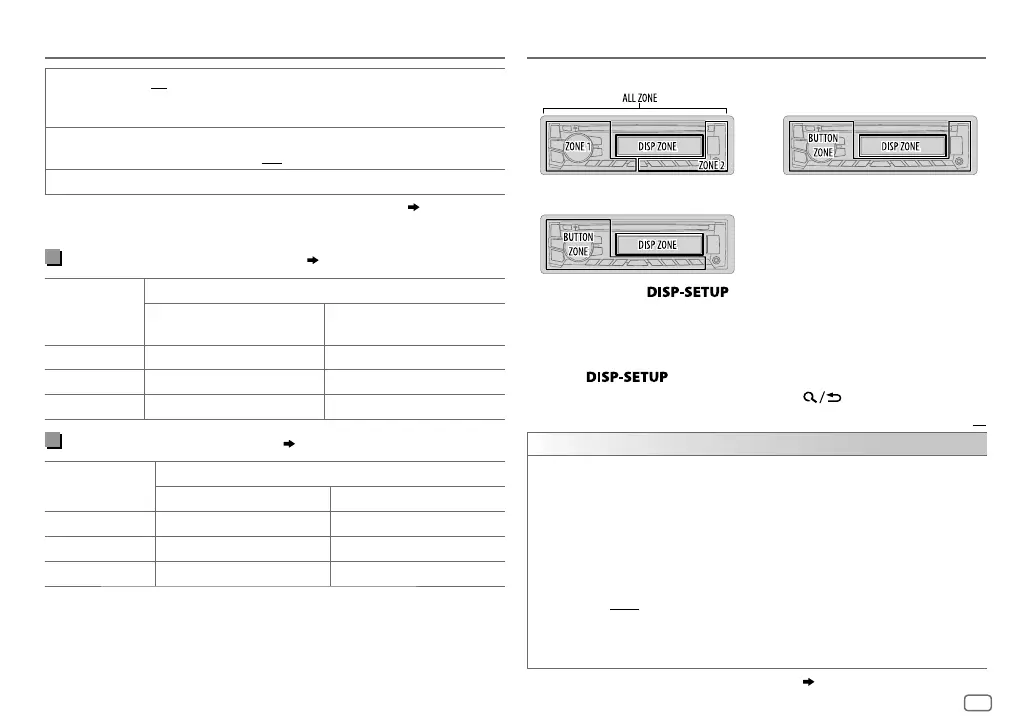
AUDIO SETTINGS
KD-R661 / KD-R469 / KD-R467 / KD-R464 / KD-R462 / KD-R461
KD-R761
KD-R567 / KD-R561
1 Press and hold .
2 Turn the volume knob to make a selection (see the following table),
then press the knob.
3 Repeat step 2 until the desired item is selected/activated or follow
the instructions stated on the selected item.
4 Press to exit.
To return to the previous setting item, press .
Default:
XX
DISPLAY
DIMMER
Selects the display and button illumination adjusted in the [
BRIGHTNESS
]
setting.
OFF
:Selects the day adjustments.;
ON
:Selects the night adjustments.;
DIMMER TIME
:Adjusts the dimmer on and off time.
Turn the volume knob to adjust the [
ON
] time, then press the knob.
Turn the volume knob to adjust the [
OFF
] time, then press the knob.
(Default: [
ON
]: 18:00 or 6:00 PM
[
OFF
]: 6:00 or 6:00 AM)
AUTO
:Changes between the day and night adjustments when you turn off or
on the car headlights. *
1
For
KD-R761
/
KD-R567
/
KD-R561
/
KD-R469
, the display and button
colors change according to the settings made on [
COLOR
].
*
1
The illumination control wire connection is required.
( 17)
DISPLAY SETTINGS
JS_JVC_KD_R761_E_EN_10_1.indd 11JS_JVC_KD_R761_E_EN_10_1.indd 11 20/10/2014 8:44:37 AM20/10/2014 8:44:37 AM


 To Next Page