ENGLISH
32
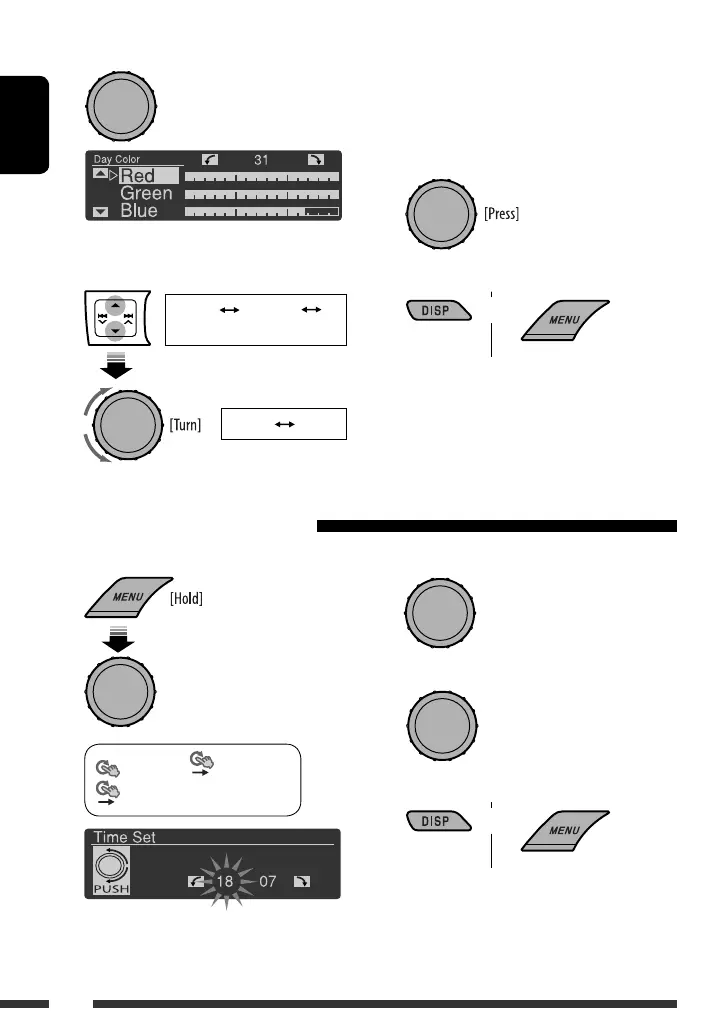
3 Select <Day Color> or <Night Color>.
4 Select a primary color, then adjust the level.
<Red> <Green>
<Blue>
<00> <31>
Repeat this procedure until you have adjust all the
three primary colors.
If <00> is selected for all the primary colors,
nothing appear on the display.
5 Confirm the settings.
6 Exit from the setting.
Select <User> to show your own colors for the
buttons and display.
or
You can set the start/end time for dimmer.
1
<Display> <Dimmer>
<Time Set>
Setting the time for dimmer
[Turn] = [Press]
[Turn] = [Press]
2 Adjust the dimmer start time.
3 Adjust the dimmer end time.
4 Exit from the setting.
[Turn] = [Press]
or
[Turn] = [Press]
Ex.: When <Day Color> is selected
EN28-37_KD-R801_003A_4.indd 32EN28-37_KD-R801_003A_4.indd 32 1/14/09 6:00:00 PM1/14/09 6:00:00 PM



 To Next Page
 Loading...