ENGLISH
28
Storing your own sound mode
You can store your own adjustments in memory.
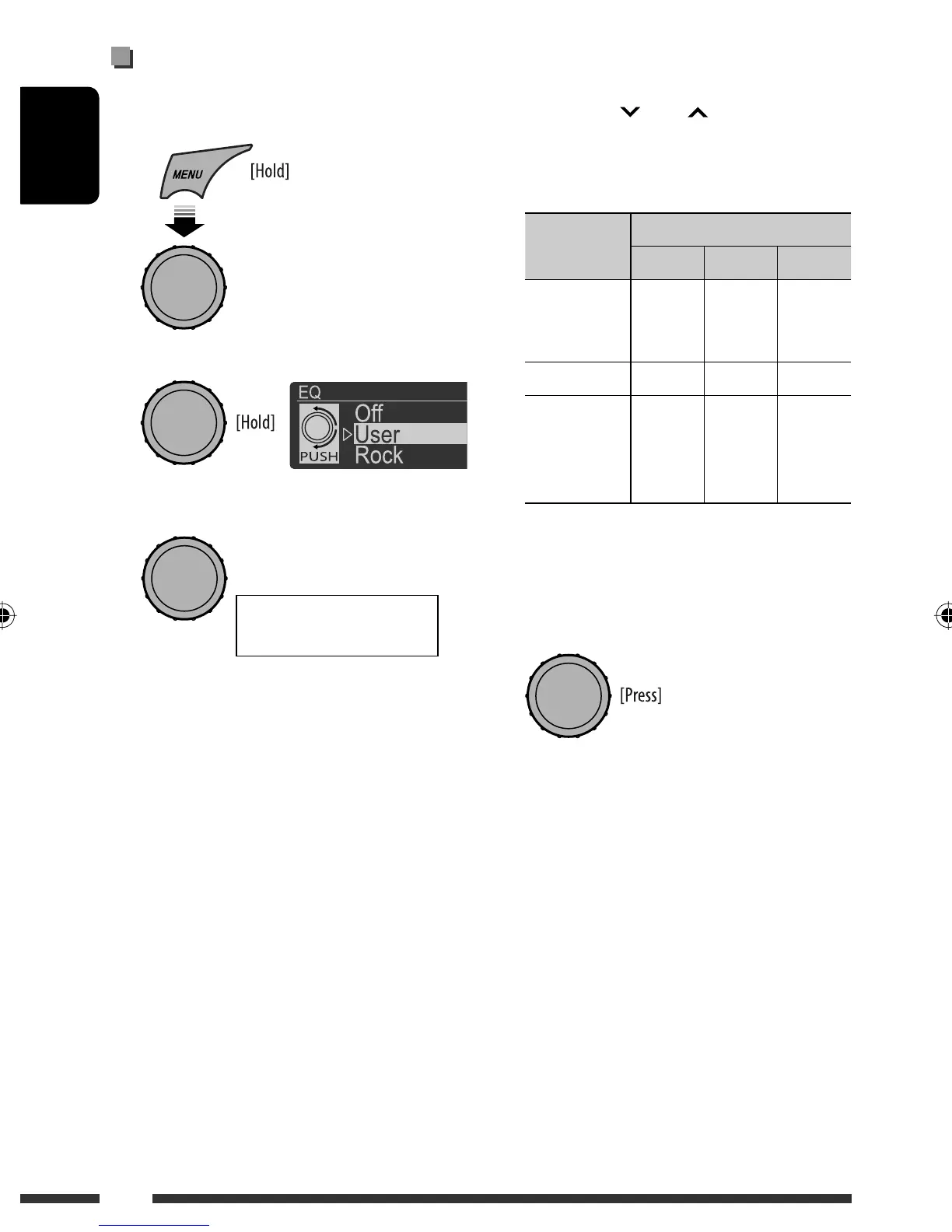
1 Select <EQ>.
2 Enter <User> setting mode.
3 Select a frequency range.
4 Adjust the sound elements of the selected
frequency range.
1 Press 4 / ¢ to adjust the
frequency.
2 Press 5 / ∞ to adjust the level.
3 Turn the control dial to djust the Q-slope.
Sound
elements
Range/selectable items
Low Mid High
Frequency 50 Hz
100 Hz
200 Hz
0.5 kHz
1.0 kHz
2.0 kHz
5.0 kHz
10.0 kHz
15.0 kHz
Level –6 to +6 –6 to +6 –6 to +6
Q Q0.7
Q1.0
Q1.4
Q2.0
Q0.7
Q1.0
Q1.4
Q2.0
Q0.7
Q1.0
Q1.4
Q2.0
5 Repeat steps 3 and 4 to adjust other
frequency ranges.
6 Store the adjustment made.
<Low> Ô <Mid> Ô
<High>
[Turn] = [Press]
[Turn] = [Press]
EN22-29_KD-R900[J]2.indd 28EN22-29_KD-R900[J]2.indd 28 1/15/09 12:46:33 PM1/15/09 12:46:33 PM


 To Next Page