EasyManua.ls Logo

JVC KD-S100 - Adjust the Volume

JVC KD-S100
45 pages
Print Icon
To Next Page IconTo Next Page
To Previous Page IconTo Previous Page
Loading...
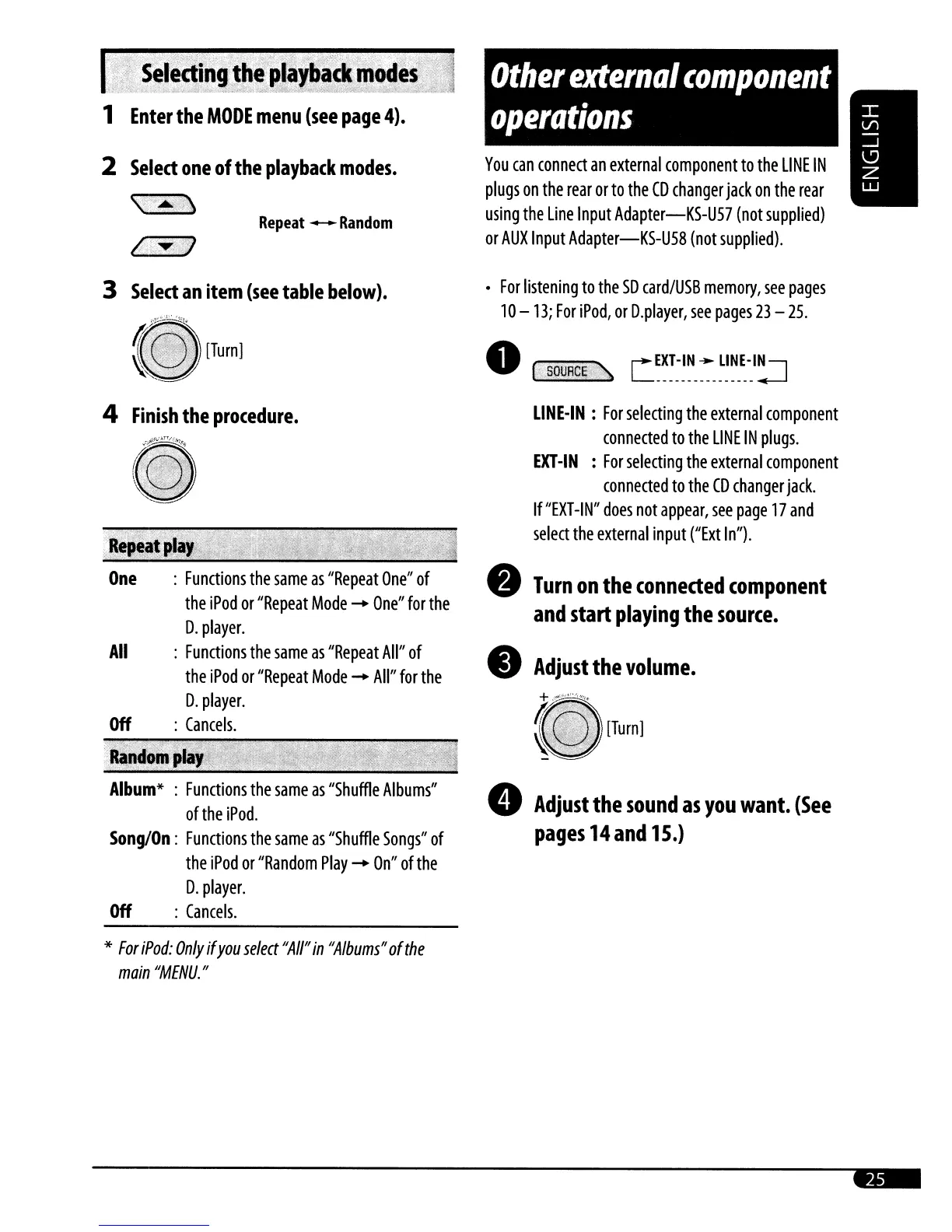
You
can
connect
an
external
component
to
the
LINE
IN
plugs
on
the
rear
or
to
the
CD
changer
jack
on
the
rear
using
the
Line
Input
Adapter-KS-U57
(not
supplied)
or
AUX
Input
Adapter-KS-U58
(not
supplied).
For
listening
to
the
SO
card/USB
memory,
see
pages
10
-13;
For
iPod,
or
O.player,
see
pages
23
-
25.
o
';iii$Q~~~I!ii:.
C~~~~~~_~_~~~_~·_I~
LINE-IN:
For
selecting
the
external
component
connected
to
the
LINE
IN
plugs.
EXT-IN
:
For
selecting
the
external
component
connected
to
the
CD
changer
jack.
If
"EXT-IN"
does
not
appear,
see
page
17
and
select
the
external
input
('lxt
In").
Turn
on
the
connected
component
and
start
playing
the
source.
Adjust
the
volume.
+
~""''''',.,,
Il"
~
[Turn]
8
Adjust
the
sound
as
you
want.
(See
pages
14
and
15.)
Album*
:
Functions
the
same
as
"Shuffle
Albums"
oftheiPod.
Song/On:
Functions
the
same
as
"Shuffle
Songs"
of
the
iPod
or
"Random
Play
-
On"
of
the
O.
player.
Off
:
Cancels.
Repeat
--
Random
4
Finish
the
procedure.
(t\
..
'./"'"
~~fIJ
,.
,.··x·<
.Rep,al~l.
One
:
Functions
the
same
as
"Repeat
One"
of
the
iPod
or
"Repeat
Mode
-
One"
for
the
O.
player.
All
:
Functions
the
same
as
"Repeat
All"
of
the
iPod
or
"Repeat
Mode
-
All"
for
the
O.
player.
Off
:
Cancels.
6;'~';:V
3
Select
an
item
(see
table
below).
2
Select
one
of
the
playback
modes.
\:A
i
.>\
1
Enter
the
MODE
menu
(see
page
4).
*
For
iPod:
Only
if
you
select
"A
1/"
in
"Albums"
of
the
main
"MENU."

Related product manuals